

YAML Cloudformation Script for standing up the base AWS VPC architecture:
My last set of blogs concentrated around running through best practices and standing up the AWS infrastructure, so as to get to the point whereby we deployed DDVE in a private subnet, it was protected by a Security group, accessible via a Bastion host and the data path between it and its back end datastore was routed via an S3 VPC endpoint. Of course we leveraged the nicely packaged Dell Cloudformation YAML file to execute the Day 0 standup of DDVE.
Of course it would be great if we could leverage CloudFormation to automate the entire process, including the infrastructure setup. For a number of reasons:
- It’s just easier and repeatable etc, and we all love Infrastructure as Code (IAC).
- Some people just want to fast-forward to the exciting stuff… configuring DDVE, attaching PPDM etc. They don’t necessarily want to gets stuck in the weeds on the security and networking side of things.
- It makes the process of spinning up a POC or Demo so much easier.
Personally of course, I clearly have a preference for the security and network stuff, and I would happily stay in the weeds all day….. but I get it, we all have to move on….. So with that in mind……
What this template deploys:
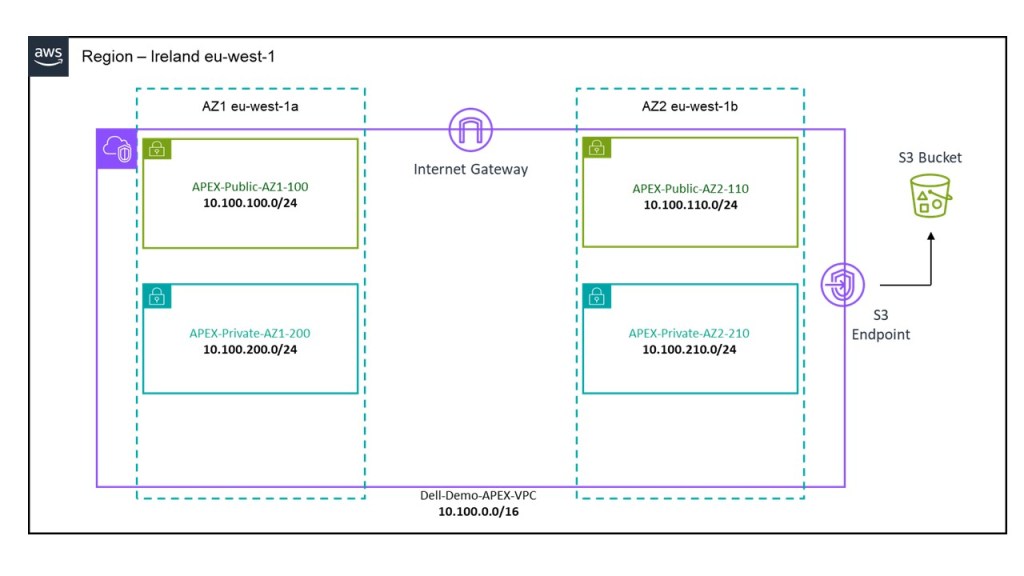
After executing the script (I will show how in the video at the end), you will end up with the following:
- A VPC deployed in Region EU-West-1.
- 1 X Private Subnet and 1 X Public Subnet deployed in AZ1.
- 1 X Private Subnet and 1 X Public Subnet deployed in AZ2.
- Dedicated routing table attached to private subnets.
- Dedicated routing table attached to public subnets with a default route pointing to an Internet Gateway.
- An Internet Gateway associated to the VPC to allow external access.
- An S3 bucket, with a user input field to allocate a globally unique bucket name. This will be deployed in the same region that the CloudFormation template is executed in. Caution, choose the name wisely, if it isn’t unique the script will most likely fail.
- VPC S3 Endpoint to allow DDVE traffic from a private subnet reach the public interface of the S3 bucket.
- Preconfigured subnet CIDR and address space as per the diagram below. This can be changed by editing the script itself of course, or I could have added some variable inputs to allow do this, but I wanted to keep this as simple as possible.
Where to find the template:
The YAML file is probably a little too long to embed here, so I have uploaded to GitHub at the following link:
https://github.com/martinfhayes/cloudy/blob/main/AWSVPCfor%20DDVE.yml
Video Demo:
There a couple of ways to do this and we can execute directly form the CLI. In most instances though it may be just as easy to run it directly from the Cloudformation GUI. In the next post we will automate the deployment of the Bastion host, Security Groups etc. At that point we will demo how to run the CloudFormation IAC code direct from CLI.
Next up part 2, where we will automate the standup of a bastion host and associated security groups.
DISCLAIMER
The views expressed on this site are strictly my own and do not necessarily reflect the opinions or views of Dell Technologies. Please always check official documentation to verify technical information.
#IWORK4DELL
 Cablestoclouds.blog
[…] up the basic architecture required to deploy DDVE and PPDM in an AWS VPC. Link to post can be found here. As promised though, I have added a little bit more in order to make the process that bit easier […]
LikeLike