
PPDM 19.17 dropped earlier today. Pick of the a pretty big bunch for me were the storage array integrations.
Storage Direct with PowerStore enhancements.
Storage Direct capability has been around with PPDM for a while now offering PowerStore platform support. (Release 19.14, which dropped in mid 2023). It achieves this by leveraging the DDBoost protocol (Data Mover) directly within a container in the PowerStore node. The original release only offered the capability crash consistent backup support however.

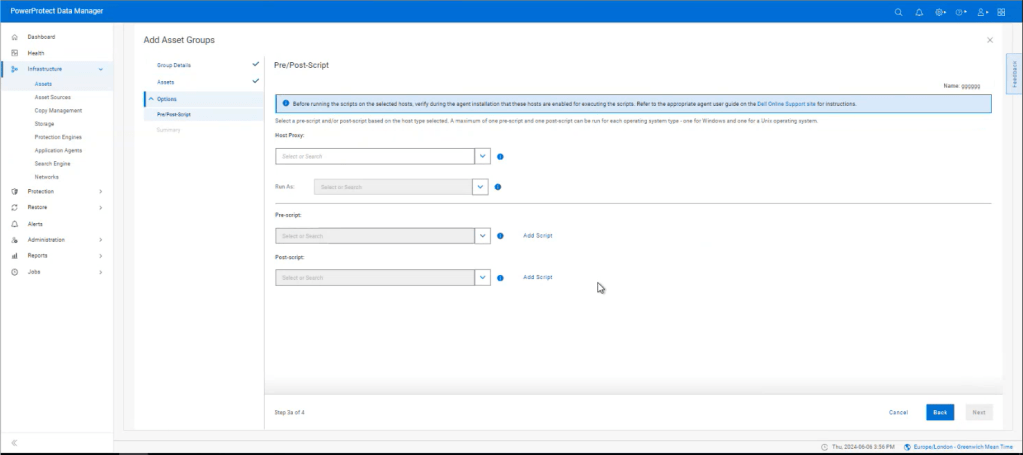
The new release of PPDM 19.17 adds some significant enhancements in terms of Application Consistent Backup support (the ability to quiesce and unquiesce the applications/databases, to ensure the full integrity of the backup). It does this by adding the capability to leverage pre and post scripts that directly allow PPDM to interact with the backend application. This also includes Meditech support but can be any generic application/database. I hope to provide a demo of this in a future post so stay tuned. (Link to brand new Meditech with PPDM/Powerstore attached in the links section below)
Storage Direct with PowerMax
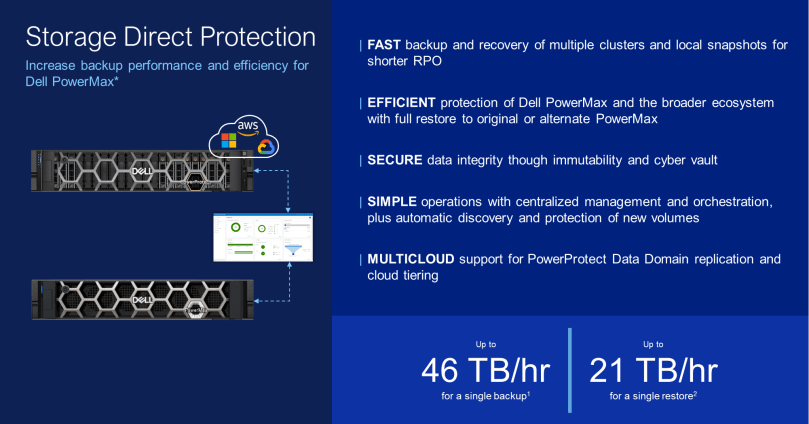
What really has caught my eye in this release, is the addition of PowerMax Storage Direct support.

Digging under the hood, this is vastly different on how the first iteration of Storage Integrated Data Protection that supported VMAX and XtremIO was implemented, that leveraged the proprietary vDisk protocol to point to a DataDomain target over FC. It served its purpose at the time, but let’s just say it was rather complicated, and didn’t scale too well.
Fast forward, and of course we have StorageDirect with PowerStore (above), which is a significant enhancement in TCO, via placing the data mover capability directly within a container in the PowerStore appliance itself. Leveraging DDBoost over IP versus a dependency on FC connectivity.
StorageDirect with PowerMax, steps this forward again, by leveraging an external Data Mover architecture, decoupling this task from the physical array itself. This is important when we consider the positioning of PowerMax, in terms of the mission criticality of the workload. All other things being equal, we want to take this load away from the array and let it do what it does best, store mission critical data. By creating this proxy architecture, of course we can now scale-out in lockstep with the requirements of the array and in line with SLA and recovery objectives. Without externalising the proxy architecture, this would be difficult to achieve. Initially the proxy will be running inside a VM on ESXi, but given that it is external, then eventually perhaps this can be in the cloud, on other hypervisor platforms, bare-metal etc.
As of this release, only the latest generation PowerMax, 2500/8500 series models are supported, offering some key benefits including but not limited to:
- Block Storage.
- Externalised Proxy architecture removes any overhead of PowerMax CPU/Cache etc.
- Scale Out Architecture with multi stream capability allows you to scale and grow as needed (More detail on this below!)
- Simplified and automated workflow integration, execution and orchestration via PPDM.
- Full and Synthetic backup support.
- Automated pre/post scripting for application consistent backups. e.g mission critical Oracle, EPIC, MSSQL backups requiring six nines availability and data consistency.
- Better integration with other formats of DDoS, including DDVE in the Cloud and on Premise ( Note: DDVE has been rebranded everywhere as Apex Protection Storage)
- Multiple PowerMax arrays supported via Unisphere.
- Support for common features including Retention Locking, Cloud Tiering, Replication.
Architectural Overview
So how does this work? There is quite a bit of detail in the attached diagram, but I will try and step through it as best I can ( Tip: I have attached in gallery format, so double-click and you should be able to expand)

All the above is fully orchestrated by PPDM manager, bar the zoning and masking and presentation of storage from the PowerMax array to the ESXi hosts where our Proxy Block Volume Data Movers reside and some initial pre-steps on the array itself. There is a good reason for this in that the intermediary FC switch could be Cisco, Brocade etc., so it likely to be very customer bespoke. Additionally, the customer may want to be judicious in what hosts are presented. So for now, that’s a task outside the PPDM workflow.
In short:
- Connect PPDM to the PowerMax Storage array, either via the embedded Unisphere application on the array itself or an external Unisphere host running on windows for instance. Both are supported.
- Create a backup storage group on PowerMax, present this to the ESXi hosts where our Proxy Data Movers will be deployed and configured. This is the masking and zoning piece that we talked about above.
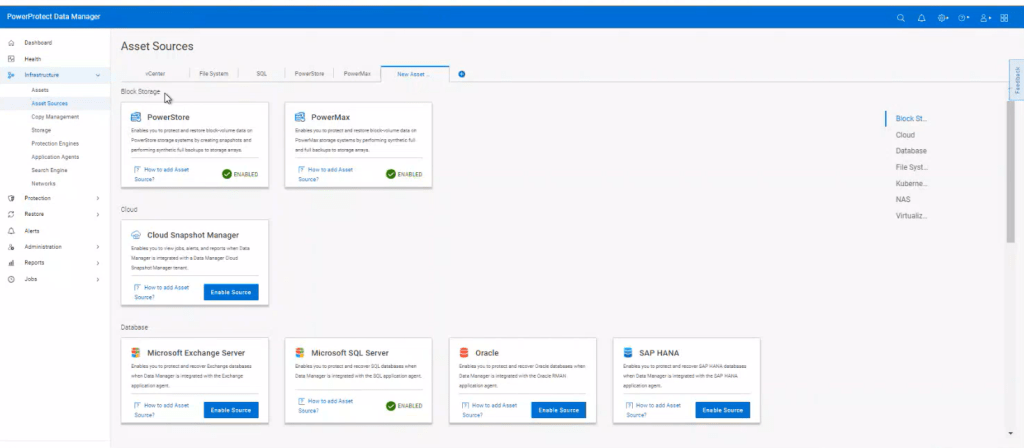
- Install the Proxy Data Mover/Block Volume Data Mover as a Protection Engine. The ability to deploy a protection engine has been around a while, but you will see in the new 19.17 UI the capability to add a ‘Block Volume’ Protection type which is limited to PowerMax. Block Volumes are obviously supported with PowerStore, but remember the DataMover is directly embedded in a container on the array. This step directly pushes a DataMover embedded within a virtual machine directly to an ESXi host, we can deploy multiple proxies in this fashion as we scale out.
- For our application host data that we wish to protect, there is a good chance that this may be a mission critical database. The initial release supports application consistent backup capability, i.e. the ability to quiesce and unquiesce the database, before we orchestrate a backup snapshot. To do this we deploy an FSagent as per normal, but we now have the ability to push pre and post scripts via the agent to the application database host to stop read/writes and resume post snapshot.

Use PPDM to fully orchestrate the backup – where the magic happens:
- Schedule the backup in PPDM as normal, PPDM then automatically discovers everything in PowerMax. Storage groups etc.
- Initiate the backup. PPDM executes the scripts via the FSagenet to freeze writes. After the freeze then we create a snapshot on the array ( the Volume we created in the pre-steps). Post the snapshot, we then automatically initiate the post script, to start writing to the database/application again. This is generally a very fast process.
- Now we can protect the snapshot by automatically presenting this storage to the ESXi/Data Mover hosts (1 or multiple dependent on what we have)
- Initially the volume/size of the backup is going to being very large, this gets pushed to our Data Domain, but in chunks of 64GB, streamed in batches. this makes the whole process extremely efficient and allows us to scale out by adding multiple proxies and scale up based on available bandwidth presented to each proxy. The more proxies I have and the more bandwidth, the faster I can send my chunks of data. From initial testing 4 seems to be the sweet spot with 25GB backend connectivity to the array.
- Of course for iterative backups, the data may have changed very little. The proxy caters for this, by doing a bitmap calculation looking for changed blocks and only transferring these via DDboost to the target Data Domain.
Links to more Information
- Nice whitepaper by my colleague Vinod Kumaresan on Meditech, PPDM and Powerstore integration here
- Another great blog by Vinod on PowerMax integration with PPDM 19.17 here.
- Partner Link to Recorded Knowledge Transfer ( partner logon required !)
- 3 part video series on Powermax integration with PPDM here
- Link to support site and document repository for 19.17 release – if it isn’t here it doesn’t exist!
- Release notes here. nice page overviewing new features.
DISCLAIMER
The views expressed on this site are strictly my own and do not necessarily reflect the opinions or views of Dell Technologies. Please always check official documentation to verify technical information.
#IWORK4DELL
 Cablestoclouds.blog
[…] Storage Direct introduced in Release 19.17. I blogged about this feature back in late July. Click here to view the blog on Storage Direct […]
LikeLike