Protecting Rancher RKE2 On-Premise Kubernetes Workloads with Dell PowerProtect Manager: Part 4 Discovering & Protecting Kubernetes Assets.

Recap of where we are at:

Nearly there, we have the following in place:

Production Environment:

  • Rancher Managed RKE2 Cluster deployed. Link to blog post here.
  • Dell CSI for PowerScale configured to present persistent storage to our environment.
  • An application running in our environment in a new production namespace writing data to a PowerScale NFS target. Link to CSI configuration and demo application blog post here.

Protection Environment:

  • Dell PowerProtect Data Manager deployed and running. Link to post here.
  • Backed by Dell PowerProtect Data Domain (APEX Protection Storage)

The next step is to demonstrate how we knit our ‘Production Environment’ and our ‘Protection Environment’ together.

Use of External Load Balancer:

If this was a production environment, where we have distributed the K8s control plane across all 3 active nodes, then we would deploy an external TCP/HTTP Load Balancer such as HAProxy in front of the control plane to distribute API activity into the cluster and provide HA for the API access process. Clearly this is a really important topic and we will dig into it in more detail in an upcoming blog post ( when we do this in production we don’t want stuff to break!). For now though, to keep things simple lets park that conversation and point PPDM directly at one of the active control plane nodes in the cluster.

Step 1: Discovering RKE2 Kubernetes Cluster

Natively within our Kubernetes cluster within the kube-system namespace, the necessary user permissions exist to execute the discovery and to allow PPDM to configure the RKE2 cluster via the API. (We will see later that PPDM configures a new namespace and deploys the Velero application etc). Personally, I have a preference to segregate this activity to a new user bound with net new permissions. Luckily this is a straightforward process and you can download and deploy the necessary YAML configuration files direct from PPDM and execute on your cluster. This is the approach we will take here.

1.1 Download YAML Files to your Management machine

Log into PPDM and navigate to ‘Downloads’ under the gear icon at the top right of the GUI
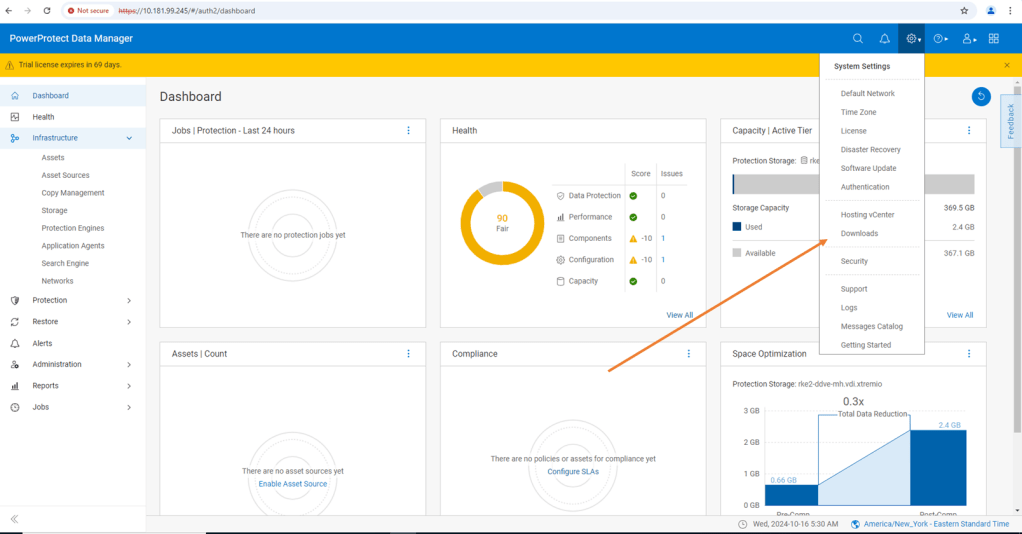
From there, open the Kubernetes tab on the left hand side and download the RBAC file. Extract the folder to a local directory. The folder contains 2 YAML files and a README file.

  • ppdm-controller-rbac.yaml
  • ppdm-discovery.yaml

The first file sets up the PPDM controller service account and RBAC permissions, the second the PPDM discovery service account and associated permissions.

1.2 Configure RKE2 Cluster with both YAML files.

There are a couple of ways to execute this, Rancher makes this really easy for the those not to familiar with the Kubectl command line. ( Although in reality this is just copy and paste in any regard)

Log back into Rancher and navigate back to our demo cluster and to the ‘Cluster Dashboard’ view. There is a touch of ‘blink and you miss it’ but at the top right hand corner there is an ‘upload’ icon.
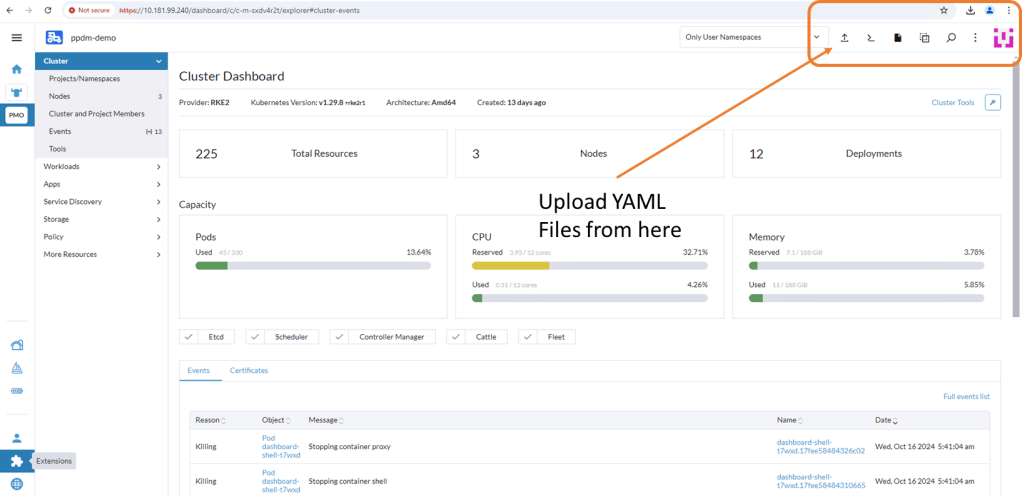
Click ‘Read from File’ and then ‘Import’ the first YAML file (ppdm-controller-rbac) into the default namespace.
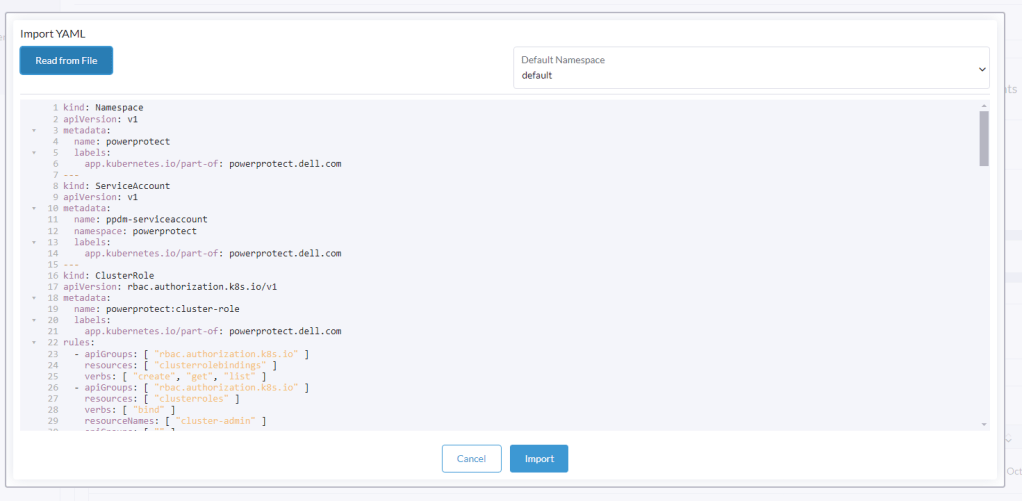
You should get a verification that the cluster was configured with a new Namespace ‘powerprotect’, a new ClusterRole, Service account etc.

Repeat the process for the second YAML you downloaded (ppdm-discovery.yaml)

As you can see this creates another ServiceAccount amongst other entities within the new powerprotect namespace.
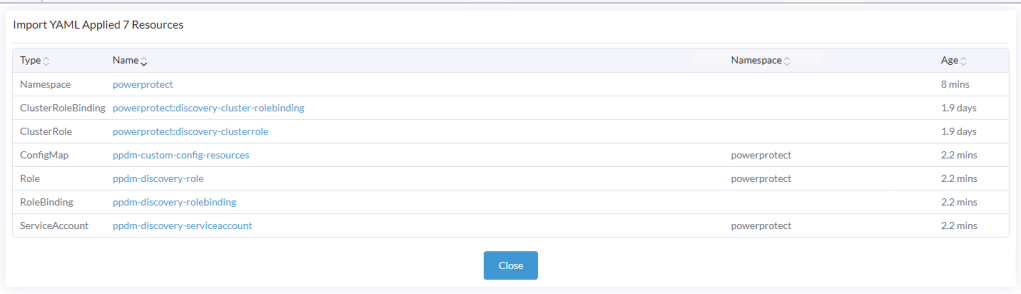
1.3 Create the secret for the PPDM-Discovery-ServiceAccount

For K8s deployments after 1.24, we need to manually create the secret associated with the service account. Open the Kubectl Shell in Rancher.

Execute the following within the Shell.

kubectl apply -f - <<EOF
apiVersion: v1
kind: Secret
metadata:
  name: ppdm-discovery-serviceaccount-token
  namespace: powerprotect
  annotations:
    kubernetes.io/service-account.name: ppdm-discovery-serviceaccount
type: kubernetes.io/service-account-token
EOF

Once applied you can see that the ppdm-discovery-serviceaccount secret was successfully created.
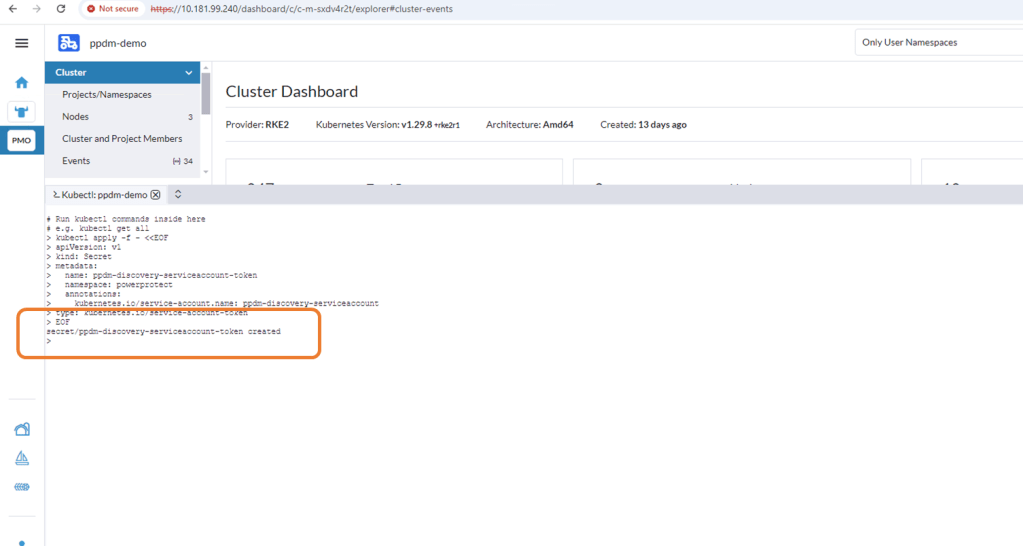
1.4 Retrieve Secret from the cluster

Using the following command retrieve the secret from the cluster

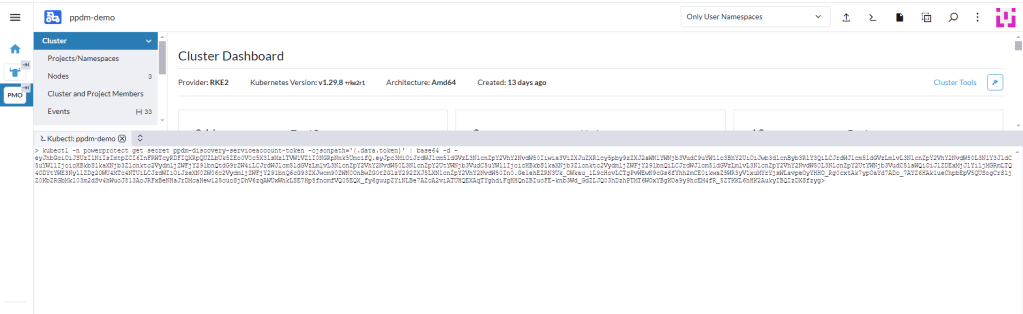
kubectl -n powerprotect get secret ppdm-discovery-serviceaccount-token -ojsonpath='{.data.token}' | base64 -d -

Make a copy of the extracted secret.

Note:

I have seen on occasion, a situation whereby an additional ‘>’ gets appended as the trailing character of the above output. This will cause the asset discovery process to fail as the secrets won’t match between PPDM and the RKE2 cluster. I have used the following command also and this does not attach the trailing ‘>’

kubectl describe secret $(kubectl get secret -n powerprotect | awk '/disco/{print $1}') -n powerprotect | awk '/token:/{print $2}'

Step 2: Configure Kubernetes Asset Source in PPDM

2.1 Enable Kubernetes Asset Source

Log into PPDM , navigate to the ‘Infrastructure’ tab, then ‘Asset Sources’. Scroll down through the GUI until you see the ‘Kubernetes' tile. Click ‘Enable Source’.

2.2 Configure the Kubernetes Asset Source

Under ‘Asset Sources’, Click ‘Add’. This will guide us through the wizard.

In the next pane, give the Kubernetes cluster a meaningful name, I have chosen the cluster name itself. Note As outlined above I have pointed it to the API interface of the first control plane node. In a production environment this will be the Load Balancer IP address. Also, a much as I harp on about DNS everywhere, I am pointing to a physical IP address and not the FQDN. Leave the discovery port as the default 6443.
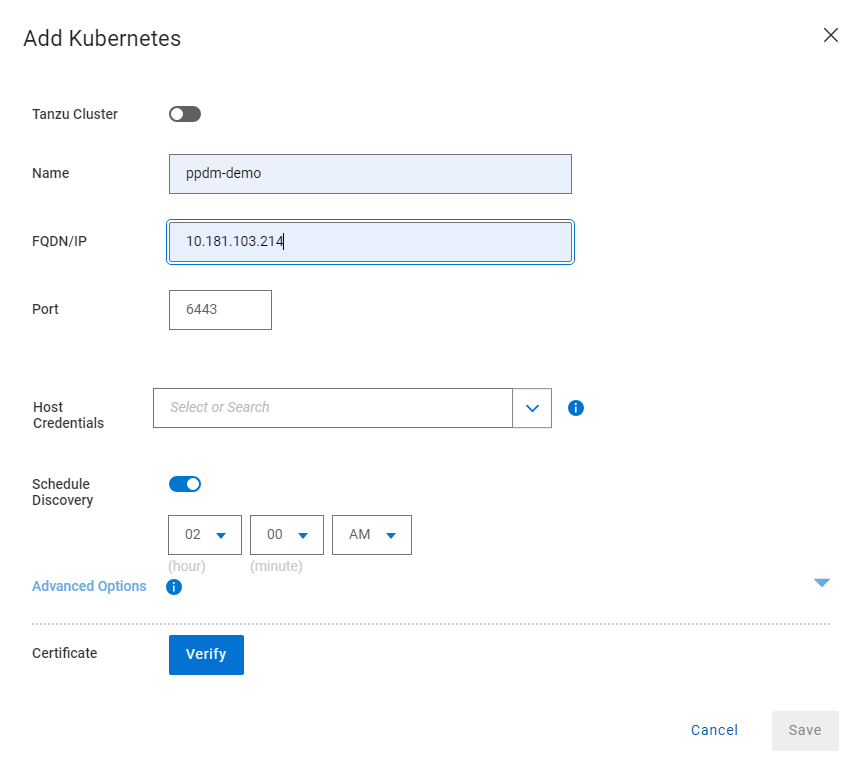
Under the ‘Host Credentials’ field, click the dropdown and ‘Add Credentials’. This is where we will inject the ‘secret’ we extracted form the RKE2 cluster (remember be careful of trailing ‘>’). Give the credential a name ( can be anything) and paste in the Service Account Token. Then click ‘Save’.

Proceed to ‘Verify’ and ‘Accept’ the certificate and then Save. The asset source should appear in the ‘Asset Sources’ window. Navigating to the System Jobs panel, you will see PPDM undergoing an asset discovery.
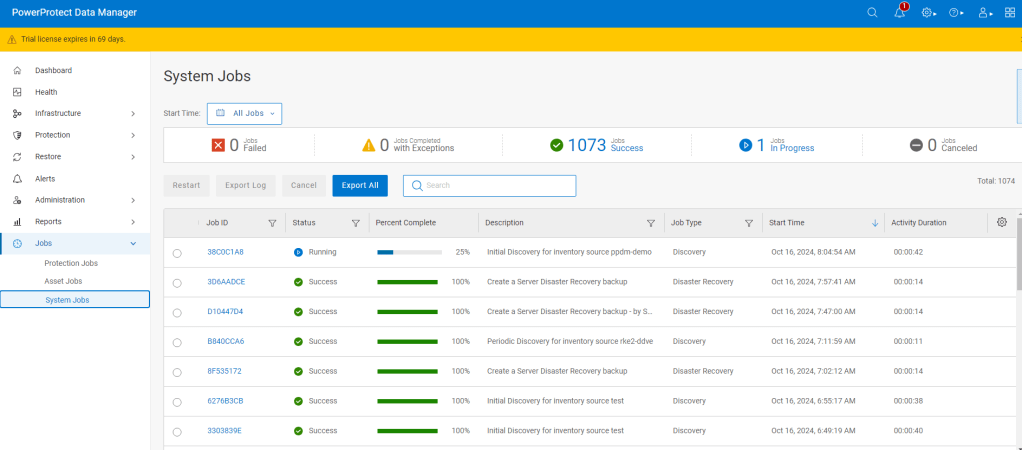
Navigate back to the Assets tab and we can see the discovery has completed and we can see all our namespaces in the RKE2 cluster ( including our system namespaces).

Step 3: Configure Protection Policy for Production Namespace.

Now that we have the end to end infrastructure built, deployed and discovered, we now need to create a policy in PPDM to protect our production application, which resides in the ‘dell-ppdm-demo’ namespace. Lots of screengrabs upcoming, but don’t worry too much if you miss something… it will be in the attached video also.

3.1 Create Protection Policy

This really is a very straightforward process. Navigate to the Protection tab and then ‘Protection Policies’. Click ‘Add’.
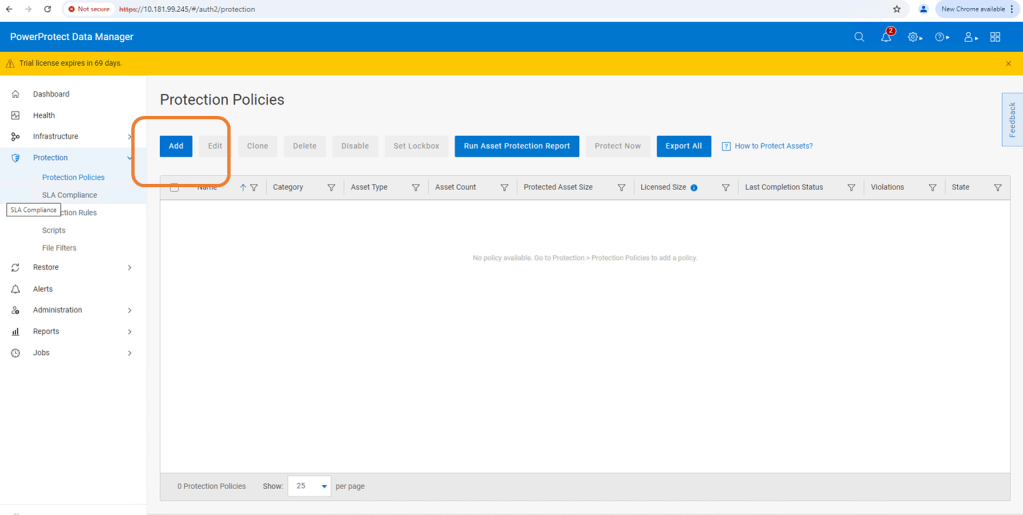
Follow the Wizard guided path.
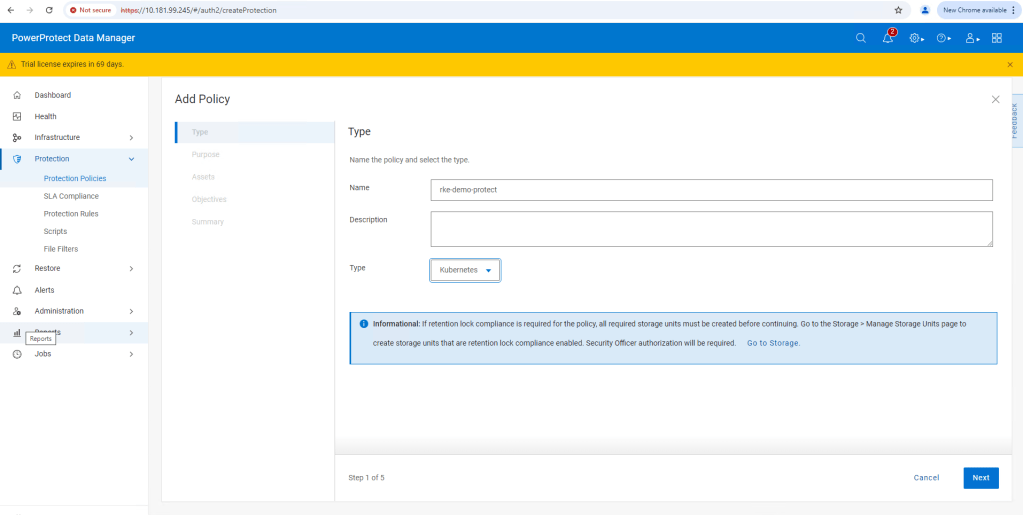
For this demo I am using ‘Crash Consistent’.
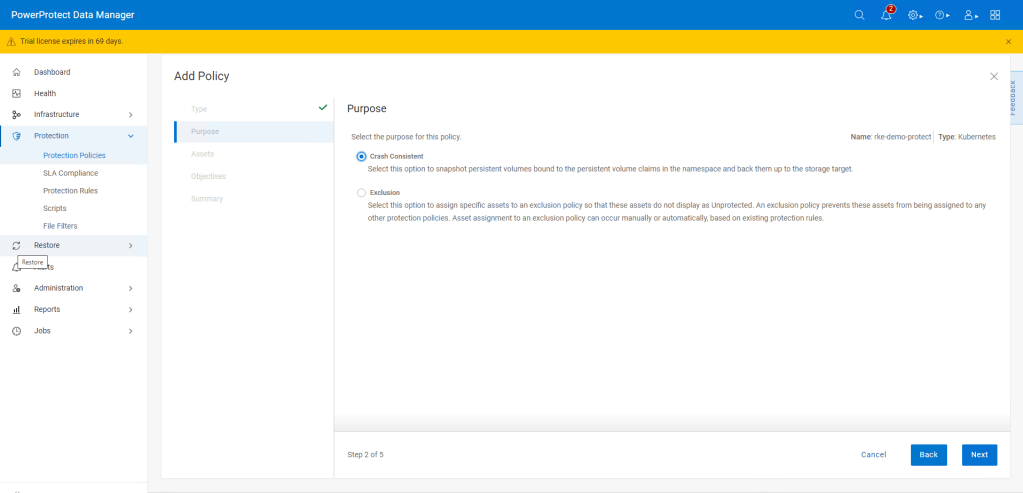
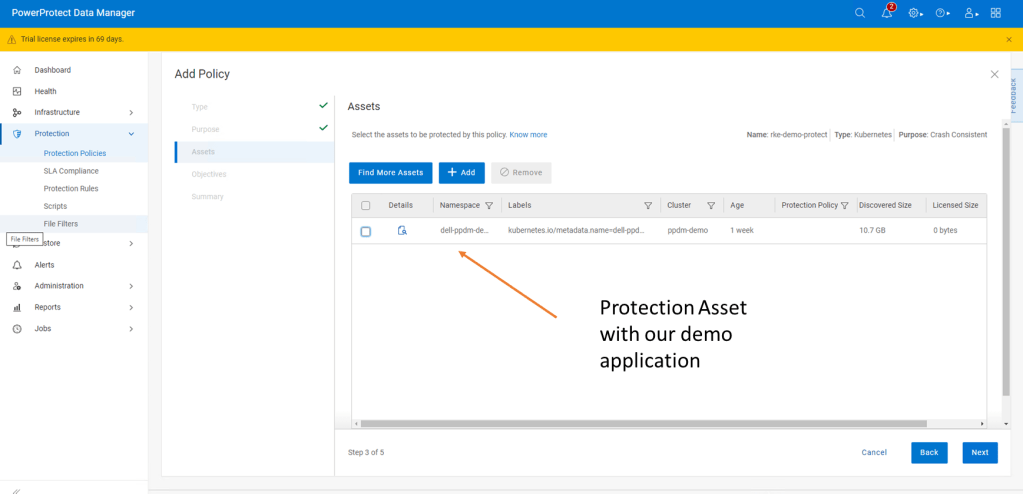
Click next and then add the namespace that contains the application that we have configured. In this case ‘dell-ppdm-demo’.

Next configure our Protection policy objectives, when and where we want to push the backup. Do we want to replicate a secondary copy to the cloud for instance or to a preconfigured cloud tier? For this demo we will keep it simple. We are going to push a ‘Full’ backup to the DDVE instance we have paired with PPDM in the last blog.

Click ‘Add’ under primary backup, and configure the policy parameters. I am going to push a full backup every 1 hour and retain for 1 day, starting at 9 AM and Ending at 9 PM.

Click ‘Next’ and then ‘Finish’.

There you go, this is really incredibly simple. At the next screen, we could wait until the protection policy kicks off as per the schedule but we will cheat a little and run the protection manually ( after the next step!).

Step 4: Configure your Cluster for Snapshot capability

So whilst we have the CSI driver installed on our cluster, we have skipped over one really important step. If we attempt to do a restore or replicate the application to a new namespace ( as we will show in the video), it will fail. The reason being we being we have installed no snapshot capability on the cluster yet.

I have covered this in detail, when we discussed PPDM in an EKS environment. Link to this is here. For now though, follow the following steps.

4.1 Install external CSI Snapshotter

Run the following commands on your cluster using Kubectl.

kubectl apply -f https://raw.githubusercontent.com/kubernetes-csi/external-snapshotter/master/client/config/crd/snapshot.storage.k8s.io_volumesnapshotclasses.yaml
kubectl apply -f https://raw.githubusercontent.com/kubernetes-csi/external-snapshotter/master/client/config/crd/snapshot.storage.k8s.io_volumesnapshotcontents.yaml
kubectl apply -f https://raw.githubusercontent.com/kubernetes-csi/external-snapshotter/master/client/config/crd/snapshot.storage.k8s.io_volumesnapshots.yaml
kubectl apply -f https://raw.githubusercontent.com/kubernetes-csi/external-snapshotter/master/deploy/kubernetes/snapshot-controller/rbac-snapshot-controller.yaml
kubectl apply -f https://raw.githubusercontent.com/kubernetes-csi/external-snapshotter/master/deploy/kubernetes/snapshot-controller/setup-snapshot-controller.yaml

4.2 Confirm the snapshot pods are running

Using the ‘Kubectl get pods -n kube-system‘ command. you should see an output as follows:

4.3 Configure VolumeSnapShot Class

Apply the following YAML to configure the VolumeSnapShot Class

kubectl apply -f - <<EOF
apiVersion: snapshot.storage.k8s.io/v1
kind: VolumeSnapshotClass
metadata:
  name: powerscale-snapclass
driver: csi-isilon.dellemc.com
deletionPolicy: Delete
parameters:
  retentionPolicy: Delete
EOF

Verify it is deployed using the ‘Kubectl get VolumeSnapShotClass‘ command.

Step 5: Test the Protection Policy

Now that we have everything configured properly, we will want to test that the protection policy is functioning. For a scheduled policy we could wait until the scheduled time but for the purposes of the demo we will initiate this manually.

5.1 Invoke ‘Protect Now’

Under Protection Policies, select the protection policy we created earlier. And Click on the ‘Protect Now’ button.

Navigate through the rest of the guided path. On this occasion we will select ‘Full Backup’ versus ‘Synthetic Full’. As it is the first time we have done the backup, technically there will be no difference in any regard.

The Protection Job will kick off and be queued for execution. You can follow its progress via the Jobs tab. All going well, as below, the job should complete successfully.

Step 6: Deploy new namespace from backup.

This will be demonstrated more readily in the video. We will execute a really simple test by:

  • Deleting the Namespace ‘Dell-PPDM-DEMO’ and everything in it, including our application. This might simulate a user error for instance.
  • Recover the namespace and the application via PPDM
  • Log back into our recovered application.

Let’s delete our namespace by using the ‘Kubectl delete ns dell-ppdm-demo‘ command:

Step 6.1 Recover Namespace and application from PPDM

Luckily we have a backup of the namespace. Navigate to the Restore tab in PPDM and select our policy and click ‘Restore’
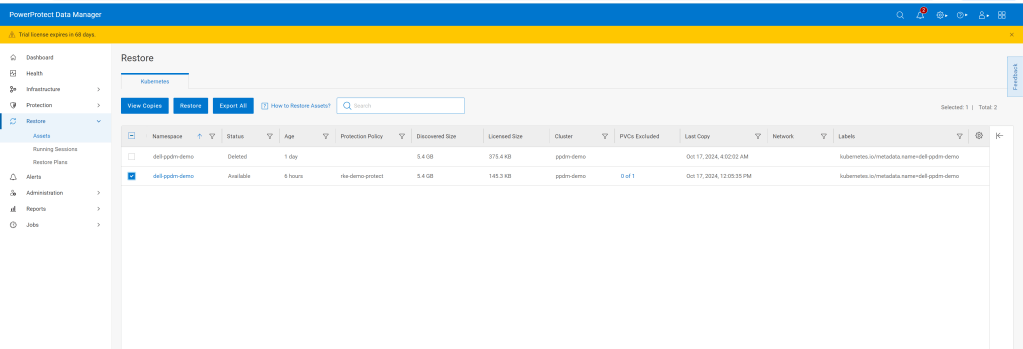
Navigate through the rest of the GUI, its very straightforward. We are going to restore to the original cluster, restore the namespace and associated PVC’s, including all scoped resources. For demo purposes we will restore to newly named namespace called ‘restored-ppdm-demo’.

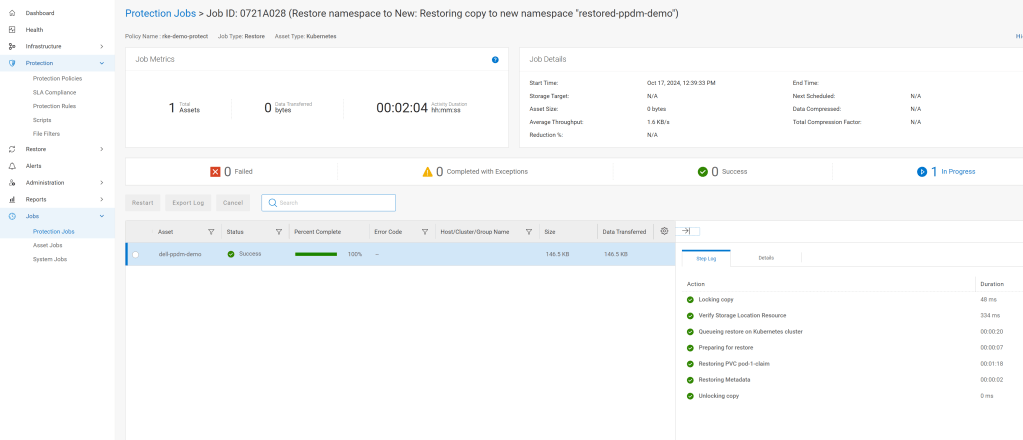
Navigate to the Protection Jobs menu and monitor progress

All going well, dependent on the size of the restore, the operation is a success:
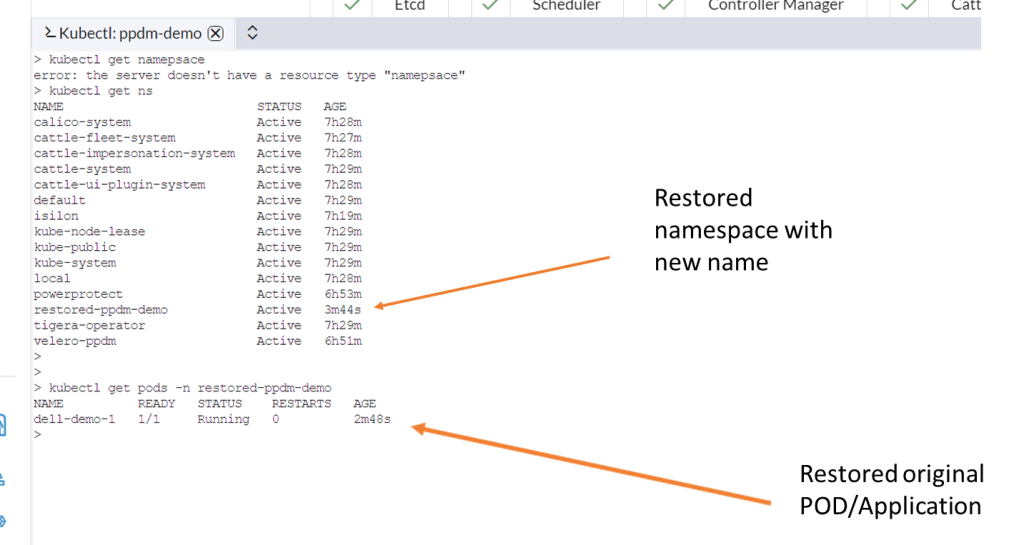
Navigate back to Rancher and lets have a look back in to the cluster to see can we see the restored namespace and associated POD.
Video Demo

DISCLAIMER

The views expressed on this site are strictly my own and do not necessarily reflect the opinions or views of Dell Technologies. Please always check official documentation to verify technical information.

#IWORK4DELL
Optimising Data Center Fabrics for Generative AI Workloads. Why?

‘Traditional network fabrics are ill equipped to deal with the performance and scale requirements demanded by the rapid emergence of Generative AI (Gen-AI)’.

That’s the common refrain… but hang on a minute, my current network infrastructure supports every other workload and application so what’s the problem? In fact my current infrastructure isn’t even that old! Why won’t it work?

To understand why this is the case we need to take a quick 10000 foot overview of what we typically have in the Data Center, then let’s layer some AI workload ( GPU’s everywhere!) on top and see what happens. Health warning… This isn’t an AI blog, like everybody else I am learning the ropes. Out of curiosity, I was interested the above statement, and wanted to challenge it somewhat to help me understand a little better.

First things first, a brief synopsis of the Enterprise Data Center fabric in 1000 words or less an 2 diagrams. I do make the bold assumption, that those reading this blog, are at least familiar with the basic spine/leaf fabrics that are pretty ubiquitous in most enterprise Data Centers.

The Basic Spine/Leaf Topology

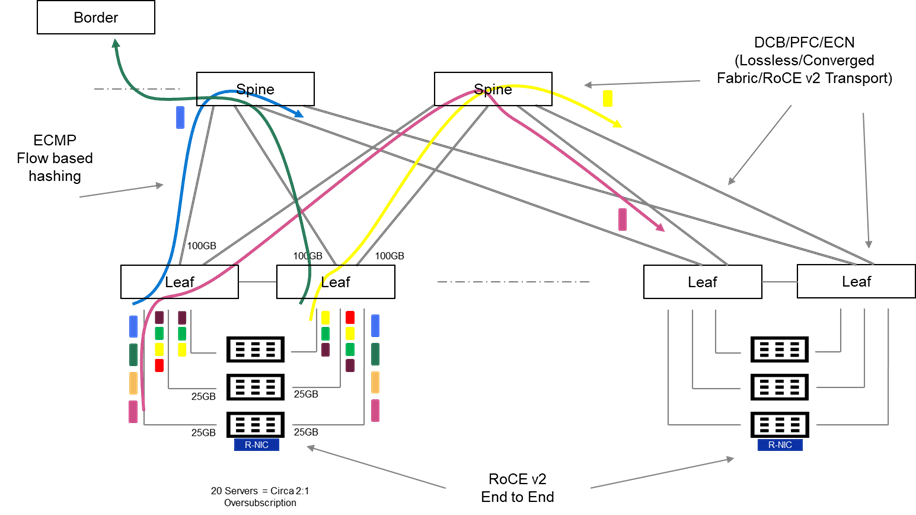
I do like a diagram! Lots going on in the above, but hopefully this should be relatively easy to unpack. There is quite a bit of terminology in the following, but I will do my best to keep this relatively high level. Where I have gone a little overboard on an terminology PFC, ECN, ECMP, i have done so with the intent on following up on the next post, where I will overview some of the solutions.

Typically we may have:

  • Many Heterogeneous flows and application types.  For example, Web Traffic bound to the Internet via the network border (Green Flow), Generic Application Client Server Traffic inter host (Purple Flow) and perhaps loss/latency sensitive traffic flows storage, real-time media etc. (Yellow Flow)
  • These flows generally tend to be short lived, small and bursty in nature.
  • The fabric may be oversubscribed at of a ratio of 2:1 or even 3:1. In other words, I may have 20 servers in a physical rack, served by 2 Top of Rack Switches (TOR). Each server connecting at 25Gbps to each TOR. (Cumulative bandwidth of 500GB). Leaf to Spine may be configured with 2 X 100Gbps, leaving the network oversubscribed at a ratio of circa 2.5:1.
  • Intelligent buffering and queuing may be built in at both the software and hardware layers to cater for this oversubscription and mitigate against any packet loss on ingress and egress. One of the key assumptions here, is that some applications are loss tolerant whilst others are not. In effect, we know in an oversubscribed architecture, we can predictably drop traffic in order to ensure we protect other more important traffic from loss.  Enhanced QoS (Quality of service) with WRED (Weighted Random Early Detect), is a common implementation of this mechanism.
  • Almost ubiquitously, ECMP (Equal Cost Multipath Routing), which is a hash-based mechanism of routing flows over multiple equally good routes is leveraged. This allows the network, over time, load balance effectively over all available uplinks from leaf to spine and from spine to leaf.
  • The fabric can be configured to enable lossless end to end transmission to support loss intolerant storage-based protocols and emulate the capabilities of Fiber Channel SAN and InfiniBand leveraging Data Centre Bridging (DCB), Priority Flow Control (PFC) and Explicit Congestion Notification (ECN).
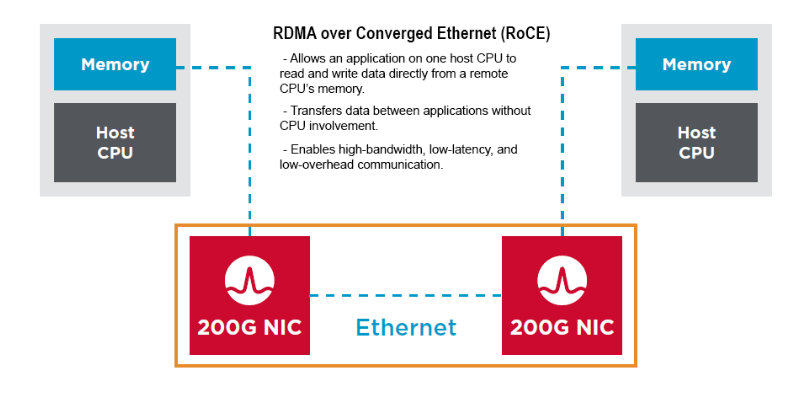
  • RDMA (Remote Direct Memory Access) capability can be combined with lossless ethernet functionality, to offer an end-to-end high performance, lossless, low latency fabric to support NVME and non-NVME capable storage, as well as emerging GPUDirect Storage, distributed shared memory database and HPC/AI based workloads.  This combined end-to-end capability, from server to RDMA capable NIC, across the fabric, is known as RoCE (RDMA over Converged Ethernet), or in its most popular iteration, RoCE v2 (routable RoCE). ( Spoiler: This will be part of the solution also!)

What about Scale and Multitenancy?

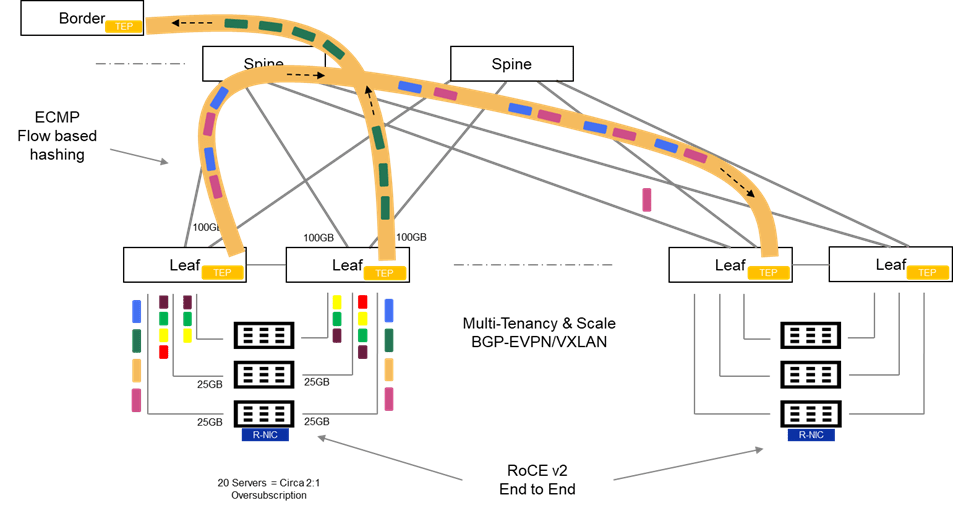
In general, enterprise grade fabrics require more than just spine/leaf to deliver feature richness in terms of scale, availability and multi-tenant capability in particular. Enterprise fabrics have evolved over the last number of years to address these limitations primarily leveraging BGP-EVPN VXLAN. Whilst considerably beyond the scope of this post, this family of features introduces enhancements to the standard spine-leaf architecture as follows:

Scale and Availability leveraging VXLAN

  • VXLAN (Virtual Extensible LAN) as opposed to VLANs. Unlike traditional VLAN networks, which are constrained to circa 4096 VLAN’s, VXLAN can theoretically scale up to 16 million logical segments.
  • Layer 2 adjacency across the fabric with VXLAN/VTEP tunnelling and distributed anycast gateway. VXLAN encapsulates layer 2 frames within UDP and tunnels payload across the network. Distributed gateway makes the networks IP gateway available across the entire fabric. This feature is a fundamental enabler to allow virtual machine IP address preservation, in the event of VM machine mobility across the fabric (e.g. VMware vMotion)
  • Failure domain segmentation via Layer 2 blast radius isolation: The Layer 2 over layer 3 VXLAN tunneling technique limits the propagation of Spanning-Tree L2 domains to the local TOR. Without such a technique there is no scalable mechanism to limit the fault propagation on one rack, polluting the entire network.

Multitenancy with MP BGP EVPN ( Multi-Protocol Border Gateway Protocol)

As an extension to the existing MP-BGP, MP-BGP with EVPN, inherits the support for multitenancy using the virtual routing and forwarding (VRF) construct. In short, we can enforce Layer 2 and Layer 3 isolation across individual tenants, whilst leveraging the same common overlay fabric. This has made this technique very popular when deploying cloud networks, both public and private.

So, I’m sure I have missed a lot and of course I have skirted over masses of detail, but broadly the above is representative of most Enterprise Data Centers.

Evolution to Support Scale Out Architectures and AI

So first things first, all is not lost! We will see this in the next post, I have alluded to the above that many of the existing features of traditional ethernet can be transposed to an environment that supports GEN-AI workloads. Emerging techniques to ‘compartmentalise’ the network into succinct areas are also beneficial…again we will discuss these in the next post.

What happens the Traditional Fabric when we load up GEN-AI workload on top?

So let’s park the conversation around rail architectures, NVIDIA NVLINK, NCCL etc. These are part of the solution. For now, let’s assume we have no enhancements, neither software or hardware to leverage. Let’s also take this from the lens of the DC Infrastructure professional…. AI is just another workload. Playing this out, and keeping this example very small and realistic:

  • 4 Servers dedicated for AI workload (learning & Inferencing). Let’s say the Dell XC 9680. Populated with our favorite GPU’s from NVIDIA, say 8 per server.
  • Each GPU has dedicated PCIE NIC speed of 200GB.

I’m a clever network guy, so I know this level of port density and bandwidth is going to blow my standard oversubscription ratio out of the water, so I’m ahead of the game. I’m going to make sure that I massively up the amount of bandwidth between my leaf layer and the spine, to the point be I have no oversubscription. I am hoping that this will look after this ‘tail latency’ requirement and Job Completion Time (JCT) metrics that I keep hearing about. I have also been told that packet loss, is not acceptable… again .. no problemo!!! My fabric has long since supported lossless ethernet for voice and storage…

so all good… well not really, not really at all!

Training and Inferencing Traffic Flow Characteristics:

To understand why throwing bandwidth at the problem will not work, we need to take a step back and understand the following:

  1. AI Training is associated with a minimal amount of North-South and a a proliferation of East-West flows. Under normal circumstances this can put queuing strain on the fabric, if not architected properly. Queuing is normal, excessive queuing is not good and can lead to packet delay and loss.
  2. AI training is associated with a proliferation of monolithic many to many (M:M) and one to many (1:M) Elephant Flows. These are extremely large continuous TCP flows, that can occupy a disproportionate share of total bandwidth over time, leading to queuing, buffering, and scheduling challenges on the fabric. This is as a result of the ‘All to All’ communication between nodes during learning.
  3. The Monolithic nature of these flows leads to poor distribution over ECMP managed links between spine and leaf. ECMP works best when flows are many, various and short-lived.

If we attempt to deploy an AI infrastructure to deliver Training and Inferencing services on a standard Ethernet fabric, we are likely to encounter the following performance issues. These have the capability to effect training job completion times by introducing latency, delay and in the worst-case loss onto the network.

Job Completion Time (JCT) is a key metric when assessing the performance of the Training phase. Training consists of multiple communications phases, and the next phase in the training process is dependent on the full completion of the previous phase. All GPU’s have to finish their tasks, and the arrival of the last message effectively ‘gates’ the start of the next phase. Thus, the last message to arrive in the process, is a key metric when evaluating performance. This is referred to as ‘tail latency’.  Clearly, a non-optimised fabric where loss, congestion and delay are evident, has the capability of introducing excessive tail latency and significantly impacting on Job Completion Times (JCT’s).

Problem 1: Leaf to Spine Congestion (Toll Booth Issue)

So we have added lots of bandwidth to the mix, and indeed we have no choice, but in the presence of Monolithic long-lived flows and b) the inability of ECMP to hash effectively, then we have the probable scenario of flows concentrating on a single, or subset of uplinks from Leaf to Spine. Invariably, this will lead to the egress switch buffer, on the leaf filling and WRED or tail drop ensuing. Congestion will of course, interrupt the TCP flow and will have a detrimental effect on tail latency. This is the ‘Toll Booth’ effect where many senders are converging on a single lane, when other lanes are available for use.

The non variable and long lived nature of the flow ( Monolithic), combined with the inability of ECMP to hash effectively ( because it depends on variability !) is a perfect storm. We end up in a situation where a single link between the Leaf and Spine is congested, even when we have multiple other links are underutilised, as if they didn’t exist at all! We have added all this bandwidth, but in effect we aren’t using it!

Problem 2: Spine to Leaf Congestion

Of course, the problem is compounded further one hop further up the network. ECMP makes a hash computation at the spine switch layer also, and chooses a downlink based on this. The invariability or homogeneous nature of the hash may lead to a sub-optimal link selection and the long-lived nature of the flow will then compound the issue, leading to buffer exhaustion, congestion and latency. Again, we may settle on one downlink and exhaust that link, whilst completely underutilise others.

Problem 3: TCP Incast – Egress Port Congestion

Finally, we potentially face a scenario created by a ‘Many to 1’ communication flow (M:1). Remember the M:M traffic flows of the learning phase are really all multiple M:1 flows also. This can occur on the last link towards the receiver when multiple senders simultaneously send traffic to the same destination.

Up next

So clearly we have zoned in on the ills of ECMP and its inability to distribute evenly flows across all available uplinks towards the spine and in turn from the spine towards the destination leaf. This is a per flow based ‘hash’ mechanism (5 Tuple) and generally works very well in a scenario where we have:

  • A high percentage of east-West Flows, but still a large relevant proportion of North-South, to Internet, SaaS, DMZ etc.
  • Many heterogenous flows that are short lived. In other words, we have many senders and many receivers. Over time, this variance, helps the ECMP hash evenly distribute across all available uplinks, and we end up with a balanced utilisation.
  • A minimal amount of ‘All to All’ communication, bar traditional multicast and broadcast, which are handled effectively by the network.

Unfortunately, AI workloads are the antithesis of 3 characteristics, outlined above. In the next post we will overview some Dell Switching Platform enhancements that address these shortcomings, in addition to some clever architectural techniques and intelligence at the server source ( e.g. NVIDIA NCCL library, Rail Topology enhancements etc.)

Stay Tuned!

DISCLAIMER

The views expressed on this site are strictly my own and do not necessarily reflect the opinions or views of Dell Technologies. Please always check official documentation to verify technical information.

#IWORK4DELL
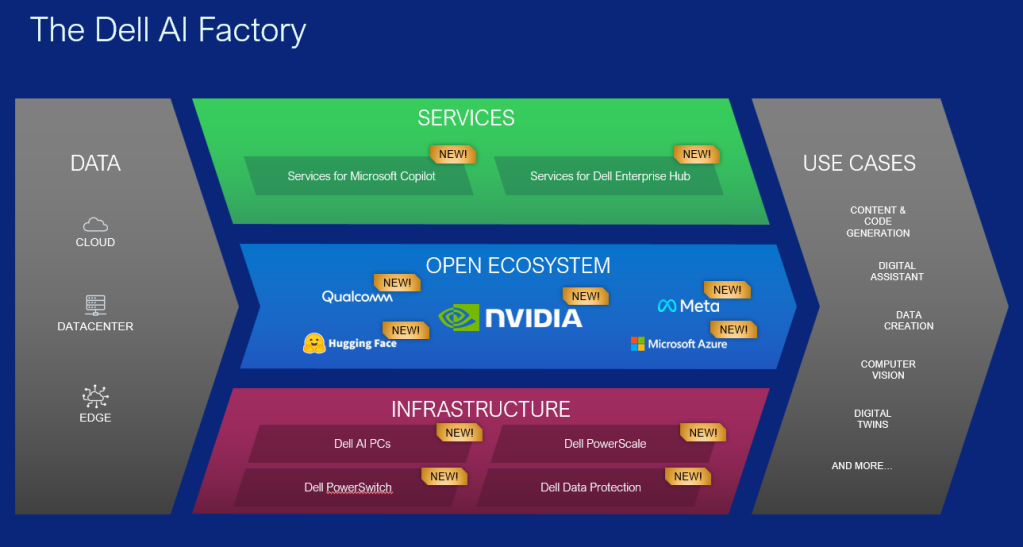
Unpacking DTW 2024. The Dell AI Factory. Infrastructure and the importance of the Network

Quite a bit to unpack here, but I’ll do my best. First things first though, it is becoming increasingly clear that network fabrics are key components to the performance of AI Compute Clusters. AI Fabrics demand special requirements such as low latency, lossless performance and lots and lots of bandwidth. The massive parallel data and application processing requirements of GenAI are driving, this exponential requirement overhead on front and back end fabrics. What was once really just the purview of niche and proprietary InfiniBand HPC environments, is quickly becoming center stage for all enterprises, together with a clear shift towards Ethernet.

Bottom Line GPU’s are getting larger and demand more bandwidth, so the networking stack must adapt to meet these new requirements. The amount of data flowing from GPU to GPU and server to storage is growing exponentially. The other point to note is that these are end to end requirements, from server, to NIC, to Switch , to the overarching Networking Operating System that knits all these components together. In order to deliver a performant end to end solution, we need an end to end approach. Enter the Dell AI Fabric…. and its foundation Dell AI fabric Infrastructure.

So what was announced?

I’ll dig into the deep weeds around topics such as Lossless fabric enablement, Intelligent load balancing/routing (plus cognitive routing. Mentioned by Michael Dell at the DTW keynote yesterday!) and end to end compute layer integration with RoCEv2, amongst others in future posts. For now though let’s overview some highlights, with a somewhat deeper nod to key new features….. As usual, I have attached some links to key content and other blogs….

So what do these new enhancements to the integrated fabric look like?

Dell Z9864F-ON with Enterprise SONiC 4.4

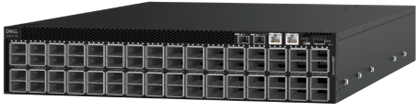
Z9864F-ON Front View

Key Hardware/Software Features

  • 102.4Tbps switching capacity (full duplex), 51.2Tbps non-blocking (half-duplex)
  • Based on the latest Broadcom Tomahawk 5 chipset.
  • Enables the next generation of unified data center infrastructure with 64 ports of 800GbE switching and routing. It can also be used as a 100/200/400 switch via breakout, allowing for a maximum of 320 Ports. Twice the performance of the current generation PowerSwitch.
  • Six on-chip ARM processors for high-bandwidth, fully-programmable streaming telemetry, and sophisticated embedded applications such as on-chip statistics summarization.
  • Unmatched power efficiency, implemented as a monolithic 5nm die.
  • RoCEv2 with VXLAN
  • Adaptive Routing and Switching
  • Cognitive Routing support in hardware (delivered by future software release)

I’ve missed loads more but… as promised this isn’t a datasheet. Of course here is the link to the new datasheet.

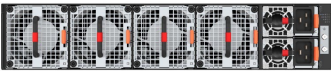
Z9864F-ON Rear View

Why this matters.

A couple of reasons:

  1. Backend Fabrics consume massive bandwidth. Design Goal #1: The higher the radix of your switch fabric the better. You want to strive for flat and dense connectivity where at all possible. This is a key design goal. In other words, the ability to pack in as much connectivity, at line rate, without having to go off fabric or introduce multiple tiers of latency inducing switches. The Dell Z9864F-ON with Enterprise SONiC 4.4, can connect up to whopping 8K GPU nodes in a single two-tier 400GB fabric. Expanding from the standard 2K in a 2 tier topology from the previous Tomahawk 4 based platform.
  2. Adaptive Routing and Switching (ARS). This is blog worthy topic in its own right but for now the bottom line: Design goal number 2: high throughput with low latency. AI/ML traffic flows, especially in the backend are characterised by a proliferation of East-West, machine to machine, GPU to GPU flows. AI/ML flows are also characterised by buffer and path filling Elephant flows, which if not managed properly can introduce loss and latency. These last two terms signal the death knell to AI/ML fabric performance. We need a mechanism to dynamically load balance across all available paths, to minimise the ill effects of elephant flows. Adaptive Routing and Switching (ARS) dynamically adjusts routing paths and load balances based on network congestion, link failures, or changes in traffic patterns. This ensures that traffic is efficiently routed through the network. So for those wondering, you may see the term Dynamic Load Balancing (DLB) used here instead. Both DLB and ARS can be used interchangeably.
  3. Cognitive Routing brings this path sharing intelligence one step further. Broadcom introduced Cognitive Routing in their industry-leading Tomahawk 5 chipset, the chip architecture underpinning the Z9684-ON. It builds upon the adaptive routing functions present in previous generations of Tomahawk products, emphasizing the performance needs of Ethernet-based AI and ML clusters. Supported in hardware as of this platform release, the true capability of this feature will be unlocked via future SONiC releases, post 4.4. For a lot more depth on this topic and how it works under the hood, follow the link to the following great post by Broadcom.

Bottom line… a higher radix, higher bandwidth switch fabric, denser connectivity with multiple line rate high bandwidth switch ports , and intelligent flow and congestion aware load balancing across all available paths at both a hardware and software layer leads to maximised bandwidth utilisation, minimised loss and reduced average and tail latency. Simple….net result…. enhanced job completion times and more responsive inferencing.

RoCEv2 with VXLAN

End to End RoCEv2 over L2 and Layer 3 networks have been around for a while with Dell Enterprise SONiC. They were designed originally for to meet the increasing popularity of converging storage over existing ethernet fabrics, but are now really gaining traction in other settings such as AI/ML backend and frontend networking.

Very long story short, traditional ethernet sucks when transporting storage or any loss intolerant application. Storage is loss intolerant, hence the rise of ‘lossless’ fabrics such as Fiber Channel. Ethernet on the other hand is a ‘lossy’ fabric, which relies on the retransmission capabilities of TCP/IP. In order to square the circle, and make ethernet lossless then a couple of QoS feature enhancements were introduced at the switch level over the past decade, including but not limited to the following:

  • Priority Flow Control (PFC) – provides congestion management by avoiding buffer overflow and achieves zero-packet loss by generating priority-based pause towards the downstream switch.
  • Enhanced Transmission Control (ETS) – allocates specific bandwidth to each class of service to prevent a single class of traffic hogging the bandwidth.
  • Explicit Congestion Notification (ECN) – marks packets when the buffer overflow is detected; end hosts check the marked packet and slow down transmission.
  • Data center bridging protocol – operates with link layer discovery protocol to negotiate QoS capabilities between end points or switches.

In layman’s terms, ethernet now had a mechanism of priortising storage flows via DSCP and ETS, pause sending packets to the next switch when it detects congestion and telling its neighbors when its buffers are about to fill (PFC and ECN), and agreeing a common language between switches in order to make sure everybody understands what is happening (DCB). Hey presto, I can send storage traffic from switch to switch without loss….

On the server side, in order to drive low latency outcomes, organisations are using RDMA ( Remote Direct Memory Access), in order to bypass the CPU delay penalty and achieve end to end, in memory inter communication between devices. When coupled with a converged ethernet fabric, as described above we get, drum roll……., RDMA over Converged Ethernet, and its latest iteration RoCEv2.

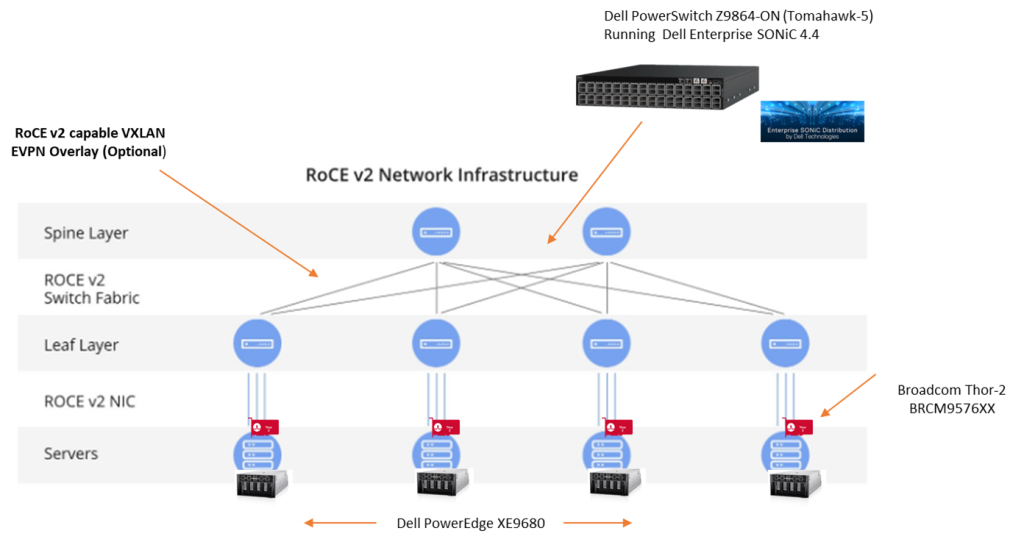
The key point here is that this is an end-to-end protocol, from the RoCE v2 capable sending NIC (did I mention the Thor 2 yet ), right across the DCB enabled Dell SONiC 4.4 Fabric ( Lossless Fabric), to the receiving end RoCEv2 enabled NIC. All components understand the common DCB language and the can respond dynamically to control notifications such as ECN ( Explicit Congestion Notification) and PFC (Priority Flow Control).

Where does VXLAN come into the picture?

Dell Enterprise SONiC has supported end to end RoCE v2 for some time now over traditional L2 and L3 transports. Release 4.4 however, adds the capability to add lossless fabric behavior, via end to end RoCE v2 over a VXLAN fabric. EVPN-VXLAN’s are extremely popular and well deployed in the enterprise, in order to achieve massive scale, segmentation, multi-tenancy and fault domain minimisation, amongst other advantages. In short it does this via encapsulating layer 2 traffic in a Layer 3 UDP packet ( VTEP & VXLAN Overlay), and controlling/distributing endpoint reachability information ( L2 MAC and L3 IP), via MP-BGP (Multiprotocol Border Gateway Protocol)…. phew, much to unpack there. Suffice to say, popular and powerful.

SONiC 4.4 now allows the ability to classify, switch and route RoCE v2 traffic received on an ingress VTEP, and impart that detail into the VXLAN overlay or tunnel. In short it is ECN/PFC aware and allows the VXLAN fabric to inherit the end to end lossless capabilities of traditional L2 switched or L3 routed networks.

Broadcom Thor-2: High Performance Ethernet NIC for AI/ML

As mentioned RoCE v2 is and end to end construct and hence the importance of the server side NIC. Coming Dell PowerEdge support of the Thor-2 network Adapter, rounds out the solution at scale. ( Apologies for the diagram.. this is actually 400GB!)

Features include:

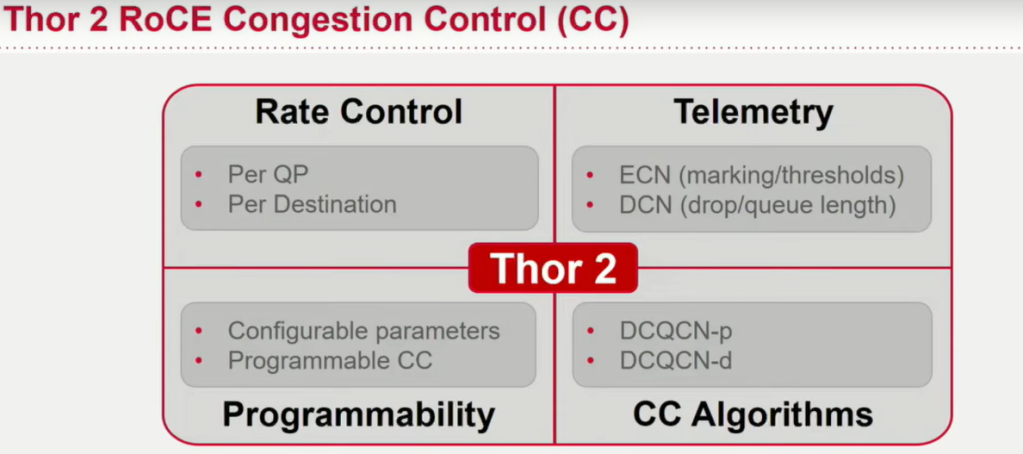
  • Support for RDMA over Converged Ethernet (RoCE) and congestion control, which are critical for AI/ML workloads.
  • The ability to handle 400 gig bi-directional line rates with low latency to ensure rapid data transfer.
  • PCIe Gen 5 by 16 host interface compatibility to maintain high throughput.
  • Advanced congestion control mechanisms that react to network congestion and optimize traffic flow.
  • Security features like hardware root of trust to ensure only authenticated firmware runs on the NIC.

I’ll blog in a future post more about the Thor-2 but for now, this is a great Cloud Field Day video link which sheds some more light on the incredible capabilities, and importance of the NIC in the end to end AI/ML architecture at scale.

Summing Up

Brevity is beautiful as they say, so for now I’ll pause and recap.

  • Enterprise AI/ML workloads demand high radix, line rate, high bandwidth and intelligent switching fabrics to handle the exponential growth of inter GPU traffic and server to server AI/ML workloads at the backend, in order to satisfy training, re-training and inferencing. ( East -West Traffic )These workloads are incredibly sensitive to latency, most especially tail latency. The end to end Dell AI factory infrastructure network layer addresses these needs both in hardware and software through the introduction of the massively scalable Tomahawk-5 based Z9664F-ON switching platform, coupled with Adaptive Congestion Control enhancements and the future capability to deliver cognitive routing at line rate scale.
  • The introduction of the Thor-2 based 400GB NIC rounds out the end to end line rate interconnectivity story between server GPU and switchport. No more oversubscription rather line rate end to end. Intelligent scheduling, telemetry and rate control features inbuilt into the NIC, together with ROCE v2 support and enhancements, deliver a true end to end non blocking, non oversubscribed lossless fabric.
  • The addition of ROCE v2 support for VXLAN BGP-EVPN based fabrics. This allows enterprise customers to now couple lossless end to end ethernet with the multitenancy, scale and performance of overlay based switched fabrics.

I’ve missed loads, so much more to unpack. I’ll pick this up again in Part 2, with a deeper technical overview of the features of Dell Enterprise SONiC and Smart Fabric Manager in particular. AI networks demand deep insights, simplified management and cohesive automation at scale in order to deliver end to end intent based outcomes. Hopefully, you can see that, even for the most seasoned infrastructure pro, you need a factory type approach, in order to deliver the infrastructure required to underpin AI workloads.

Additional Links:

DISCLAIMER

The views expressed on this site are strictly my own and do not necessarily reflect the opinions or views of Dell Technologies. Please always check official documentation to verify technical information.

#IWORK4DELL
APEX Protection Storage for Public Cloud: Build your DDVE and PPDM Playground Part 2

Extended IAC YAML Script – Adds everything else to the recipe.

Short post this week.

My last blog post leveraged AWS CloudFormation and a YAML script to stand up the basic architecture required to deploy DDVE and PPDM in an AWS VPC. Link to post can be found here. As promised though, I have added a little bit more in order to make the process that bit easier when it comes to running through the DDVE/PPDM deployment process (More on that in upcoming future posts!)

The extended script can be found on Github. Please feel free to reuse, edit, plagiarise, or indeed provide some candid feedback (always welcome).

What this script adds.

  • Windows 2016 Bastion Host on T2.Micro Free Tier instance.
  • Security Group attached to Bastion host to allow RDP only from Internet
  • DDVE Security Group configured (will use when we deploy DDVE)
  • IAM Role and Policy configured to control DDVE access to S3 Bucket ( we will use when we deploy DDVE)
  • Outputs generated to include:
    • Public IP address for bastion host
    • Security Group name for DDVE
    • IAM Role ID
    • S3 Bucket Name

So all the base work has now been done, the next set of posts will get down to work in terms of deploying and configuring DDVE and PPDM. Stay tuned!

DISCLAIMER
The views expressed on this site are strictly my own and do not necessarily reflect the opinions or views of Dell Technologies. Please always check official documentation to verify technical information.

#IWORK4DELL

APEX Protection Storage for Public Cloud: Build your DDVE and PPDM Playground.

YAML Cloudformation Script for standing up the base AWS VPC architecture:

My last set of blogs concentrated around running through best practices and standing up the AWS infrastructure, so as to get to the point whereby we deployed DDVE in a private subnet, it was protected by a Security group, accessible via a Bastion host and the data path between it and its back end datastore was routed via an S3 VPC endpoint. Of course we leveraged the nicely packaged Dell Cloudformation YAML file to execute the Day 0 standup of DDVE.

Of course it would be great if we could leverage CloudFormation to automate the entire process, including the infrastructure setup. For a number of reasons:

  1. It’s just easier and repeatable etc, and we all love Infrastructure as Code (IAC).
  2. Some people just want to fast-forward to the exciting stuff… configuring DDVE, attaching PPDM etc. They don’t necessarily want to gets stuck in the weeds on the security and networking side of things.
  3. It makes the process of spinning up a POC or Demo so much easier.

Personally of course, I clearly have a preference for the security and network stuff, and I would happily stay in the weeds all day….. but I get it, we all have to move on….. So with that in mind……

What this template deploys:

After executing the script (I will show how in the video at the end), you will end up with the following:

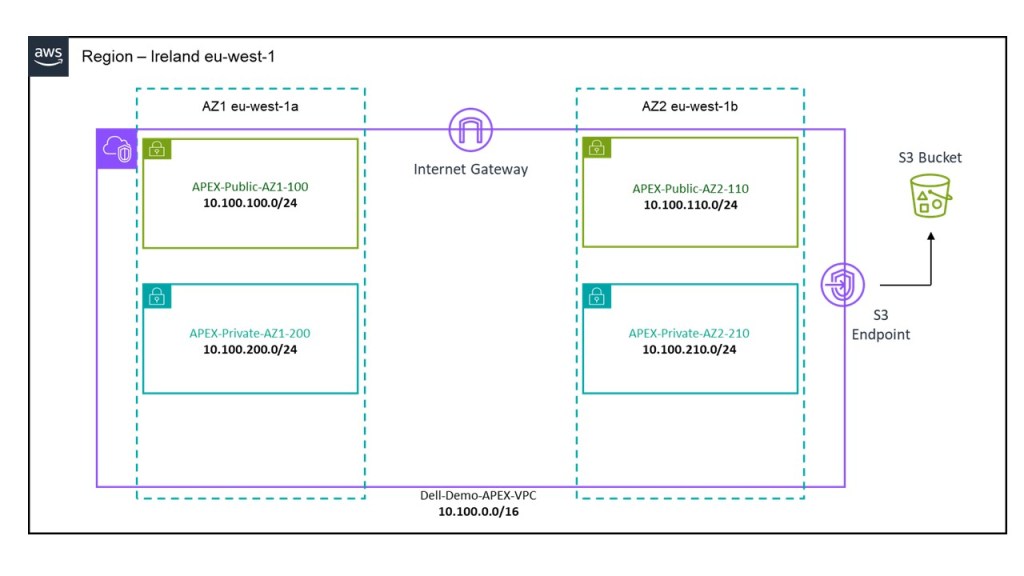
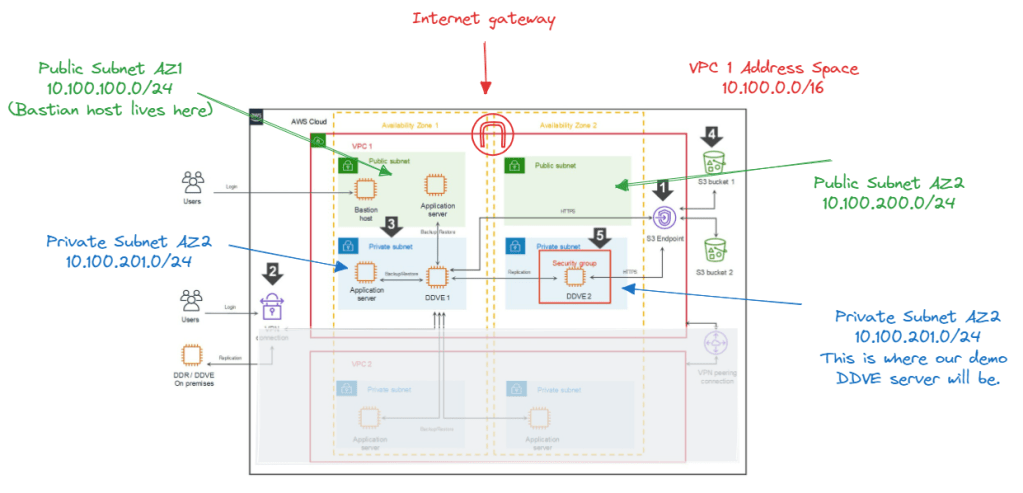
  1. A VPC deployed in Region EU-West-1.
  2. 1 X Private Subnet and 1 X Public Subnet deployed in AZ1.
  3. 1 X Private Subnet and 1 X Public Subnet deployed in AZ2.
  4. Dedicated routing table attached to private subnets.
  5. Dedicated routing table attached to public subnets with a default route pointing to an Internet Gateway.
  6. An Internet Gateway associated to the VPC to allow external access.
  7. An S3 bucket, with a user input field to allocate a globally unique bucket name. This will be deployed in the same region that the CloudFormation template is executed in. Caution, choose the name wisely, if it isn’t unique the script will most likely fail.
  8. VPC S3 Endpoint to allow DDVE traffic from a private subnet reach the public interface of the S3 bucket.
  9. Preconfigured subnet CIDR and address space as per the diagram below. This can be changed by editing the script itself of course, or I could have added some variable inputs to allow do this, but I wanted to keep this as simple as possible.

Where to find the template:

The YAML file is probably a little too long to embed here, so I have uploaded to GitHub at the following link:

https://github.com/martinfhayes/cloudy/blob/main/AWSVPCfor%20DDVE.yml

Video Demo:

There a couple of ways to do this and we can execute directly form the CLI. In most instances though it may be just as easy to run it directly from the Cloudformation GUI. In the next post we will automate the deployment of the Bastion host, Security Groups etc. At that point we will demo how to run the CloudFormation IAC code direct from CLI.

Next up part 2, where we will automate the standup of a bastion host and associated security groups.

DISCLAIMER
The views expressed on this site are strictly my own and do not necessarily reflect the opinions or views of Dell Technologies. Please always check official documentation to verify technical information.

#IWORK4DELL

APEX Protection Storage for Public Cloud: DDVE on AWS End to End Installation Demo

Part 4: Automated Infrastructure as Code with AWS CloudFormation

The last in this series of blog posts. I’ll keep the written piece brief, given that the video is 24 minutes long. It passes quickly I promise! The original intent of this series was to examine how we build the security building blocks for a APEX Protection Storage DDVE deployment. Of course as it tuns out, at the end we get the bonus of actually automating the deployment of DDVE on AWS using Cloudformation

Quick Recap

Part 1: Policy Based Access Control to the S3 Object Store

Here we deep-dived into the the S3 Object store configuration, plus we created the AWS IAM policy and role which is used to allow DDVE securely access the S3 bucket, based on explicit permission based criteria.

Part 2: Private connectivity from DDVE to S3 leveraging VPC S3 Endpoints

In this post, we explored in depth the use of the AWS S3 endpoint feature, which allows us to securely deploy DDVE in a private subnet, yet allow it access to a publicly exposed service such as S3, without the need to traverse the public internet.

Part 3: Firewalling EC2 leveraging Security Groups

We examined the most fundamental component of network security in AWS, Security Groups. These control how traffic is allowed in and out of our EC2 instances and by default controlling the traffic that is allowed between instances. DDVE of course is deployed on EC2

What Next….

This post Part 4…will

  • Configure the VPC basic networking for the demo, including multiple AZ’s, public/private subnets and an Internet Gateway. So we will look something like the following: Note I greyed out the second VPC at the bottom diagram. Hold tough ! This is for another day. In the video we will concentrate on VPC1 (AZ1 and AZ2). Our DDVE appliance will be deployed in private subnet in VPC1/AZ2. Our Bastion host will be in the public subnet in VPC1/AZ1

  • Deploy and configure a windows based Bastian or Jump host, so that we can manage our private environment from the outside.
  • Configure and deploy the following:
    • S3 Object store
    • IAM Policy and Role for DDVE access to the S3 policy store
    • S3 Endpoint to allow access to S3 from a private subnet
    • Security Group to protect the DDVE EC2 appliance.
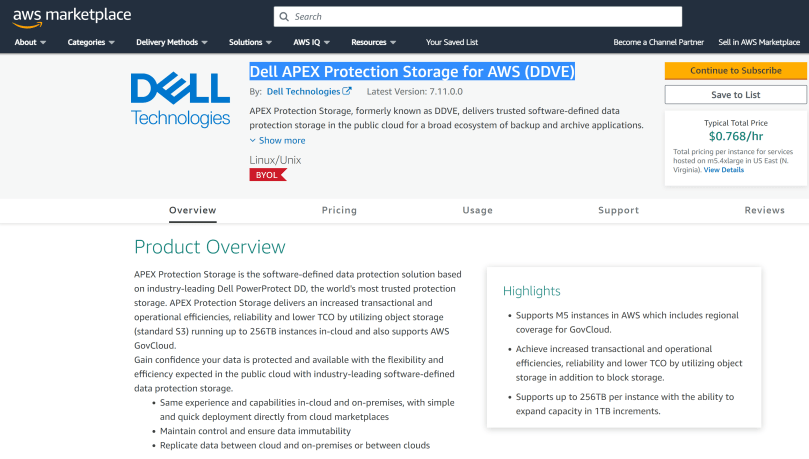
  • Finally, install Dell APEX Protection Storage for AWS (DDVE) direct from the AWS Marketplace
  • The installation will be done using the native AWS Infrastructure as Code offering, Cloudformation

Anyway, as promised, less writing, more demo! Hopefully, the video will paint the picture. If you get stuck, then the other earlier posts should help in terms of more detail.

Up Next…

So that was the last in this particular series. We have got the point where we have DDVE spun up. Next up, we look at making things a bit real….by putting Apex Protection Storage to work.

DISCLAIMER
The views expressed on this site are strictly my own and do not necessarily reflect the opinions or views of Dell Technologies. Please always check official documentation to verify technical information.

#IWORK4DELL

Dell Tech World Zero Trust Update: Project Zero Fort

Followers of my blog will be very aware of the emphasis I have been placing on the emergence of Zero Trust. Back in October 2022, Dell announced the partnership with MISI and CyberPoint International to power the Zero Trust Center of Excellence at DreamPort to provide organisations with a secure data center to validate Zero trust use cases. In April of this year, Dell expanded upon this vision by announcing the Ecosystem of partners, security companies to create a unified Zero Trust solution

Zero Trust is a cybersecurity framework that automates an organization’s security architecture and orchestrates a response as soon as systems are attacked. The challenge, however, lies in implementing a complete solution guided by the seven pillars of Zero Trust. No company can do this alone.

Today marks the the 3rd part of this strategy. Project Fort Zero ,a new initiative that will deliver an end-to-end Zero Trust security solution, validated at the advanced maturity level by the U.S. Department of Defense, within the next 12 months. Project Fort Zero is a Dell-led initiative that brings together best-in-class technology from more than 30 companies, so we can design, build and deliver an end-to-end Zero Trust security solution. This solution will help global public and private-sector organizations adapt and respond to cybersecurity risks while offering the highest level of protection. 

This is a big deal, Zero Trust is a challenge. Many vendors make claims around ‘Zero Trust Capable’. These are similar to statements such as ‘HD Ready’, for those of you who can remember the days of analog TV’s… or ‘Cloud Ready’. In reality, Zero Trust is a validated framework, that requires deep understanding across a broad portfolio of technologies and ever deepening set of skills to orchestrate, deliver and integrate a cohesive outcome. Project Fort Zero will help accelerate this process by delivering a repeatable blueprint for an end-to end solution that is based on a globally recognised validated reference architecture.

Policy Framework

At the heart of the solution, Zero trust is a a framework based on the mantra of ‘never trust, always verify’ or in my opinion ‘conditional trust’. Only trust something you know about (authenticate) and have determined its role and level of access (Authorize), based on the ‘Principle of Least Privilege’. Furthermore, ZTA mandates that the network is continuously monitored for change. Trust is not forever…. Zero Trust seeks to continuously authorize and authenticate based on persistent monitoring of the environment. Trust should be revoked if the principle of least privilege is not met.

ZTA does this by defining a policy framework built on business logic (Policy Engine) and implemented via a broad suite of technological controls using a control plane Policy Decision Point (PDP) and multiple Policy Enforcement Points (PEP) distributed across the environmental data plane. Zero Trust is not Zero trust without this policy framework. In practice this isn’t easy..

7 Pillars of Zero Trust

Dell will work with the DoD to validate the 7 Pillars and 45 different capabilities that make up the Zero Trust Architecture. These capabilities are further defined into 152 prescribed activities.

Can I go it alone?

For customers who may be mid-stream, have started there journey already or wish to evolve over time towards zero-trust, then Dell do offer products and solutions with native foundational built in Zero-Trust capabilities and a mature set of advisory services that provide an actionable roadmap for Zero trust adoption.

However, even a cursory review of the above 7 pillar schematic, gives an indication of the scale of the lift involved in delivering an end to end Zero Trust Architecture. The presence of multiple vendors across disparate technology siloes can present an implementation and integration burden, overwhelming to even the largest of our customers and partners. The intent of Project Fort Zero is to remove this burden from our customers and guarantee a successful outcome. If possible this is the more straightforward and preferable path.

Where to find more information?

Check back here for a continuation of my 7 Pillars of Zero Trust. This will be a technical deep dive into the technologies underpinning the above. As more information becomes available over the next couple of days I will edit this list on the fly!

Cable to Clouds: Zero Trust Blog Series

Dell Enterprise Security Landing Page

DoD Zero Trust Reference Architecture

Herb Kelsey’s Blog: DT Build Ecosystem to Speed Zero Trust Adoption

DISCLAIMER
The views expressed on this site are strictly my own and do not necessarily reflect the opinions or views of Dell Technologies. Please always check official documentation to verify technical information.

#IWORK4DELL

Why Dell Zero Trust? Disappearing Perimeters

Just after the New Year, I caught up with a work colleague of mine and I started to chat about all the good work we are doing in Dell with regards Zero Trust and the broader Zero Trust Architecture (ZTA) space. Clearly he was very interested (Of course!!). We talked about the Dell collaboration with MISI (Maryland Innovation Security Institute) and CyberPoint International at DreamPort, the U.S Cyber Command’s premier cybersecurity innovation facility. There, Dell will power the ZT Center of Excellence to provide organisations with a secure data center to validate Zero Trust use cases in the flesh.

Of course, me being me, I was on a roll. I started to dig into how this will be based on the seven pillars of the Department of Defense (DoD) Zero Trust Reference Architecture. Control Plane here, Macro-segmentation there, Policy Enforcement Points everywhere!

Pause… the subject of a very blank stare…. Reminiscent of my days as a 4 year old. I knew the question was coming.

“But Why Zero Trust?”

This forced a pause. In my defense, I did stop myself leaning into the casual response centered on the standard logic: Cyber attacks are on the increase, ransomware, malware, DoS, DDoS, phishing, mobile malware, credential theft etc., ergo we must mandate Zero-Trust. Clearly this didn’t answer the question, why? Why are we facing more cyber related incidences and why shouldn’t I use existing frameworks such as ‘Defense in Depth’? We have used them for decades, they were great then, why not now? What has changed?

Of course a hint lies in the title of this post, and in particular the very first line of the DoD Reference Architecture guide.

“Zero Trust is the term for an evolving set of cybersecurity paradigms that move defenses from static, network-based perimeters to focus on users, assets, and resources. Zero Trust assumes there is no implicit trust granted to assets or user accounts based solely on their physical or network location (i.e., local area networks versus the Internet) or based on asset ownership (enterprise or personally owned)”

So the goal is to move from ‘static, network-based perimeters’ to ‘focus on users, assets and resources’. However, as you may have guessed, the next question is……

“But Why?”

I think we can formulate a relevant coherent answer to this question.

The Problem of De-Perimeterisation

Traditional approaches to network and infrastructure security are predicated on the idea that I can protect the perimeter. Stop the bad stuff at the gate and only leave the good stuff in leveraging firewalls, ACL’s, IPS and IDS systems and other platforms. ‘Defense in Depth’ has become a popular framework that enhances this network perimeter approach, by adding additional layers on the ‘inside’, another firewall here another ACL there. Just in case something gets through. Like a series more granular sieves, eventually, we will catch the bad stuff, even if it has breached the perimeter.

This approach of course has remained largely the same since the 1990’s, for as long as the Network firewall has existed. ( in fact longer but I choose not to remember that far back!)

The ‘noughties’ were characterised by relative simplicity:

  • Applications all live in the ‘Data-Center’ on physical hardware. No broad adoption of virtualisation just yet. What’s born in the DC stays in the DC for the most part. Monolithic workflows.
  • Hub/Spoke MPLS based WAN and Simple VPN based remote access. Generally no split tunnels allowed. In other words to get to the internet, when ‘dialed-in’ you needed to reach it via the corporate DC.
  • Fledgling Internet services, pre SaaS.
  • We owned pretty much all our own infrastructure.

In this scenario, the network perimeter/border is very well defined and understood. Placing firewalls and defining policy for optimal effectiveness is a straightforward process. Ports were opened towards the internet but the process was relatively static and manageable.

Interestingly, even back then we could possibly trace the beginnings of what we now know of Zero-Trust movement. In 2004, the Jericho Forum, which later merged into the Open Group Security Forum, remarked rather prophetically;

The traditional electronic boundary between a corporate (or ‘private’) network and the Internet is breaking down in the trend which we have called de-perimeterisation

And this was almost 20 years ago, when things were….. well, simple!

Rolling on to the next decade.

Things are beginning to change, I had to put a little thought into where I drew my rather crude red line representing the network perimeter. We now have:

  • The rise of X86 and other types of server virtualisation. All very positive but lending itself to proliferation of ‘virtual machines’ within the DC. Otherwise known as VM sprawl. Software Defined Networking and Security ‘Defense in Depth’ solutions soon followed such as VMware NSX to manage these new ‘East-West’ flows in the Data Center. Inserting software based firewalls representing the birth of micro-segmentation as we know it.
  • What were ‘Fledging’ Web based services have now firmly become ‘Business Critical ‘ SaaS based services. How we connected to these services became a little bit more complicated, indeed obfuscated. More and more these were machine to machine flows versus machine to human flows. For instance, my internal app tier pulling from an external web based SaaS database server. The application no longer lived exclusively in the DC nor did we have exclusive ownership rights.
  • More and More, the remote workforce were using the corporate DC as a trombone transit to get to business SaaS resources on the web. This started to put pressure on the mandate around ‘thou must not split-tunnel’, simply because performance was unpredictable at best, due to latency and jitter. (Unfortunately we still haven’t figured out a way to speed up the speed of light!)

Ultimately, in order for the ‘Defend the Perimeter’ approach to be successful we need to:

  1. ‘Own our own infrastructure and domain.‘ Clearly we don’t own nor control the Web based SaaS services outlined above.
  2. ‘Understand clearly our borders, perimeter and topology.’ Our clarity is undermined here due to the ‘softening’ of the split-tunnel at the edge and our lack of true understanding of what is happening on the internet, where our web based services reside. Even within our DC, our topology is becoming much more complicated and the data flows are much more difficult to manage and understand. The proliferation of East-West flows, VM sprawl, shadow IT and development etc. If an attack breached our defenses, it is difficult to identify just how deep it may have gotten or where the malware is hiding.
  3. ‘Implement and enforce our security policy within our domain and at our perimeter’ Really this is dependent on 1 and 2, clearly this is now more of a challenge.

The Industry began to recognise the failings of the traditional approach. Clearly we needed a different approach. Zero Trust Architectures (ZTA), began to mature and emerge both in theory and practice.

  1. Forrester Research:
    • 2010: John Kindervag coined the phrase ‘Zero Trust’ to describe the security model that you should not implicitly trust anything outside or inside your perimeter and instead you must verify everything and anything before connecting them to the network or granting access to their systems.
    • 2018: Dr. Chase Cunningham. Led the evolution into Zero Trust eXtended Framework (ZTN). ‘Never Trust always Verify’
  2. Google BeyondCorp:
    • 2014: BeyondCorp is Google’s implementation of the Zero-Trust model. Shifts access controls from the network perimeter to individual users, BeyondCorp enables secure work from any location without the need for a traditional VPN
  3. Gartner:

And so the the current decade:

Because the perimeter is everywhere, the perimeter is in essence dead…….

I refrained from the red marker on this occasion, because I would be drawing in perpetuity. The level of transformation that has taken place over the last 4-5 years in particular has been truly remarkable. This has placed an immense and indelible strain on IT Security frameworks and the network perimeter, as we know them. It is no longer necessary to regurgitate the almost daily stream of negative news pertaining to cyber related attacks on Government, Enterprise and small business globally, in order to copperfasten the argument, that we need to accelerate the adoption of a new fit for purpose approach.

In today’s landscape:

  • Microservice based applications now sit everywhere in the enterprise and modern application development techniques leveraging CI/CD pipelines are becoming increasingly distributed. Pipelines may span multiple on-premise and cloud locations and change dynamically based on resourcing and budgetary needs.
  • Emerging enterprises may not need a traditional DC as we know it or none at all, they may leverage the public cloud, edge, COLO and home office exclusively.
  • The rise of the Edge and enabling technologies such as 5G and Private Wireless has opened up new use cases and product offerings where applications must reside close to the end-user due to latency sensitivity.
  • The continued and increasing adoption of existing established enterprises of ‘Multi-Cloud’ architectures.
  • The emergence of Multi-Cloud Data mobility. User and application data is moving, more and more across physical and administrative boundaries based on business and operational needs.
  • The exponential growth of remote work and the nature of remote work being ‘Internet First’. More often than not, remote users are leveraging internet based applications, SaaS and not leveraging any traditional Data Center applications. Increasingly a VPN less experience is demanded by users.
  • Ownership it shifting rapidly from Capex to dynamic, ‘Pay As You Use/On-demand’ Opex based on-premise cloud like consumption models, such as Dell APEX.

So, if you recall, the three key controls required to implement a ‘Perimeter’ based security model include:

  1. Do I own the Infrastructure? Rarely at best, more than likely some or increasingly none at all. Indeed many customers want to shift the burden of ownership completely to the Service Provider (SP).
  2. Do we understand clearly our border, perimeter and topology? No. In a multi-cloud world with dynamic modern application flows our perimeter is constantly changing and in flux, and in some cases disappearing.
  3. Can we implement security policy at the perimeter? Even if we had administrative ownership, this task would be massively onerous, given that our perimeter is now dynamic at best and possibly non existent.

So where does that leave us? Is it a case of ‘out with the old in with the new’? Absolutely not! More and more security tooling and systems will emerge to support the new Zero Trust architectures, but in reality we will use much of what already exists. Will we still leverage existing tools in our armoury such Firewalls, AV, IPS/IDS, and Micro-segmentation? Of course we will. Remember ZTA is a framework not a single product. There is no single magic bullet. It will be a structured coming together of the people, process and technology. No one product or piece of software will on its own implement Zero Trust.

What we will see though emerge, is a concentration of systems, processes and tooling in order to allow us deliver on the second half of the first statement in the DoD Reference Architecture Guide.

Zero Trust assumes there is no implicit trust granted to assets or user accounts based solely on their physical or network location (i.e., local area networks versus the Internet) or based on asset ownership (enterprise or personally owned)”

If we can’t ‘grant trust’ based on where something resides or who owns it, then how can we ‘grant trust’ and to what level?

The answer to that lies in a systematic and robust ability to continuously authenticate and conditionally authorize every asset on the network, and to allocate access on the principle of ‘least privilege’. To that end, Identity and Access Management systems and processes (IAM) will step forward, front and center in a Zero Trust world. ( and into the next post in this Zero Trust series…..)

DISCLAIMER
The views expressed on this site are strictly my own and do not necessarily reflect the opinions or views of Dell Technologies. Please always check official documentation to verify technical information.

#IWORK4DELL