
Firewalling EC2 leveraging Security Groups
Quick recap.
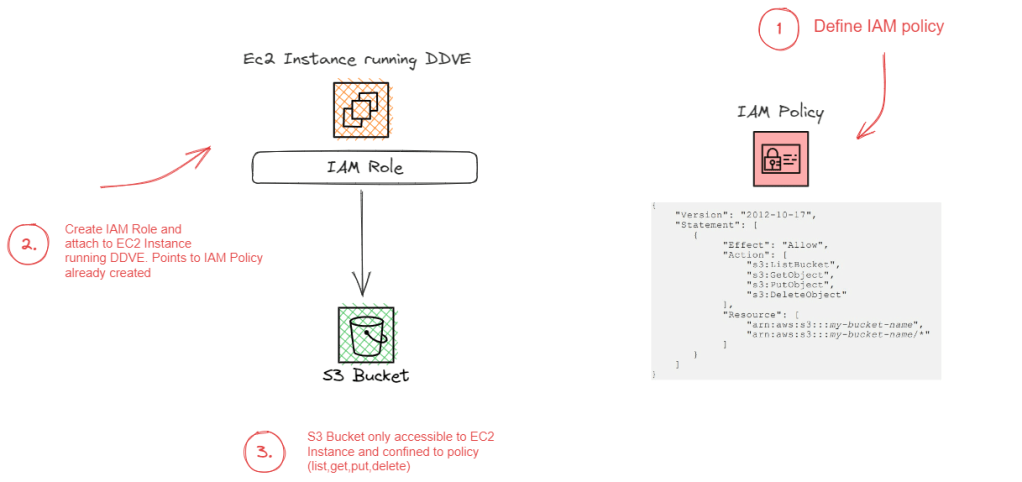
In Part 1 and Part 2 of this series we concentrated on the relationship between the DDVE software running on EC2 and its target datastore, S3. As with anything cloud based permissions and IAM play a critical role and then we delved into the techniques used to securely connect to S3 from a private subnet.
But what about some of the more traditional elements to infrastructure security within the environment? How do we firewall our critical assets at Layer 3 and Layer 4 (IP and Port level). The nuts and bolts, the first layer of defense.
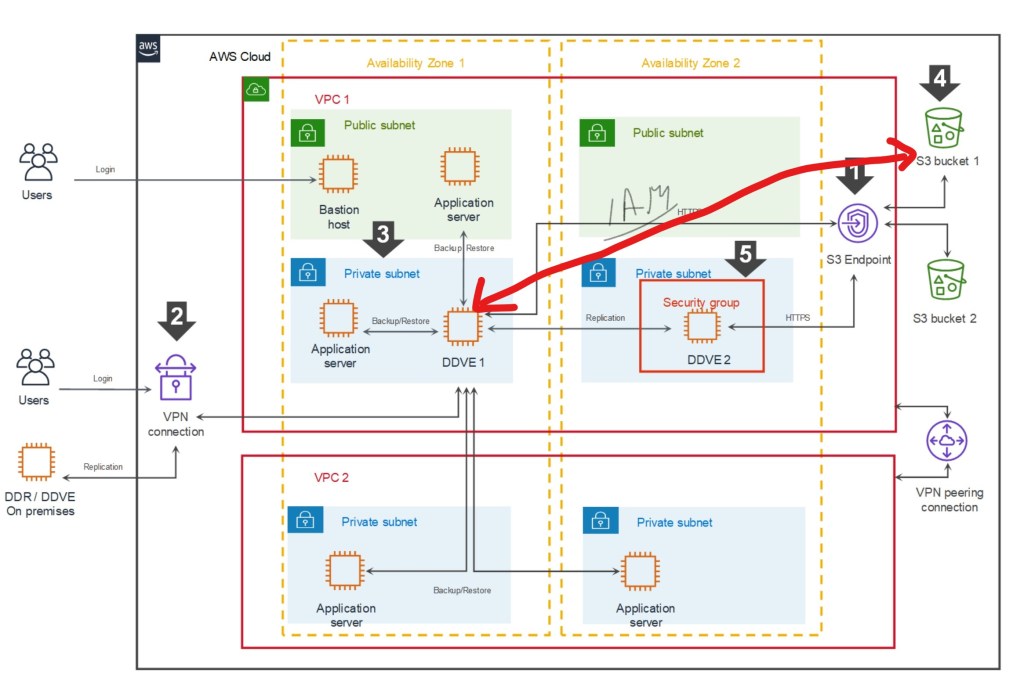
Referring back to our original diagram again, we can see that we use a Security Group to provide that protection to the EC2 instance itself, to allow only the traffic necessary ingress/egress the DDVE appliance.

What are Security Groups?
Security Groups are possibly the most fundamental component of network security in AWS, controlling how traffic is allowed into or out of your EC2 instances, and by default controlling the traffic that is allowed between instances. They are stateful (more on that in a minute) and applied in both an inbound and outbound direction. In the spirit of blogging, let’s try and run through this with an example, focused on the DDVE Security Group configuration. We will implement this example in the video demo at the end of this post.

The above diagram is an excerpt of the Security Group we will create and attach to our EC2 instance. For clarity I have just included a couple of rules. In the video we will configure all of the required rules as per the Dell Technologies best practice ( disclaimer: as always though please refer to the latest documentation for the most up to date guidance). Anyway, the purpose here is to demonstrate how this actual works and how we apply the rules. Ports and IP addresses will always invariably change.
In the above we have our EC2 Instance that has a Security Group attached. We have two rule sets as standard:
- The Inbound ruleset is configured to allow traffic from our Bastian server over SSH (22) and HTTPS(443) to communicate with DDVE. We have also explicitly defined the source port of the Bastian host. We will need HTTPS access from the Bastian host in order to configure the GUI
- The Outbound ruleset is configured to allow traffic from our DDVE instance to communicate to our S3 bucket via REST API HTTPS(443). Note I have included the destination as the prefix list, that was created when we configured the S3 endpoint in the last post. Technically we could open up all HTTPS outbound traffic, but we should where possible be restrictive as possible based on the principle of least privilege.
A couple of points to note here:
- Security Groups are Stateful. If you send a request from your instance, that is allowed by the Outbound ruleset, the response for that request is allowed by default, regardless of the Inbound ruleset, and vice versa. In the above example when the Bastian host initiates a HTTPS session over 443, then the return traffic will be via an ephemeral random port (32768 and above). There is no need to configure a rule allowing this traffic outbound.
- Security Groups are always permissive with an implicit deny at the end. You can’t create rules that deny access. We can do this using another security tool, Access Control Lists
- Nested References. We can refer to other security groups as a security group source. We haven’t used this here, but it is especially useful if we want to avoid the creation of multiple rules, that make the configuration unwieldy.
- Can be attached to multiple instances. This is especially handy if I have multiple EC2 instances that require the same security treatment
- Security groups are at VPC level. They are local only to the VPC they were configured
- Not processed by EC2 instance or ENI. The Security Group rules are processed outside the EC2 instance in AWS. This is clearly important to prevent flooding or DoS attacks based on load. If traffic is denied, the EC2 instance will never see the traffic.
- Default Behavior. If you create a new security group and don’t add any rules then all inbound traffic is blocked by default and all outbound is allowed. I’ve been caught by this once or twice.
What about Network Access Control Lists (NACLS)?
So we aren’t going to use these in the video demo, but it is good to understand how they differ from and sometimes complement Security Groups.
The principle difference is that SG’s allow specific inbound and outbound traffic at the resource level, such as the EC2 instance. Network access control lists (NACLs), on the other hare applied at the subnet level. ACL’s allow you to create explicit deny rules and are stateless, versus SG’s which only allow permit rules and are stateful.
Using our previous example, what would happen if we tried to use an ACL instead of a Security Group to permit traffic from the Bastian server to the DDVE EC2 instance over Port 443 (HTTPS)? Because the ACL has no concept of ‘State’, it does not realise that the return traffic is in response to a request from the Bastian server. It can’t knit the the ‘state’ of the flow together. The result now of course is that we would need to create another ACL to permit the outbound traffic based on the high order ephemeral port range we discussed earlier. As you can imagine, this will get very complex, very quickly, if we have to write multiple outbound/inbound ACL rules to compensate for the lack of statefullness.
However…. remember SG’s have there own limitation. We cannot write deny rules. With ACL’s we can and this can be done at the subnet level. Which gives us the power to filter/block traffic at a very granular level. Using our example, consider a scenario whereby we notice a suspicious IP address sending over port 443 to our Bastian server (remember this is on a public subnet). Say this address is coming from source 5.5.5.5. With ACL’s we can write a simple deny rule at the subnet level to deny traffic from this source, yet till allow everything else configured with our security group.

Security Group Rule Configuration for AWS
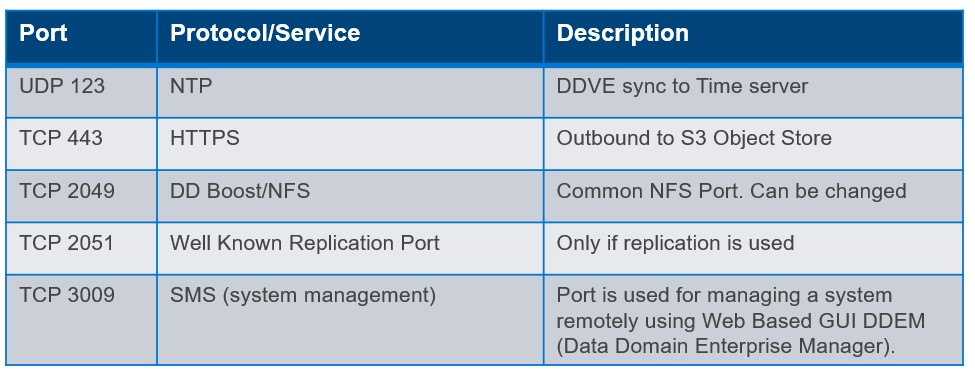
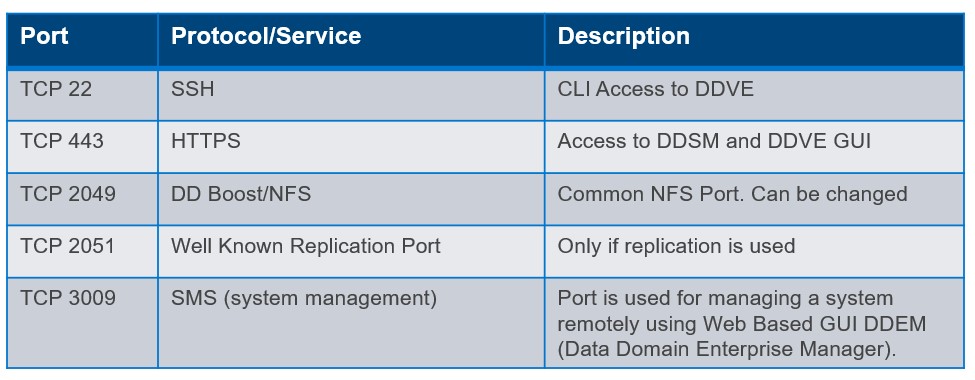
So earlier in this post we identified a couple rules that we need for S3 access outbound, SSH/HTTPS access inbound etc. In the following video example we will configure some more to enable other common protocol interactions such as DD Boost/NFS, Replication, System Management etc. Of course, the usual caveat applies here, please refer to official Dell Technologies Product Documentation ( I’ll post a few links at the bottom of the post), for the most up to date best practice and guidance. The purpose of this post is to examine the ‘why’ and the ‘how’, the specific ‘what’ is always subject to change !
Outbound Sample Ruleset
Inbound Sample Ruleset
Video Demo
Short and sweet this time, we will dive straight into creating a Security Group with the inbound/outbound ruleset as defined above. In the next post, we will do a longer video, from which we will go through the complete process from start to finish. VPC setup, IAM configuration, S3 Endpoint standup, Security Group configuration all brought together using Infrastructure as Code (IAC) and CloudFormation!
Quick Links
As promised a couple of handy references. Note: You may need Dell customer/partner privilege to access some content . Next up the full process end to end……
APEX Storage for Public Cloud Landing Page
Dell Infohub Introduction to DDVE
PowerProtect DDV on AWS 7.10 Installation and Administration Guide
DISCLAIMER
The views expressed on this site are strictly my own and do not necessarily reflect the opinions or views of Dell Technologies. Please always check official documentation to verify technical information.
#IWORK4DELL








 Cablestoclouds.blog