

In a previous post, I talked pretty exhaustively about how we came to the point where the need for a Zero Trust Architecture has become obvious. The process of de-perimiterisation has, to all intents and purposes rendered many of the network based controls and the process around how they are implemented, whilst not quite obsolete, to a large degree ineffective. Certainly we have lost considerable trust in the ability of these controls to deal with the myriad of new threat vectors and the rapidly expanding and ever vulnerable attack surface.
So the answers are beginning to emerge in the form of of validated architectures or frameworks from NIST, CISA and the US Department of Defense, amongst others. I think in truth, they are really different sides to the same coin. In particular, all frameworks lean heavily into the concepts of authentication and authorisation, or more broadly speaking Identity Access Management (IAM).
If you recall from the last post, we called out the importance of IAM within a Zero Trust Architecture;
‘a systematic and robust ability to continuously authenticate and conditionally authorize every asset on the network, and to allocate access on the principle of ‘least privilege’. To that end, Identity and Access Management systems and processes (IAM) will step forward, front and center in a Zero Trust world’
Right, so the easy button…… IAM is the new Perimeter… and we are off to the races! Unfortunately not quite yet. As previously stated ZTA, is not a single product, or single uniform architecture, or a one size fits all approach. Identity Access and Management (IAM), is the bedrock component of ZTA, but is a complex, deep and mature subject in its own right, and equally heterogenous in terms of architecture diversity. In order to begin to understand how Zero Trust knits together (Pillars, Tenets etc.), we must at a very minimum understand some of the foundational concepts around Identity and Access Management (IAM). The purpose of this blog post.
Before we start exploring these foundational concepts then we need to note some realities:
- Most if not all organisations have pre-existing IAM architectures that have matured over years, that mirror the de-perimeterisation effect. As the perimeters have been eroded via the journey to the public cloud and the edge, then so has the requirement for their traditional legacy IAM services to respond in kind. Where once life was easy with on premise MS Active Directory, now many customers are using more advanced techniques to facilitate these multi cloud use cases. For example, leveraging SAML for Federated Single Sign On (SSO) for SaaS based services such as Salesforce.com. It is not uncommon for organisations to have complex, non centralised and dispersed IAM architectures. It is also true to say IAM is a hot topic in IT, in its own right!
- ‘Lifting and Shifting’ these embedded IAM systems to facilitate the implementation of Zero Trust may present a challenge. Nothing is of course impossible, especially in greenfield, but these systems tend to be tightly engrained in existing business processes. The likelihood, is that it may be easier to find a way to integrate and augment, where feasible, pre-existing IAM systems into an emerging Zero Trust implementation, as much as practically possible. Indeed, a well constructed Zero Trust system should be capable of bridging together the multiple components of a non centralised IAM system.
So… enough on Zero-Trust for a while and back to some foundational IAM concepts. I think everybody who will read this blog will have heard of the terminology, but hopefully the next sections will bring some of the ideas and constructs together. Clearly the below is not exhaustive. As mentioned IAM is a big area in its own right.
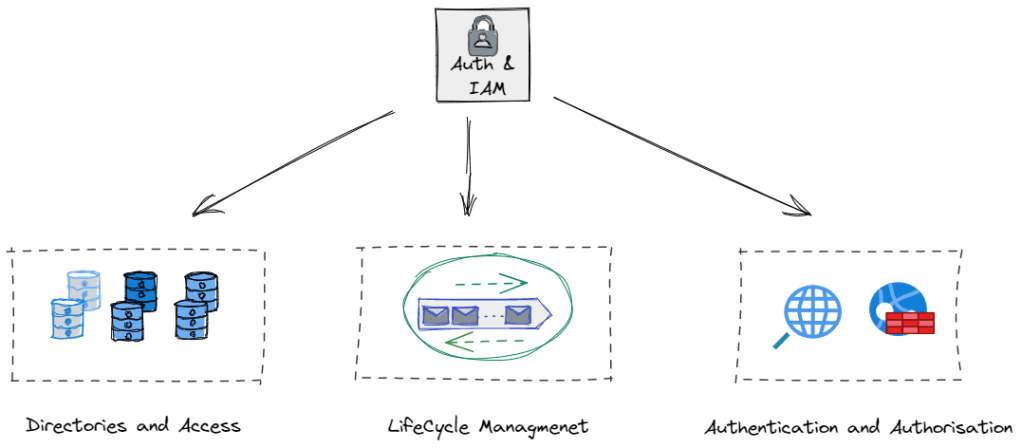
This blog is going to follow the travails of a fictional employee, Mary, who works in a typical enterprise running Microsoft in the back and front office. A bit naff I know, but hopefully the practical examples help somewhat.
1. Directories and Access.. where is my information stored and how do I get it?
Microsoft Active Directory
The days of the Yellow Pages may be long gone, but we still leverage the IT Phonebook. These take multiple types and forms but possibly the most familiar to many is Microsoft’s Active Directory (AD), of course there are Linux commercial alternatives such a Red Hat Directory Server and many different proprietary and open source directory services. For now though let’s concentrate on MS AD.
Keeping this very high level, AD will store attributes about both individual users, groups, laptops, printers, services etc, much like the Yellow Pages stores attributes about multiple entities, services, people and businesses. AD is then has a mechanism to structure this data ( domains, forests and tress), and protocols embedded in it to manage access, authentication and retrieval.
Lightweight Directory Access Protocol (LDAP)
For security reasons, we don’t just allow anybody access to the phonebook, to browse, amend, query or retrieve data as they see fit. So we need a means of managing this. For this we use a lightweight client-server based protocol known as LDAP to do the job for us. Anybody who has searched for a domain attached printer for instance will have used LDAP. The LDAP Client (your laptop) queries the LDAP Server (MS AD) for the relevant objects. The server will of course seek to authenticate you, based on your network username and password, determine what level of permissions you have been administratively assigned, and then if authorised, return you a list of available network printers.
This is IAM in action. We have successfully ‘Identified’ the user, ‘Authenticated’ her via a network username and password and ‘authorised’ the correct level of access based on her AD group policy. This mechanism is still very widely deployed and LDAP based systems have expansive and far reaching support across identity, security and application vendors. Active Directory, is probably the most widely deployed LDAP implementation and is likely to be around for a long time to come yet.
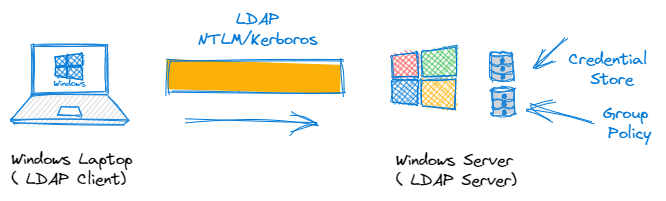
What about the Cloud ? IDaaS
Sure, the above is very simplistic. Everything is cloud now right? Identity as a Service (IDaaS) are a family of offerings that offer cloud based directory services as well as wrap around authentication, authorization, Single Sign On, Federation and and life cycle management services. For now though, its enough to know they exist. Continuing the Microsoft theme we have Azure Active Directory for those who wish to push these services to the cloud. There is a nice link here, that goes through some of the comparisons between both on-premise and cloud based AD offerings.
2. Identity Life Cycle Management
What happens if Mary leaves the company or moves department?
We mentioned or at least alluded to at the start of the blog, the integration of IAM systems and the overall business process. The intersection between HR systems and IAM is very common, in order to manage the everyday process of employees ‘joining’, ‘moving’ through the business and eventually ‘leaving’. Good systems are built with the principle of least privilege at their core. Once a user or entity is assigned a level of privilege based on this principle, then the IAM system can continuously ‘authenticate, authorise and account’ for a users activity throughout the users lifecycle. This AAA concept is very old but is still foundational to IAM.
Of course, when a user leaves the company, or an entity is retired from use, then the principle of least privilege dictates that all access should be revoked ( No Access). This is why closed loop IAM systems are integrated tightly with HR systems to help share business logic and governance processes between them. Without stating the blindingly obvious, we need to know when Mary leaves the company and automate the response to that in terms of rights revocation etc.
The management of non human accounts and entities are of course a greater challenge, as their is unlikely to be a HR based revocation process in place. HR manage humans! These may be API accounts, with full admin rights for instance. Managing and providing governance around these accounts is of course a challenge that Zero Trust and Privileged Access Management (PAM) attempts to solve. More on that in a future blog…

3. Authentication and Authorisation
These concepts are really at the core of identity management systems. So lets start with some definitions:
Authentication:
The process whereby one or more factors of authentication – for example, a password, is used to validate that the identity claimed by the user or entity is known to the system. In our case the system being the MS AD Identity Store. A factor may be:
- Something the user is: A fingerprint, Biometric data, location etc
- Something they have: A hardware/software security token such as an RSA fob
- Something they know: A Username/Password or answer to a challenge question, what was your first cat’s name?
So Multi-Factor Authentication (MFA) has been all the rage at the moment and is key component of Zero Trust. It very simply is the combination of two or more of the above when verifying credentials.
Authorisation:
This is the process of granting the right level of access to a resource once they have been authenticated. By its nature it is based on policy enforcement and context. For instance when Mary was onboarded, she may have been added to a certain AD group with specific access rights to the Finance/HR systems only. Policy is preventing her access to the Engineering domain.
What about Single Sign On (SSO)
SSO allows users to access different resources without multiple requests for credentials. In the case where Mary wants to map a new drive and browse a share within the AD forest then the Kerberos authentication protocol is used to manage the reuse of credentials throughout the forest whenever an access to a new resource is attempted.
What about the Cloud and connectivity to other stuff ?
So it is fair to say that the above is very simplistic overview of how IAM would work in a standard windows environment, but it does nonetheless introduce concepts around Directory Stores, IAM lifecycle Management, Authentication, Authorisation and Single Sign On (SSO).
With the explosion of cloud based apps and the growing popularity of other systems based on microservices and open source platforms, then we cannot just rely on the traditional mechanisms such as LDAP and RADIUS to deliver cross platform/entity identity authentication, authorisation and federation. I suspect many are familiar with the following terms and jargon, but may not quite understand quite what they do.
SAML (Security Assertion Markup Language)
Simply put, SAML is a protocol for authenticating to web applications. We touched on federation earlier, and SAML is an extension of this concept that allows us to federate identity information across entities and allow organisations to communicate and trust and provide single sign on capabilities for each others users.
So typically Mary will look to access resources within her own AD domain, Of course being in finance she will want to access an online service such as Salesforce.com. It would be really nice, if Mary, could leverage her existing AD username/password when logging onto Salesforce.com. Clearly this is advantageous in that it makes things much easier for Mary (she doesn’t have to scribble down another username/password pair), but it is a much more secure process for the company. Losing access credential data is generally is very serious. By limiting the amount of credentials and federating their use, administrators can control their distribution in a much more secure fashion. If their is a breach then the credential can be revoked centrally in the master directory (AD), access is then revoked everywhere including for SFDC access. Of course from a lifecycle perspective, if Mary were to leave, we don’t have to worry about what web applications she has access to, all rights can be revoked everywhere, quickly and efficiently.

So what just happened? At a very high level, and without getting into the SAML weeds…
- Mary authenticates to her corporate Active Directory running Federation Services using her windows credentials as per normal ( remember Kerberos above). ADFS is known as the Identity Provider (IdP) in SAML parlance
- AD FS returns a SAML ‘Assertion’ to Mary’s browser.
- Mary’s browser submits the ‘assertion’ to Salesforce. Once Salesforce receives this assertion, because it comes from a trusted IdP, then Mary is logged on.
To say this is a very simplistic representation of SAML is an understatement, but the process is really as straightforward as the above. SAML has been a tremendously successful protocol, based on XML, since its inception in the mid 90’s. Indeed SAML 2.0 is the current version in use, and it has been around since 2005! We use it everyday, even outside the corporate world example above. Every time a website asks us do we wish to logon via Goggle, Facebook, Twitter etc., that is SAML using federated identity and SSO in action.
OAuth2
Oauth2 is a highly successful newer protocol developed by Google and Twitter in 2006. It was developed in response to the deficiencies of SAML when used on mobile devices. API driven and based on JSON versus XML and is thus much more lightweight. OAuth deals with ‘Authorisation’ only and delegates ‘Authentication’ tasks to another protocol OpenID Connect (OIDC). It is typically used to grant user access to information without exposing the password. Rather than giving away your username and password to a 3rd party app you grant the use of a token instead. what the…. 🙂
Ok so a practical example, without digging deep into the weeds. Mary is in work, and spending some time perusing LinkedIn (We are all guilty!)
Mary logs on and LinkedIn prompts her to add her google contacts as suggested new connections. Mary approves the request, This is OAuth2 in action. OAuth2 issues an ‘authorization’ token to approve one application to interact with another application on your behalf, without ever exposing your username/password. Another very common example, Mary could grant a photo printing service access to their private photos on Google Gallery, without ever having to share her username and password.
Technically, OAuth2 is an authorization protocol and not an authentication protocol. OpenID Connect, is an authentication protocol built top of OAuth2.
OpenID Connect (OIDC)
OIDC is an identity layer built on top of the OAuth2 framework. It allows third-party applications to verify the identity of the end-user and to obtain basic user profile information. OIDC uses JSON web tokens in lieu of usernames and passwords. Think of it like producing your passport at hotel check-in. The clerk accepts the passport as a lightweight and valid claim of your identity in order to check you in. They trust the passport authority to underpin Mary’s identity. It has nothing to do with authorisation however, the hotel clerk still references the booking information, to verify if Mary can access the executive lounge etc.
From a real world example, Mary sitting in the Hotel lobby decides to logon to Spotify on her mobile. Spotify prompts her to either logon directly or use her Facebook credentials , whereby she logs on to Facebook and Facebook passes her credentials to Spotify and she is quickly logged on. Like the hotel example, once logged on via OpenID Connect/Facebook, Spotify then carries out further authorisation checks to see if she has access to premium or audio books for instance.
Summing up
So what’s next…
To say the above is a very high level simplistic overview of IAM is an understatement, clearly when you dig a bit deeper, some of the protocol interdependencies are indeed quite complex. Nonetheless, hopefully we have provided some grounding before we can delve in a conversation around Zero Trust in earnest. In particular, the 7 pillars of the DoD Zero Trust Framework, and in particular the next post in the series, concentrating on Pillar 1: The User

 Cablestoclouds.blog
[…] privilege’, of course Identity and Access Management (IAM). I have a previous post here, that covers the broader topic of IAM in more detail. In future nuggets, I will cover some of the […]
LikeLike