
Part 4: Automated Infrastructure as Code with AWS CloudFormation
The last in this series of blog posts. I’ll keep the written piece brief, given that the video is 24 minutes long. It passes quickly I promise! The original intent of this series was to examine how we build the security building blocks for a APEX Protection Storage DDVE deployment. Of course as it tuns out, at the end we get the bonus of actually automating the deployment of DDVE on AWS using Cloudformation
Quick Recap
Part 1: Policy Based Access Control to the S3 Object Store
Here we deep-dived into the the S3 Object store configuration, plus we created the AWS IAM policy and role which is used to allow DDVE securely access the S3 bucket, based on explicit permission based criteria.
Part 2: Private connectivity from DDVE to S3 leveraging VPC S3 Endpoints
In this post, we explored in depth the use of the AWS S3 endpoint feature, which allows us to securely deploy DDVE in a private subnet, yet allow it access to a publicly exposed service such as S3, without the need to traverse the public internet.
Part 3: Firewalling EC2 leveraging Security Groups
We examined the most fundamental component of network security in AWS, Security Groups. These control how traffic is allowed in and out of our EC2 instances and by default controlling the traffic that is allowed between instances. DDVE of course is deployed on EC2
What Next….
This post Part 4…will
- Configure the VPC basic networking for the demo, including multiple AZ’s, public/private subnets and an Internet Gateway. So we will look something like the following: Note I greyed out the second VPC at the bottom diagram. Hold tough ! This is for another day. In the video we will concentrate on VPC1 (AZ1 and AZ2). Our DDVE appliance will be deployed in private subnet in VPC1/AZ2. Our Bastion host will be in the public subnet in VPC1/AZ1
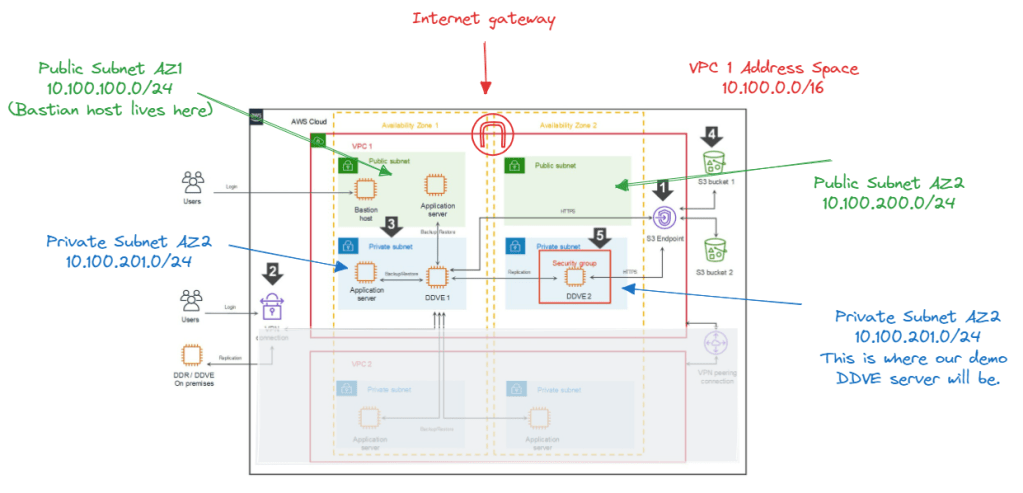
- Deploy and configure a windows based Bastian or Jump host, so that we can manage our private environment from the outside.
- Configure and deploy the following:
- S3 Object store
- IAM Policy and Role for DDVE access to the S3 policy store
- S3 Endpoint to allow access to S3 from a private subnet
- Security Group to protect the DDVE EC2 appliance.
- Finally, install Dell APEX Protection Storage for AWS (DDVE) direct from the AWS Marketplace
- The installation will be done using the native AWS Infrastructure as Code offering, Cloudformation
Anyway, as promised, less writing, more demo! Hopefully, the video will paint the picture. If you get stuck, then the other earlier posts should help in terms of more detail.
Up Next…
So that was the last in this particular series. We have got the point where we have DDVE spun up. Next up, we look at making things a bit real….by putting Apex Protection Storage to work.
DISCLAIMER
The views expressed on this site are strictly my own and do not necessarily reflect the opinions or views of Dell Technologies. Please always check official documentation to verify technical information.
#IWORK4DELL


Leave a Reply