Part 1: Policy Based Access Control to the S3 Object Store
APEX Protection storage is based on the industry leading PowerProtect DD Virtual Edition. Going forward Dell will leverage the new branding for the cloud based offer. In this series of technical blogs, we will look to explore how we can secure its implementation based on industry, Dell and AWS best practice. As ever this is only guidance only, and I will endeavor where possible to add publicly available reference links. If in doubt consult your Dell or Dell partner technical/sales resources!
Amazon Simple Storage Service (Amazon S3) is an object storage service offering industry-leading scalability, data availability, security, and performance. Customers of all sizes and industries can store and protect any amount of data for virtually any use case, such as data lakes, cloud-native applications, and mobile apps. Of course it is also the backend object datastore for PowerProtect DDVE/APEX Protection Storage. When both are paired together then customers can enjoy significant savings on their monthly AWS bills, due to the native deduplication capabilities of DDVE and the enhanced portability, flexibility and security capabilities of DDVE versus the standard cloud offering. Better together!
If you are familiar with S3 however, it can also be configured to be widely accessible and open to the internet ( although this is no longer the default behavior). Nonetheless, it is absolutely paramount that we take steps to implement security controls to limit access based on the ‘principle of least privilege’. In reality only DDVE should have access to the S3 datastore.
I thought it would be a good idea to step through some of these in practical terms, starting with the bedrock of how we control the implementation of the concept of ‘least privilege’, of course Identity and Access Management (IAM). I have a previous post here, that covers the broader topic of IAM in more detail. In future nuggets, I will cover some of the other controls we can use to protect the environment, including VPC endpoints, encrypted access, security groups and the VPC architecture.
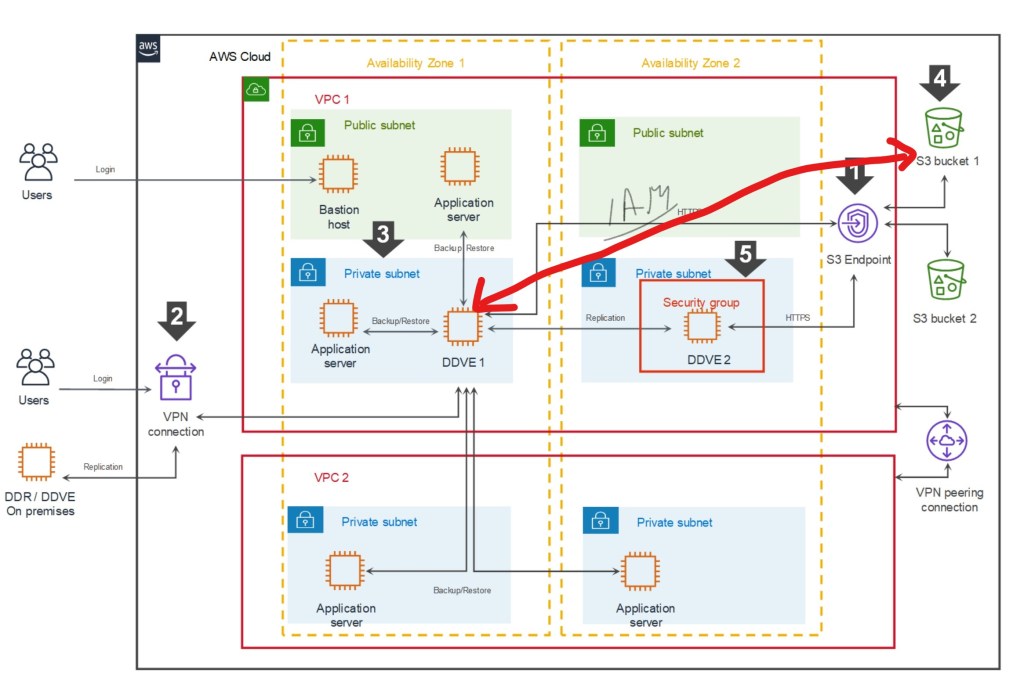
The following schematic gives an overview of what a fully functional DDVE architecture will look like in AWS. The purpose of this blog is to provide an overview of the fundamental concept of how we control access from the DDVE appliance (EC2) to the target S3 bucket, leveraging the native IAM capabilities of the AWS cloud. The red line between both entities below.
What we are trying to achieve?
Referring to the above schematic (we will refer heavily to this in the next post also):
Logging into the AWS environment with enough user privileges to configure IAM policies. In this demo I have logged in as the ‘root’ user. Clearly we wouldn’t do that under normal circumstances.
Deploying an S3 bucket as a target for DDVE. In this instance we have done this as a first step. but it can be done after the fact either manually or via a Cloudformation template.
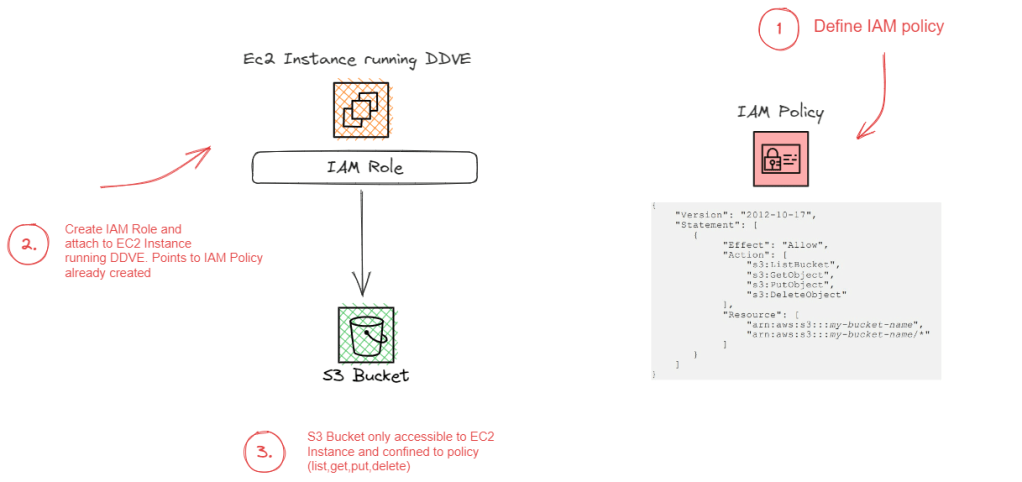
Configure an IAM Identity-Based policy to allow list, read, write to the ‘Resource’, the AWS S3 Bucket.
Configure an IAM role and attach to the EC2 instance. The role will reference the Identity-Based Policy we have configured in the previous step. An identity based policy attaches the policy to the ‘user’, in this scenario the user is EC2 instance running DDVE.
Step 1:Create S3 Bucket
Logon to AWS and navigate to S3 -> Create a bucket
In this instance I have created a bucket named ‘ddvedemo1’ in region eu-west-1. Note the bucket name as we will need this to configure the JSON based IAM policy.
Step 2: Create the IAM Identity-Based Policy
Navigate to Services -> All Services -> IAM. Ignore my lack of MFA for root user and access permissions for alarms etc… !!!! Click on policies under IAM resources.
Click on Create Policy on the next screen
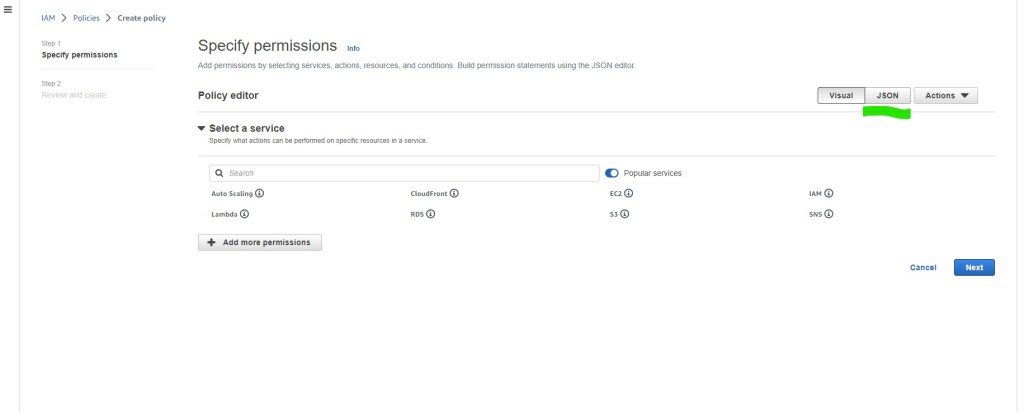
In the Specify permissions page, we will want to create the policy using JSON. Click on the JSON tab and you will navigate to the ‘Specify permissions’ page.
In the policy editor, enter the following JSON code, using the S3 bucket name you have defined earlier.
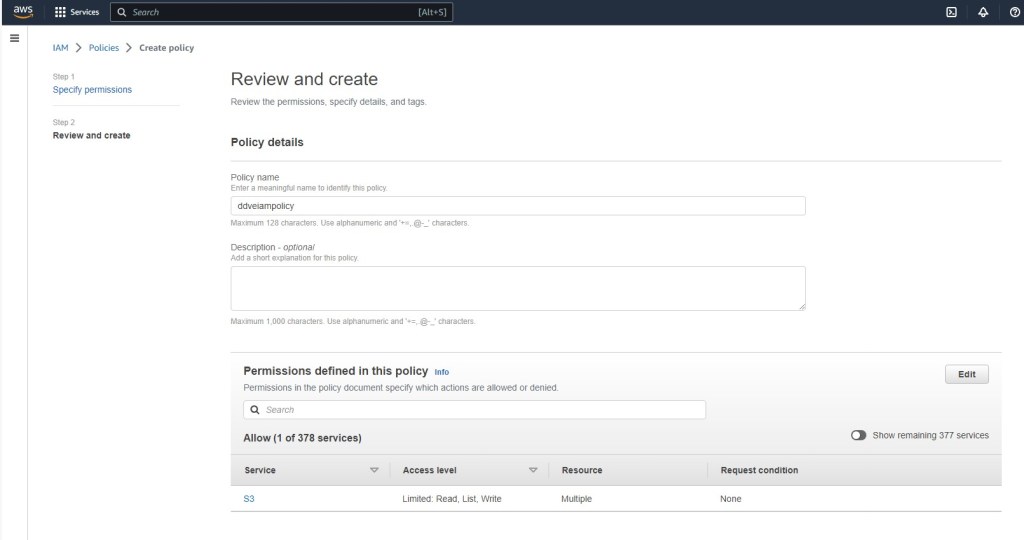
Click next and navigate to the ‘Review and create’ tab. give your policy a meaningful name. I’m calling mine ‘ddveiampolicy’. its always a good idea to add a tag also. Click ‘Create Policy’
Congratulations you have just created a ‘customer managed’ IAM policy. Note the ‘AWS managed’ policies have the little AWS icon beside them.
Step 3: Create the Role for the EC2 Instance running DDVE
Next step is to create an IAM role and attach it to the EC2 instance. This is a relatively straightforward process as follows:
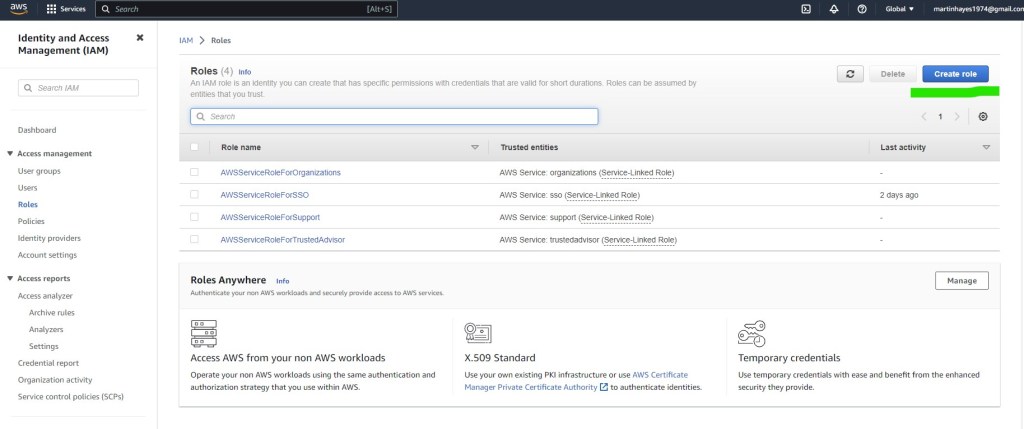
On the IAM pane, navigate to Roles -> Create Role
Select trusted entity type AWS Service EC2. Note the description, where it specifies that this option allows an EC2 instance to make calls to AWS services on your behalf. This is exactly what we are trying to achieve.
Click next to add permissions to the the new role. Here you will see the policy that we have created earlier. Select the policy ‘ddveiampolicy’ and click next.
Finally add a meaningful role name. You will need to remember this later on. I have called it ‘DDVES3’. Review the rest of the configuration and add a tag if you wish. Finalise by clicking ‘Create Role’
On the roles page you are now presented with the new role ‘DDVES3’. When we deploy the EC2 instance running DDVE, either via the Cloudformation template or indeed manually, we will then attach the IAM role.
Summing up and next steps:
So yes there are other ways of doing this even leveraging other IAM techniques. Attaching an IAM role to the instance however has some significant advantages in terms credential and access key management. When leveraging IAM roles, the EC2 instance talks directly to the metadata service to get temporary credentials for the role. EC2 then in turn, uses these temporary credentials to talk to services, such as S3. The benefits to this are pretty clear in terms of there being no need to maintain shared/secret keys and credentials on the server itself ( always a risk), and there is automatic credential rotation which is tunable. This further lessens the impact of any accidental credential loss/leak.
As for next steps, we will start to look at the VPC architecture itself and examine what tools and controls we can leverage to safeguard the environment further.
Followers of my blog will be very aware of the emphasis I have been placing on the emergence of Zero Trust. Back in October 2022, Dell announced the partnership with MISI and CyberPoint International to power the Zero Trust Center of Excellence at DreamPort to provide organisations with a secure data center to validate Zero trust use cases. In April of this year, Dell expanded upon this vision by announcing the Ecosystem of partners, security companies to create a unified Zero Trust solution
Zero Trust is a cybersecurity framework that automates an organization’s security architecture and orchestrates a response as soon as systems are attacked. The challenge, however, lies in implementing a complete solution guided by the seven pillars of Zero Trust. No company can do this alone.
Today marks the the 3rd part of this strategy. Project Fort Zero ,a new initiative that will deliver an end-to-end Zero Trust security solution, validated at the advanced maturity level by the U.S. Department of Defense, within the next 12 months. Project Fort Zero is a Dell-led initiative that brings together best-in-class technology from more than 30 companies, so we can design, build and deliver an end-to-end Zero Trust security solution. This solution will help global public and private-sector organizations adapt and respond to cybersecurity risks while offering the highest level of protection.
This is a big deal, Zero Trust is a challenge. Many vendors make claims around ‘Zero Trust Capable’. These are similar to statements such as ‘HD Ready’, for those of you who can remember the days of analog TV’s… or ‘Cloud Ready’. In reality, Zero Trust is a validated framework, that requires deep understanding across a broad portfolio of technologies and ever deepening set of skills to orchestrate, deliver and integrate a cohesive outcome. Project Fort Zero will help accelerate this process by delivering a repeatable blueprint for an end-to end solution that is based on a globally recognised validated reference architecture.
Policy Framework
At the heart of the solution, Zero trust is a a framework based on the mantra of ‘never trust, always verify’ or in my opinion ‘conditional trust’. Only trust something you know about (authenticate) and have determined its role and level of access (Authorize), based on the ‘Principle of Least Privilege’. Furthermore, ZTA mandates that the network is continuously monitored for change. Trust is not forever…. Zero Trust seeks to continuously authorize and authenticate based on persistent monitoring of the environment. Trust should be revoked if the principle of least privilege is not met.
ZTA does this by defining a policy framework built on business logic (Policy Engine) and implemented via a broad suite of technological controls using a control plane Policy Decision Point (PDP) and multiple Policy Enforcement Points (PEP) distributed across the environmental data plane. Zero Trust is not Zero trust without this policy framework. In practice this isn’t easy..
7 Pillars of Zero Trust
Dell will work with the DoD to validate the 7 Pillars and 45 different capabilities that make up the Zero Trust Architecture. These capabilities are further defined into 152 prescribed activities.
Can I go it alone?
For customers who may be mid-stream, have started there journey already or wish to evolve over time towards zero-trust, then Dell do offer products and solutions with native foundational built in Zero-Trust capabilities and a mature set of advisory services that provide an actionable roadmap for Zero trust adoption.
However, even a cursory review of the above 7 pillar schematic, gives an indication of the scale of the lift involved in delivering an end to end Zero Trust Architecture. The presence of multiple vendors across disparate technology siloes can present an implementation and integration burden, overwhelming to even the largest of our customers and partners. The intent of Project Fort Zero is to remove this burden from our customers and guarantee a successful outcome. If possible this is the more straightforward and preferable path.
Where to find more information?
Check back here for a continuation of my 7 Pillars of Zero Trust. This will be a technical deep dive into the technologies underpinning the above. As more information becomes available over the next couple of days I will edit this list on the fly!
DISCLAIMER The views expressed on this site are strictly my own and do not necessarily reflect the opinions or views of Dell Technologies. Please always check official documentation to verify technical information.
In a previous post, I talked pretty exhaustively about how we came to the point where the need for a Zero Trust Architecture has become obvious. The process of de-perimiterisation has, to all intents and purposes rendered many of the network based controls and the process around how they are implemented, whilst not quite obsolete, to a large degree ineffective. Certainly we have lost considerable trust in the ability of these controls to deal with the myriad of new threat vectors and the rapidly expanding and ever vulnerable attack surface.
So the answers are beginning to emerge in the form of of validated architectures or frameworks from NIST, CISA and the US Department of Defense, amongst others. I think in truth, they are really different sides to the same coin. In particular, all frameworks lean heavily into the concepts of authentication and authorisation, or more broadly speaking Identity Access Management (IAM).
If you recall from the last post, we called out the importance of IAM within a Zero Trust Architecture;
‘a systematic and robust ability to continuously authenticate and conditionally authorize every asset on the network, and to allocate access on the principle of ‘least privilege’. To that end, Identity and Access Management systems and processes (IAM) will step forward, front and center in a Zero Trust world’
Right, so the easy button…… IAM is the new Perimeter… and we are off to the races! Unfortunately not quite yet. As previously stated ZTA, is not a single product, or single uniform architecture, or a one size fits all approach. Identity Access and Management (IAM), is the bedrock component of ZTA, but is a complex, deep and mature subject in its own right, and equally heterogenous in terms of architecture diversity. In order to begin to understand how Zero Trust knits together (Pillars, Tenets etc.), we must at a very minimum understand some of the foundational concepts around Identity and Access Management (IAM). The purpose of this blog post.
Before we start exploring these foundational concepts then we need to note some realities:
Most if not all organisations have pre-existing IAM architectures that have matured over years, that mirror the de-perimeterisation effect. As the perimeters have been eroded via the journey to the public cloud and the edge, then so has the requirement for their traditional legacy IAM services to respond in kind. Where once life was easy with on premise MS Active Directory, now many customers are using more advanced techniques to facilitate these multi cloud use cases. For example, leveraging SAML for Federated Single Sign On (SSO) for SaaS based services such as Salesforce.com. It is not uncommon for organisations to have complex, non centralised and dispersed IAM architectures. It is also true to say IAM is a hot topic in IT, in its own right!
‘Lifting and Shifting’ these embedded IAM systems to facilitate the implementation of Zero Trust may present a challenge. Nothing is of course impossible, especially in greenfield, but these systems tend to be tightly engrained in existing business processes. The likelihood, is that it may be easier to find a way to integrate and augment, where feasible, pre-existing IAM systems into an emerging Zero Trust implementation, as much as practically possible. Indeed, a well constructed Zero Trust system should be capable of bridging together the multiple components of a non centralised IAM system.
So… enough on Zero-Trust for a while and back to some foundational IAM concepts. I think everybody who will read this blog will have heard of the terminology, but hopefully the next sections will bring some of the ideas and constructs together. Clearly the below is not exhaustive. As mentioned IAM is a big area in its own right.
This blog is going to follow the travails of a fictional employee, Mary, who works in a typical enterprise running Microsoft in the back and front office. A bit naff I know, but hopefully the practical examples help somewhat.
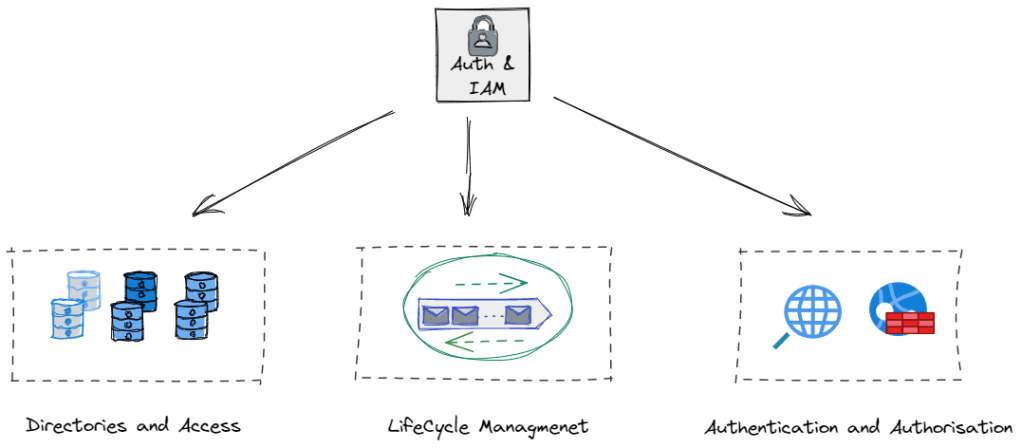
1. Directories and Access.. where is my information stored and how do I get it?
Microsoft Active Directory
The days of the Yellow Pages may be long gone, but we still leverage the IT Phonebook. These take multiple types and forms but possibly the most familiar to many is Microsoft’s Active Directory (AD), of course there are Linux commercial alternatives such a Red Hat Directory Server and many different proprietary and open source directory services. For now though let’s concentrate on MS AD.
Keeping this very high level, AD will store attributes about both individual users, groups, laptops, printers, services etc, much like the Yellow Pages stores attributes about multiple entities, services, people and businesses. AD is then has a mechanism to structure this data ( domains, forests and tress), and protocols embedded in it to manage access, authentication and retrieval.
Lightweight Directory Access Protocol (LDAP)
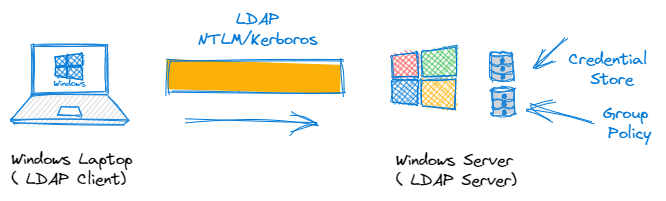
For security reasons, we don’t just allow anybody access to the phonebook, to browse, amend, query or retrieve data as they see fit. So we need a means of managing this. For this we use a lightweight client-server based protocol known as LDAP to do the job for us. Anybody who has searched for a domain attached printer for instance will have used LDAP. The LDAP Client (your laptop) queries the LDAP Server (MS AD) for the relevant objects. The server will of course seek to authenticate you, based on your network username and password, determine what level of permissions you have been administratively assigned, and then if authorised, return you a list of available network printers.
This is IAM in action. We have successfully ‘Identified’ the user, ‘Authenticated’ her via a network username and password and ‘authorised’ the correct level of access based on her AD group policy. This mechanism is still very widely deployed and LDAP based systems have expansive and far reaching support across identity, security and application vendors. Active Directory, is probably the most widely deployed LDAP implementation and is likely to be around for a long time to come yet.
What about the Cloud ? IDaaS
Sure, the above is very simplistic. Everything is cloud now right? Identity as a Service (IDaaS) are a family of offerings that offer cloud based directory services as well as wrap around authentication, authorization, Single Sign On, Federation and and life cycle management services. For now though, its enough to know they exist. Continuing the Microsoft theme we have Azure Active Directory for those who wish to push these services to the cloud. There is a nice link here, that goes through some of the comparisons between both on-premise and cloud based AD offerings.
2. Identity Life Cycle Management
What happens if Mary leaves the company or moves department?
We mentioned or at least alluded to at the start of the blog, the integration of IAM systems and the overall business process. The intersection between HR systems and IAM is very common, in order to manage the everyday process of employees ‘joining’, ‘moving’ through the business and eventually ‘leaving’. Good systems are built with the principle of least privilege at their core. Once a user or entity is assigned a level of privilege based on this principle, then the IAM system can continuously ‘authenticate, authorise and account’ for a users activity throughout the users lifecycle. This AAA concept is very old but is still foundational to IAM.
Of course, when a user leaves the company, or an entity is retired from use, then the principle of least privilege dictates that all access should be revoked ( No Access). This is why closed loop IAM systems are integrated tightly with HR systems to help share business logic and governance processes between them. Without stating the blindingly obvious, we need to know when Mary leaves the company and automate the response to that in terms of rights revocation etc.
The management of non human accounts and entities are of course a greater challenge, as their is unlikely to be a HR based revocation process in place. HR manage humans! These may be API accounts, with full admin rights for instance. Managing and providing governance around these accounts is of course a challenge that Zero Trust and Privileged Access Management (PAM) attempts to solve. More on that in a future blog…
3. Authentication and Authorisation
These concepts are really at the core of identity management systems. So lets start with some definitions:
Authentication:
The process whereby one or more factors of authentication – for example, a password, is used to validate that the identity claimed by the user or entity is known to the system. In our case the system being the MS AD Identity Store. A factor may be:
Something the user is: A fingerprint, Biometric data, location etc
Something they have: A hardware/software security token such as an RSA fob
Something they know: A Username/Password or answer to a challenge question, what was your first cat’s name?
So Multi-Factor Authentication (MFA) has been all the rage at the moment and is key component of Zero Trust. It very simply is the combination of two or more of the above when verifying credentials.
Authorisation:
This is the process of granting the right level of access to a resource once they have been authenticated. By its nature it is based on policy enforcement and context. For instance when Mary was onboarded, she may have been added to a certain AD group with specific access rights to the Finance/HR systems only. Policy is preventing her access to the Engineering domain.
What about Single Sign On (SSO)
SSO allows users to access different resources without multiple requests for credentials. In the case where Mary wants to map a new drive and browse a share within the AD forest then the Kerberos authentication protocol is used to manage the reuse of credentials throughout the forest whenever an access to a new resource is attempted.
What about the Cloud and connectivity to other stuff ?
So it is fair to say that the above is very simplistic overview of how IAM would work in a standard windows environment, but it does nonetheless introduce concepts around Directory Stores, IAM lifecycle Management, Authentication, Authorisation and Single Sign On (SSO).
With the explosion of cloud based apps and the growing popularity of other systems based on microservices and open source platforms, then we cannot just rely on the traditional mechanisms such as LDAP and RADIUS to deliver cross platform/entity identity authentication, authorisation and federation. I suspect many are familiar with the following terms and jargon, but may not quite understand quite what they do.
SAML (Security Assertion Markup Language)
Simply put, SAML is a protocol for authenticating to web applications. We touched on federation earlier, and SAML is an extension of this concept that allows us to federate identity information across entities and allow organisations to communicate and trust and provide single sign on capabilities for each others users.
So typically Mary will look to access resources within her own AD domain, Of course being in finance she will want to access an online service such as Salesforce.com. It would be really nice, if Mary, could leverage her existing AD username/password when logging onto Salesforce.com. Clearly this is advantageous in that it makes things much easier for Mary (she doesn’t have to scribble down another username/password pair), but it is a much more secure process for the company. Losing access credential data is generally is very serious. By limiting the amount of credentials and federating their use, administrators can control their distribution in a much more secure fashion. If their is a breach then the credential can be revoked centrally in the master directory (AD), access is then revoked everywhere including for SFDC access. Of course from a lifecycle perspective, if Mary were to leave, we don’t have to worry about what web applications she has access to, all rights can be revoked everywhere, quickly and efficiently.
So what just happened? At a very high level, and without getting into the SAML weeds…
Mary authenticates to her corporate Active Directory running Federation Services using her windows credentials as per normal ( remember Kerberos above). ADFS is known as the Identity Provider (IdP) in SAML parlance
AD FS returns a SAML ‘Assertion’ to Mary’s browser.
Mary’s browser submits the ‘assertion’ to Salesforce. Once Salesforce receives this assertion, because it comes from a trusted IdP, then Mary is logged on.
To say this is a very simplistic representation of SAML is an understatement, but the process is really as straightforward as the above. SAML has been a tremendously successful protocol, based on XML, since its inception in the mid 90’s. Indeed SAML 2.0 is the current version in use, and it has been around since 2005! We use it everyday, even outside the corporate world example above. Every time a website asks us do we wish to logon via Goggle, Facebook, Twitter etc., that is SAML using federated identity and SSO in action.
OAuth2
Oauth2 is a highly successful newer protocol developed by Google and Twitter in 2006. It was developed in response to the deficiencies of SAML when used on mobile devices. API driven and based on JSON versus XML and is thus much more lightweight. OAuth deals with ‘Authorisation’ only and delegates ‘Authentication’ tasks to another protocol OpenID Connect (OIDC). It is typically used to grant user access to information without exposing the password. Rather than giving away your username and password to a 3rd party app you grant the use of a token instead. what the…. 🙂
Ok so a practical example, without digging deep into the weeds. Mary is in work, and spending some time perusing LinkedIn (We are all guilty!)
Mary logs on and LinkedIn prompts her to add her google contacts as suggested new connections. Mary approves the request, This is OAuth2 in action. OAuth2 issues an ‘authorization’ token to approve one application to interact with another application on your behalf, without ever exposing your username/password. Another very common example, Mary could grant a photo printing service access to their private photos on Google Gallery, without ever having to share her username and password.
Technically, OAuth2 is an authorization protocol and not an authentication protocol. OpenID Connect, is an authentication protocol built top of OAuth2.
OpenID Connect (OIDC)
OIDC is an identity layer built on top of the OAuth2 framework. It allows third-party applications to verify the identity of the end-user and to obtain basic user profile information. OIDC uses JSON web tokens in lieu of usernames and passwords. Think of it like producing your passport at hotel check-in. The clerk accepts the passport as a lightweight and valid claim of your identity in order to check you in. They trust the passport authority to underpin Mary’s identity. It has nothing to do with authorisation however, the hotel clerk still references the booking information, to verify if Mary can access the executive lounge etc.
From a real world example, Mary sitting in the Hotel lobby decides to logon to Spotify on her mobile. Spotify prompts her to either logon directly or use her Facebook credentials , whereby she logs on to Facebook and Facebook passes her credentials to Spotify and she is quickly logged on. Like the hotel example, once logged on via OpenID Connect/Facebook, Spotify then carries out further authorisation checks to see if she has access to premium or audio books for instance.
Summing up
So what’s next…
To say the above is a very high level simplistic overview of IAM is an understatement, clearly when you dig a bit deeper, some of the protocol interdependencies are indeed quite complex. Nonetheless, hopefully we have provided some grounding before we can delve in a conversation around Zero Trust in earnest. In particular, the 7 pillars of the DoD Zero Trust Framework, and in particular the next post in the series, concentrating on Pillar 1: The User
Late last week, Dell dropped its newest release of its Cyber Recovery Management software, Dell PowerProtect Cyber Recovery 19.13. Here is the link to the latest set of release notes (note you will need a registered logon to access). A relatively short post from me this time but here are some of the key highlights:
Multilink Support between Vault DD and CyberSense
This is a quite a significant feature addition. For those customers with Cyber Recovery 19.13 paired with CyberSense 8.2, then for the first time you can leverage multiple links between CyberSense and the DataDomain system in the vault to improve CyberSense analysis performance, when the network is the bottleneck. I will follow up with a future blog post, in terms of how configuration will look like, upgrade options, routing implications, interaction with DDBoost and how that load balances flows for maximum utilisation, but for now, suffice to say it has been a much requested feature that is now available.
Other Enhancements
Users can now orchestrate an automated recovery with PowerProtect Data Manager within the AWS vault using AWS EBS snapshots. (Stay tuned for a future deep dive of the Cyber Recovery AWS architecture)
Analytics can be processed on Avamar and PowerProtect DP backups of Hyper-V workloads to ensure integrity of the data for recovery against cyberattacks.
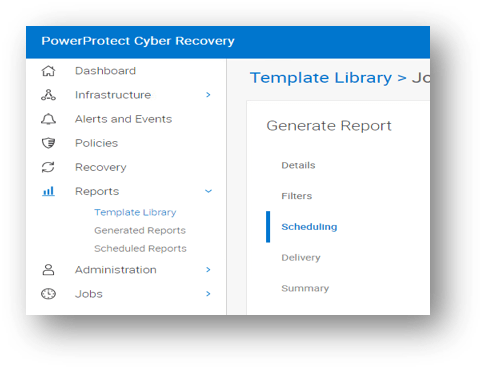
Users can generate on-demand or scheduled job reports directly from the Cyber Recovery UI.
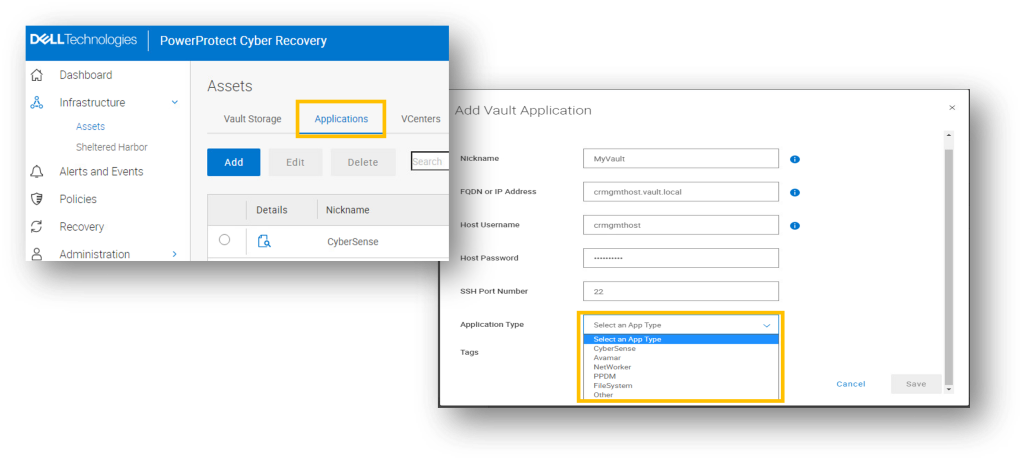
The new Vault application wizard allows users to add backup and analytic applications into the vault, such as CyberSense, Avamar, networker, PPDM amongst others.
Multiple Cyber Recovery vaults can be configured in the same AWS cloud region.
CyberSense dynamic license metering calculates the daily active data indexed for accurate licensing and renewals. Automatically remove stale hosts from license capacity and simplified process and licensing to move/migrate the CyberSense server.
Simpler format for alerts and emails to comprehend statistics of analysed jobs with actionable capabilities. Messages can now be sent to syslog that can include directories of suspect files after an attack.
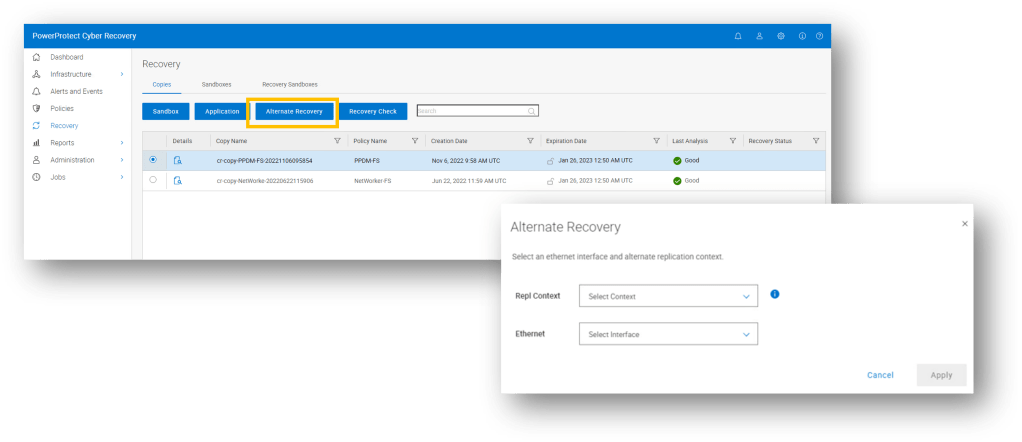
UI Driven Recovery to alternate PPDD workflow, streamlining the ability to recover to an alternate PPDD and allowing the administrator to run multiple recoveries concurrently.
Where to find more information:
Note: You may need to register in order to access some/all of the following content:
DISCLAIMER The views expressed on this site are strictly my own and do not necessarily reflect the opinions or views of Dell Technologies. Please always check official documentation to verify technical information.
What is Directive (EU) 2022/2555 and why it matters?
Everybody should be aware of the White House Executive order (EO 14028) and the mandate to strengthen security across the federal landscape and by definition the enterprise. However, on this side of the pond, the EU in somewhat typically understated fashion have introduced their own set of directives, that are equally impactful in terms of depth and scope.
NIS 2 was published on the 27th December 2022 and EU Member States have until 17 October 2024 to adopt and publish the provisions necessary to comply with the Directive. A short runway in anybody’s language.
Note the first word in the title, ‘Directive’. This is not a recommendation, and holds comparable if not more weight within the EU, than the White House Executive Order does in the U.S.
There will be a significant widening of scope as to what organisations will be affected by the new directive, as compared to NIS1. Operators of services such utility providers, Data Centre service providers and public government services will be deemed “essential” at a centralised pan European level using the ‘size-cap’ rule. So once, you are deemed as a medium or large entity operating within the sector or providing services covered within the sector, you are bound by the regulation, no matter what member-state you reside in. Member states no longer have the wiggle room to determine what qualifies or doesn’t qualify, with one interesting exception, they can circumvent the size-cap rule to include smaller entities in the relevant sectors. So you have ‘wiggle room’ as long as it means regulating more versus less! Indeed, in some instances, size won’t matter and the ‘size-cap rule’ will not apply at all, once the service is deemed critically essential. e.g. public electronic communications.
Other critical sectors will be defined as ‘important’, such as the manufacture of certain key products and delivery of certain services e.g. Postal Services. They will be subject to less regulatory oversight than the “essential” category, but compliance will still be mandatory and the undertaking will still be significant.
So what areas does the directive cover, I will defer to a future post(s) to explore in a little more depth what this may mean, but Article 21 Paragraph 2 covers some of the following. I briefly flirted with the idea of quoting the entire “Paragraph 2” but I promised myself to keep this brief. Key message here is that this ‘Directive’ is all encompassing and far reaching, across both process, procedures and technical controls, I have highlighted/paraphrased just a few here, because they re-enforce much of what we have talked about in this blog series thus far:
Article 21 Paragraph 2 – Interesting Snippets
(c) Business Continuity, backup management, disaster recovery and crisis management.
(d) Supply Chain security, including the security-related aspects concerning the relationships between each entity and its direct suppliers and service providers.
(f) Policies and procedures regarding the use of cryptography and where appropriate encryption.
(j) The use of multi-factor authentication or continuous authentication solutions, secured voice, video and text communications and secured emergency communications systems within the entity, where appropriate.
Clearly (c) needs to be framed in response to the prevalence and ongoing negative impact of ransomware. This blog focused late last year on the Dell CR offering and there is much more to come in this regard over the next couple of months. Remembering of course the distinction between Business Continuity (BC) and traditional Disaster Recovery(DR), as many organisations are discovering to their cost after the ‘cyber breach’ fact. DR does not guarantee BC in the presence of a ransomware attack! We need guarantees around data immutability, cyber resilience and leverage vaulting technology if and where we can.
We have also touched in this blog around Dell Secure Software Development (SDL) processes and end to end secure supply chain. Here is thelinkback to the great session that my colleagues Shakita and Marshal did in December 2022, on the work Dell is doing around SBOM for instance. More on this broader topic in the future posts.
Finally, its hard read anything on this topic without being struck by the focus on policy, encryption, multi-factor/continuous authentication and network segmentation. Sounds very ‘Zero-Trustesque’, that’s because NIS2 shares many of the same principles and tenets. Indeed, I’ll finish with a direct quote from the directive introductory paragraph.
More to come……
Essential and important entities should adopt a wide range of basic cyber hygiene practices, such as zero-trust principles, software updates, device configuration, network segmentation, identity and access management or user awareness, organise training for their staff and raise awareness concerning cyber threats, phishing or social engineering techniques. Furthermore, those entities should evaluate their own cybersecurity capabilities and, where appropriate, pursue the integration of cybersecurity enhancing technologies, such as artificial intelligence or machine-learning systems to enhance their capabilities and the security of network and information systems.
DISCLAIMER The views expressed on this site are strictly my own and do not necessarily reflect the opinions or views of Dell Technologies. Please always check official documentation to verify technical information.
Introducing the ‘Boxes and Lines’ Whiteboard Nugget Series
I’ve been spending a lot more time in the office recently and naturally I’m tending to bump into colleagues and fellow team members in the corridor ( I know maybe I should be spending more time at my desk!). Interestingly enough however, if we do get into a conversation around infrastructure security, which is quite often, then nobody has the time to digest a verbalised version of ‘PowerPoint Martin’.
More often that not, they are looking for a quick explainer of what a particular feature/function is and in what context does it sit within the ‘Big Picture’. Upon reflection, in a world pre-pandemic, this is something I used to do all the time in my role as a ‘technologist’. Sure, we still need to delve deep into the architecture every now and again, as I have and will continue to do in this blog around Zero Trust, Cyber Resilience and the NIST Framework in particular. However, most people I deal with tend to be pretty industry and tech savvy, and readily understand the big picture, or the ‘why’. Like my ‘corridor friends’ they are really looking to understand quickly the ‘what’ and the ‘how’ with a large dash of ‘brevity’ on the side.
Still, in pre-pandemic reflection mode, I was thinking how I had done this before? Anybody who knows me, will have just virtually ‘rolled their eyes’ in anticipation of the answer. I like to draw, scribble, more often than not scrawl, ‘boxes and lines’ on a whiteboard, to articulate the ‘how’. So there you have it, the purpose and title of this blog within a blog. My firm commitment, that I will adhere to unwaveringly, is that there will be no PowerPoint, not even a screengrab. If I can’t scribble it on a whiteboard and talk about it for 5-10 minutes then it won’t be here…..
So where to begin? Apologies I am going to do exactly what I said I wouldn’t do…. a brief nugget on the big picture. I’ll forgive myself on this occasion as context is important for future ‘nuggets’ in the series. So what is the Dell Trusted Infrastructure?
Very broadly… brevity is beautiful as they say. Dell Trusted Infrastructure’ is propped up by three key pillars.
Protect Data and Systems:
Data at Rest Encryption (D@RE), Safe BIOS, RBAC/MFA, Tamper proof secure Logging and Auditing, Automated compliance monitoring, Hardware Root of Trust, secure boot chain of trust, digitally signed secure updates etc. The list is pretty long
Enhance Cyber Resilience:
So here we have not just the product platform focus around Power Protect Cyber Recovery and the other CR based platforms but also some other offerings and features across the portfolio that help detect threats before they happen. For example AI/ML based storage monitoring and anomaly detection. CloudIQ Cybersecurity is a key offering underpinning this pillar, as well as the next
Overcome Security Complexity:
Advanced Services, partner integrations, CloudIQ, Storage and Security Automation etc.
All three pillars transcend the Dell portfolio offering from Storage, Server, HCI, Data Protection and Networking. Ultimately underpinned by industry standards, frameworks and recommended best practices such as the NIST Cyber Security Framework , with a keen eye on Zero Trust as the emerging industry wide security North Star.
Phew, That was pretty brief and hopefully to the point. Clearly there is an awful lot of great innovation going on within each of the pillars. The next post in ‘Boxes and Lines’ series will dig into into a little deeper into and intrinsic feature or two within the ‘Protect Data and Systems’ pillar perhaps.
Stay tuned…..
DISCLAIMER The views expressed on this site are strictly my own and do not necessarily reflect the opinions or views of Dell Technologies. Please always check official documentation to verify technical information.
Just after the New Year, I caught up with a work colleague of mine and I started to chat about all the good work we are doing in Dell with regards Zero Trust and the broader Zero Trust Architecture (ZTA) space. Clearly he was very interested (Of course!!). We talked about the Dell collaboration with MISI (Maryland Innovation Security Institute) and CyberPoint International at DreamPort, the U.S Cyber Command’s premier cybersecurity innovation facility. There, Dell will power the ZT Center of Excellence to provide organisations with a secure data center to validate Zero Trust use cases in the flesh.
Of course, me being me, I was on a roll. I started to dig into how this will be based on the seven pillars of the Department of Defense (DoD) Zero Trust Reference Architecture. Control Plane here, Macro-segmentation there, Policy Enforcement Points everywhere!
Pause… the subject of a very blank stare…. Reminiscent of my days as a 4 year old. I knew the question was coming.
“But Why Zero Trust?”
This forced a pause. In my defense, I did stop myself leaning into the casual response centered on the standard logic: Cyber attacks are on the increase, ransomware, malware, DoS, DDoS, phishing, mobile malware, credential theft etc., ergo we must mandate Zero-Trust. Clearly this didn’t answer the question, why? Why are we facing more cyber related incidences and why shouldn’t I use existing frameworks such as ‘Defense in Depth’? We have used them for decades, they were great then, why not now? What has changed?
Of course a hint lies in the title of this post, and in particular the very first line of the DoD Reference Architecture guide.
“Zero Trust is the term for an evolving set of cybersecurity paradigms that move defenses from static, network-basedperimeters to focus on users, assets, and resources. Zero Trust assumes there is no implicit trust granted to assets or user accounts based solely on their physical or network location (i.e., local area networks versus the Internet) or based on asset ownership (enterprise or personally owned)”
So the goal is to move from ‘static, network-based perimeters’ to ‘focus on users, assets and resources’. However, as you may have guessed, the next question is……
“But Why?”
I think we can formulate a relevant coherent answer to this question.
The Problem of De-Perimeterisation
Traditional approaches to network and infrastructure security are predicated on the idea that I can protect the perimeter. Stop the bad stuff at the gate and only leave the good stuff in leveraging firewalls, ACL’s, IPS and IDS systems and other platforms. ‘Defense in Depth’ has become a popular framework that enhances this network perimeter approach, by adding additional layers on the ‘inside’, another firewall here another ACL there. Just in case something gets through. Like a series more granular sieves, eventually, we will catch the bad stuff, even if it has breached the perimeter.
This approach of course has remained largely the same since the 1990’s, for as long as the Network firewall has existed. ( in fact longer but I choose not to remember that far back!)
The ‘noughties’ were characterised by relative simplicity:
Applications all live in the ‘Data-Center’ on physical hardware. No broad adoption of virtualisation just yet. What’s born in the DC stays in the DC for the most part. Monolithic workflows.
Hub/Spoke MPLS based WAN and Simple VPN based remote access. Generally no split tunnels allowed. In other words to get to the internet, when ‘dialed-in’ you needed to reach it via the corporate DC.
Fledgling Internet services, pre SaaS.
We owned pretty much all our own infrastructure.
In this scenario, the network perimeter/border is very well defined and understood. Placing firewalls and defining policy for optimal effectiveness is a straightforward process. Ports were opened towards the internet but the process was relatively static and manageable.
Interestingly, even back then we could possibly trace the beginnings of what we now know of Zero-Trust movement. In 2004, the Jericho Forum, which later merged into the Open Group Security Forum, remarked rather prophetically;
“The traditional electronic boundary between a corporate (or ‘private’) network and the Internet is breaking down in the trend which we have called de-perimeterisation“
And this was almost 20 years ago, when things were….. well, simple!
Rolling on to the next decade.
Things are beginning to change, I had to put a little thought into where I drew my rather crude red line representing the network perimeter. We now have:
The rise of X86 and other types of server virtualisation. All very positive but lending itself to proliferation of ‘virtual machines’ within the DC. Otherwise known as VM sprawl. Software Defined Networking and Security ‘Defense in Depth’ solutions soon followed such as VMware NSX to manage these new ‘East-West’ flows in the Data Center. Inserting software based firewalls representing the birth of micro-segmentation as we know it.
What were ‘Fledging’ Web based services have now firmly become ‘Business Critical ‘ SaaS based services. How we connected to these services became a little bit more complicated, indeed obfuscated. More and more these were machine to machine flows versus machine to human flows. For instance, my internal app tier pulling from an external web based SaaS database server. The application no longer lived exclusively in the DC nor did we have exclusive ownership rights.
More and More, the remote workforce were using the corporate DC as a trombone transit to get to business SaaS resources on the web. This started to put pressure on the mandate around ‘thou must not split-tunnel’, simply because performance was unpredictable at best, due to latency and jitter. (Unfortunately we still haven’t figured out a way to speed up the speed of light!)
Ultimately, in order for the ‘Defend the Perimeter’ approach to be successful we need to:
‘Own our own infrastructure and domain.‘ Clearly we don’t own nor control the Web based SaaS services outlined above.
‘Understand clearly our borders, perimeter and topology.’ Our clarity is undermined here due to the ‘softening’ of the split-tunnel at the edge and our lack of true understanding of what is happening on the internet, where our web based services reside. Even within our DC, our topology is becoming much more complicated and the data flows are much more difficult to manage and understand. The proliferation of East-West flows, VM sprawl, shadow IT and development etc. If an attack breached our defenses, it is difficult to identify just how deep it may have gotten or where the malware is hiding.
‘Implement and enforce our security policy within our domain and at our perimeter’ Really this is dependent on 1 and 2, clearly this is now more of a challenge.
The Industry began to recognise the failings of the traditional approach. Clearly we needed a different approach. Zero Trust Architectures (ZTA), began to mature and emerge both in theory and practice.
Forrester Research:
2010: John Kindervag coined the phrase ‘Zero Trust’ to describe the security model that you should not implicitly trust anything outside or inside your perimeter and instead you must verify everything and anything before connecting them to the network or granting access to their systems.
2014: BeyondCorp is Google’s implementation of the Zero-Trust model. Shifts access controls from the network perimeter to individual users, BeyondCorp enables secure work from any location without the need for a traditional VPN
Because the perimeter is everywhere, the perimeter is in essence dead…….
I refrained from the red marker on this occasion, because I would be drawing in perpetuity. The level of transformation that has taken place over the last 4-5 years in particular has been truly remarkable. This has placed an immense and indelible strain on IT Security frameworks and the network perimeter, as we know them. It is no longer necessary to regurgitate the almost daily stream of negative news pertaining to cyber related attacks on Government, Enterprise and small business globally, in order to copperfasten the argument, that we need to accelerate the adoption of a new fit for purpose approach.
In today’s landscape:
Microservice based applications now sit everywhere in the enterprise and modern application development techniques leveraging CI/CD pipelines are becoming increasingly distributed. Pipelines may span multiple on-premise and cloud locations and change dynamically based on resourcing and budgetary needs.
Emerging enterprises may not need a traditional DC as we know it or none at all, they may leverage the public cloud, edge, COLO and home office exclusively.
The rise of the Edge and enabling technologies such as 5G and Private Wireless has opened up new use cases and product offerings where applications must reside close to the end-user due to latency sensitivity.
The continued and increasing adoption of existing established enterprises of ‘Multi-Cloud’ architectures.
The emergence of Multi-Cloud Data mobility. User and application data is moving, more and more across physical and administrative boundaries based on business and operational needs.
The exponential growth of remote work and the nature of remote work being ‘Internet First’. More often than not, remote users are leveraging internet based applications, SaaS and not leveraging any traditional Data Center applications. Increasingly a VPN less experience is demanded by users.
Ownership it shifting rapidly from Capex to dynamic, ‘Pay As You Use/On-demand’ Opex based on-premise cloud like consumption models, such as Dell APEX.
So, if you recall, the three key controls required to implement a ‘Perimeter’ based security model include:
Do I own the Infrastructure? Rarely at best, more than likely some or increasingly none at all. Indeed many customers want to shift the burden of ownership completely to the Service Provider (SP).
Do we understand clearly our border, perimeter and topology? No. In a multi-cloud world with dynamic modern application flows our perimeter is constantly changing and in flux, and in some cases disappearing.
Can we implement security policy at the perimeter? Even if we had administrative ownership, this task would be massively onerous, given that our perimeter is now dynamic at best and possibly non existent.
So where does that leave us? Is it a case of ‘out with the old in with the new’? Absolutely not! More and more security tooling and systems will emerge to support the new Zero Trust architectures, but in reality we will use much of what already exists. Will we still leverage existing tools in our armoury such Firewalls, AV, IPS/IDS, and Micro-segmentation? Of course we will. Remember ZTA is a framework not a single product. There is no single magic bullet. It will be a structured coming together of the people, process and technology. No one product or piece of software will on its own implement Zero Trust.
What we will see though emerge, is a concentration of systems, processes and tooling in order to allow us deliver on the second half of the first statement in the DoD Reference Architecture Guide.
“Zero Trust assumes there is no implicit trust granted to assets or user accounts based solely on their physical or network location (i.e., local area networks versus the Internet) or based on asset ownership (enterprise or personally owned)”
If we can’t ‘grant trust’ based on where something resides or who owns it, then how can we ‘grant trust’ and to what level?
The answer to that lies in a systematic and robust ability to continuously authenticate and conditionally authorize every asset on the network, and to allocate access on the principle of ‘least privilege’. To that end, Identity and Access Management systems and processes (IAM) will step forward, front and center in a Zero Trust world. ( and into the next post in this Zero Trust series…..)
DISCLAIMER The views expressed on this site are strictly my own and do not necessarily reflect the opinions or views of Dell Technologies. Please always check official documentation to verify technical information.
A guest contribution by Shakita DennisChain and Marshal Savage. (They did all the heavy lifting with the great video content below).
This post appeared originally on one of the other Blogs I contribute to: Engineeringtechnologists.com. I strongly recommend you head over there for same great content by my fellow technologist colleagues.
What is an SBOM (Software Bill of Materials) ?
Executive Order (EO) 14028, Improving the Nation’s Cybersecurity, references heavily the NIST Secure Software Development Framework (SSDF) – SP 800-218. Bottom line, this is a mechanism for aiding organisations develop and deliver secure software, throughout its lifecycle. Following on, last September, White House Memorandum M-22-18 officially required federal agencies to comply with the NIST guidance and any subsequent updates thereafter. A key component of this is the requirement, as a supplier, to ‘self- attest’ that software is built based on secure software development methodologies and to provide a SBOM (Software Bill of materials)
In truth, this is common sense and critical for all organisations, federal or otherwise. Bottom line, we all need to know what is in our applications and the software that we use. I think we all want to avoid the Log4J scramble again.
Modern cloud native and embedded firmware-based systems are architected using a compendium of open source, 3rd party commercial and in-house developed software and processes. Software Based Bill of materials (SBOM) shines a light on just that. What ingredients, what versions, what underlying packages and software are going into our applications?
In this episode, join Dell’s Shakita DennisChain and Marshal Savage, as they discuss the importance of SBOM and how to develop frameworks and procedures to deliver SBOM in practice. Well worth the listen!
#IWORK4DELL
As ever all the opinions expressed in the above post are my own, and do not necessarily represent the views of Dell Technologies.
Last week Dell released the much anticipated version 19.12 of the Cyber Recovery Solution. Obviously, one of the clear highlights was the ability to deploy the Cyber Recovery solution on Google Cloud Platform. The solution leverages PowerProtect DD Virtual Edition (DDVE) storage appliance in a GCP VPC to store replicated data from a production DD system in a secure vault environment. This data can then then be recovered to the production DD system. My colleague Ben Mayer gives an excellent high level overview in his blog, that can be found at https://www.cloudsquared.blog/2022/11/powerprotect-cyber-recovery-for-google.html.
This of course rounds out support for vault capability across all 3 major public clouds ( AWS, Azure and now GCP). This is a really exciting development and I look forward to digging deeper into what this means technically over the next couple of weeks and months, as part of my ongoing Dell Cyber Recovery Series.
But there are many other highlights to the release as follows (Clearly my list isn’t exhaustive….. I’m picking out the bits that have captured my attention, as ever please refer to the official Dell release note documentation for all the underlying detail)
Support for new Software Releases
DD OS 7.10
PowerProtect Data manager 19.12
Networker 19.7
Avamar 19.7
Cybersense 7.12 and Cybersense 8.0
Cyber Recovery Solution support in AWS GovCloud (US)
For those those not familiar, AWS GovCloud gives government customers and their partners the flexibility to architect secure cloud solutions that comply with the FedRAMP High baseline; the DOJ’s Criminal Justice Information Systems (CJIS) Security Policy; U.S. International Traffic in Arms Regulations (ITAR); Export Administration Regulations (EAR); Department of Defense (DoD) Cloud Computing Security Requirements Guide (SRG) for Impact Levels 2, 4 and 5; FIPS 140-2; IRS-1075; and other compliance regimes.
AWS GovCloud Regions are operated by employees who are U.S. citizens on U.S. soil. AWS GovCloud is only accessible to U.S. entities and root account holders who pass a screening process.
A little under the radar, but for obvious reasons, likely to be a very important feature enhancement for customers.
CyberSense on AWS & Platform Extension
Beginning, CR version 19.12 (this release), the CR vault on AWS supports the CyberSense software. Really this is a very significant feature addition as it adds the ability to ‘analyze’ file and data integrity after data is replicated to the Cyber recovery Vault and a retention lock is applied.
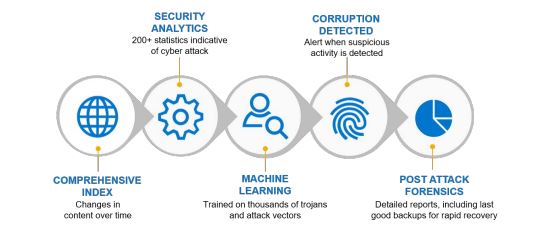
CyberSense automatically scans the backup data, creating point-in-time observations of files and data. These observations enable CyberSense to track how files change over time and uncover even the most advanced type of attack. Analytics are generated that detect encryption/corruption of files or database pages, known malware extensions, mass deletions/creations of files, and more.
Machine learning algorithms then use analytics to make a deterministic decision on data corruption that is indicative of a cyberattack. The machine learning algorithms have been trained with the latest trojans and ransomware to detect suspicious behavior. If an attack occurs, a critical alert is displayed in the Cyber Recovery dashboard. CyberSense post-attack forensic reports are available to diagnose and recover from the ransomware attack quickly.
In truth this capability is a key capability of the Cyber Sense Solution. Even with the best of intentions, once we make a copy from the production side to the vault, we can never 100% be quite sure that the ‘data’ replicated is 100% clean, once we initiate the MTREE replication between DD appliances. The ML/AI capability of CyberSense, helps mitigate against this risk.
Finally, and more to follow on this topic in future posts. The expansion of the platform footprint of the CyberSense 8.0 software to support a SLES 12 SP5 based virtual appliance, ideal for small or medium sized deployments and environments.
DISCLAIMER The views expressed on this site are strictly my own and do not necessarily reflect the opinions or views of Dell Technologies. Please always check official documentation to verify technical information.
As discussed in the previous post , the Dell Cyber recovery solution is underpinned by Data Domain. I need a Data Domain appliance in the production side that will replicate to a Data Domain appliance in the secure Vault using MTREE replication. The question is how do I get data into the production side Data Domain appliance in the first place? We could write data manually perhaps, but in the real word Data Domain will likely be be paired with some type of backup system (Dell Avamar, Dell Networker or Dell Power Protect DataManager).
This post will cover the basic standup of Dell PowerProtect DataManager (PPDM). This really is a powerful product that is multi-cloud optimised, allowing you to discover, manage, protect and restore workloads from multiple sources (Windows, Linux, K8S, VMware, Hyper-V, Oracle, SAP HANA etc.). Clearly, I won’t do it complete justice in this post, so the somewhat humble goal, as outlined above is to populate the MTREE with backup data. the fact that I got it working is of course testament of how easy a product it is to deploy and use.
Step 1: Deploy PowerProtect PPDM
Referring back to our previous diagram from the last post , we will concentrate on the ‘Green Box’.
Again, the assumption here is that we know how to deploy an OVA/OVF. The PowerProtect DataManager Deployment Guide provides all the low level detail you need. The only real step to watch is Step 5, where the OVF template asks where you wish to deploy the software? This is an ‘on-premise/hybrid’ configuration.
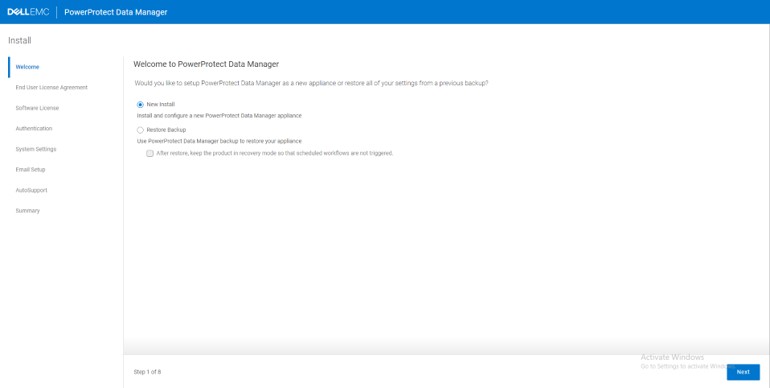
Next, Power up the Virtual Machine in the vCenter console. Once booted, browse using https to the FQDN of the appliance. (We have already setup NTP and DNS for everything in the last post). You will be presented with the following initial setup workflow.
Run through the install workflow.
Select 90 Day Eval
Add your password for admin user (again I used the uber secure Password123!)
Setup your Timezone and NTP servers. I used UTC+. Again, NTP is your friend so should be setup properly
Untoggle the Mail Server option, as we won’t be sending alerts etc
The setup will take a little time, but you can watch the progress here. Exciting !
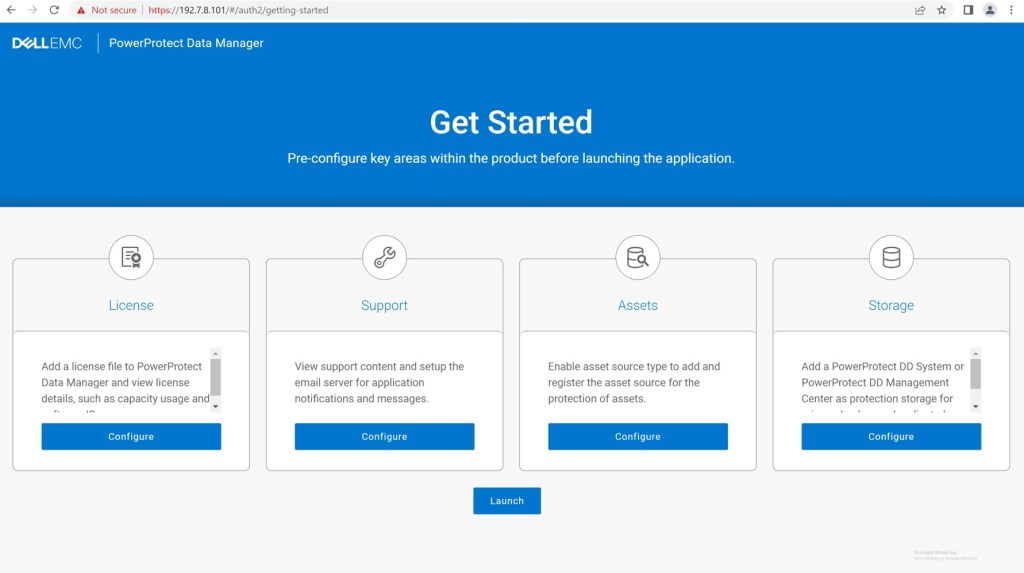
All going well, the install will complete successfully and your browser will redirect to the following screen. Skip the workflows and go directly to ‘Launch’. Logon as ‘admin’ with the password you created during the setup process.
Step 2: Configure PPDM Storage
Of course you may rightly ask, why didn’t I do this in the wizard, well…my excuse is that it does help to understand how the GUI is laid out from the main menu. In this step, we are presenting the PPDM with its target storage device, the DDVE we configured in the last blog post. This is really very straightforward.
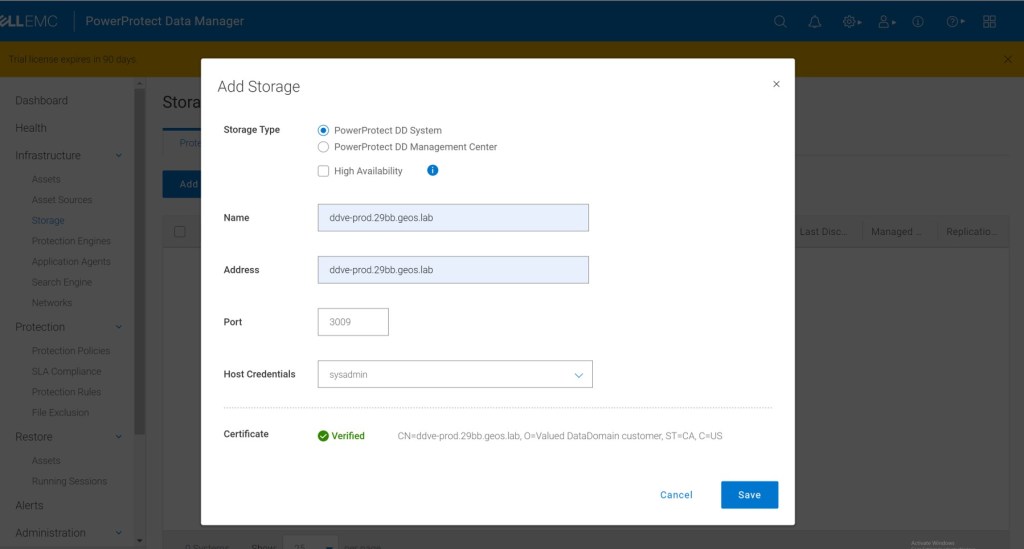
From the main menu, navigate to Infrastructure > Storage > Add
Follow the ‘Add Storage’ dialogue, select PowerProtect DD System ad the storage type. Don’t worry about HA for now. Make sure you add the device using the FQDN and use sysadmin as the DD user. Accept the rest of the defaults and verify the certificate.
Verify you can see the newly presented storage. You may need to refresh the browser or navigate to another area of the GUI and back to storage in order to see our DDVE storage resource populate.
Step 3: Add vCenter Assets
The next step in the process is create the ‘link’ between PPDM and vSphere vCenter. Here it discovers ‘Assets’ that are eligible for protection and recovery. Firstly, we will add details to PPDM Manager regarding the vCenter server that hosts it.
Now add the the same vCenter resource so that we can automatically discover resources. When stepping through the workflow make sure you check the vSphere Plugin tickbox. Of course you are given the option of IP versus FQDN, be safe not sorry, pick FQDN.
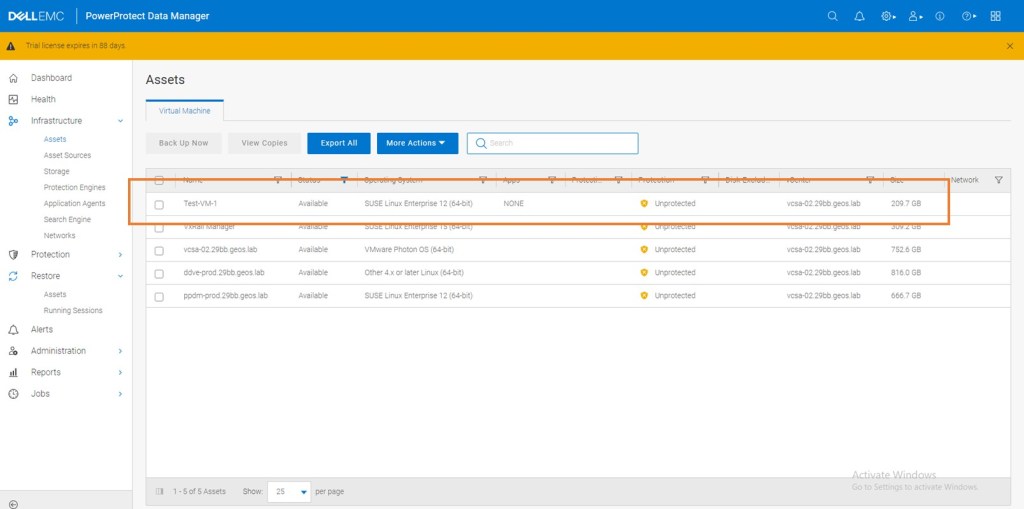
Once vCenter is added, it will automatically discover ‘assets’ under its control. In other words in the vCenter Inventory. In the next section we will create and run a demo protection policy. Truthfully this will look better via a live video. As promised at the end of the series we will do an end to end video blog… I think they are called vlogs?
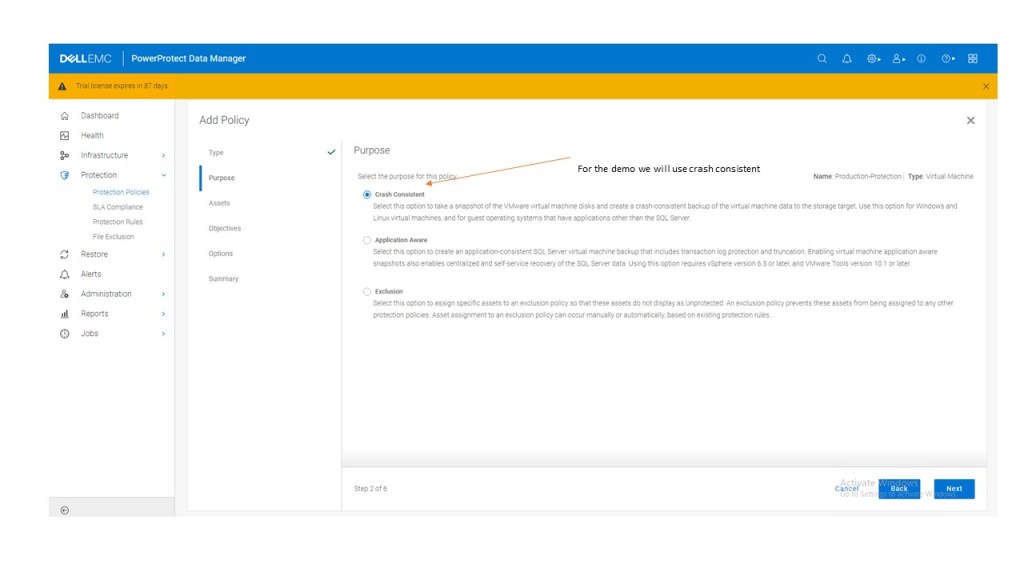
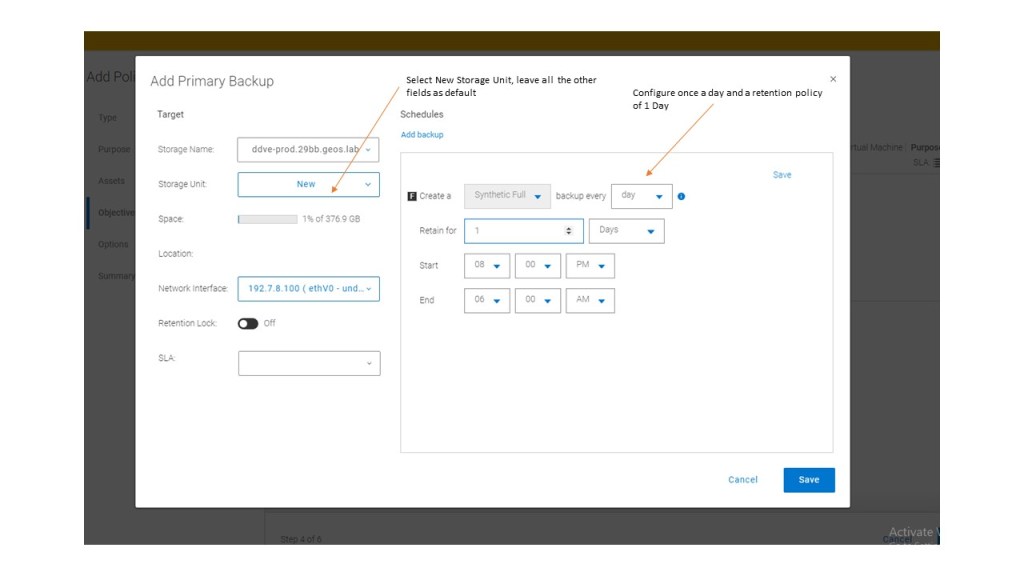
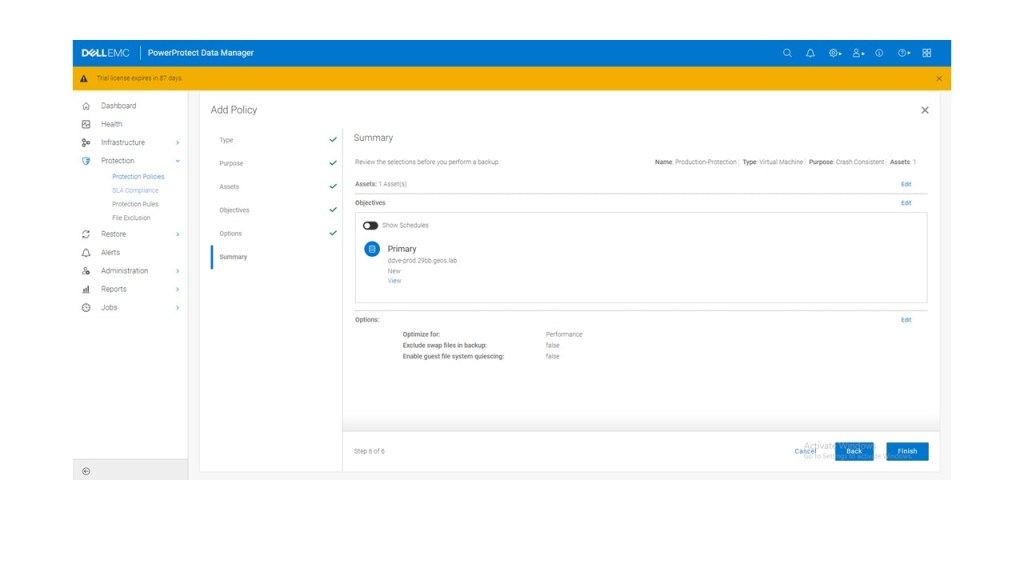
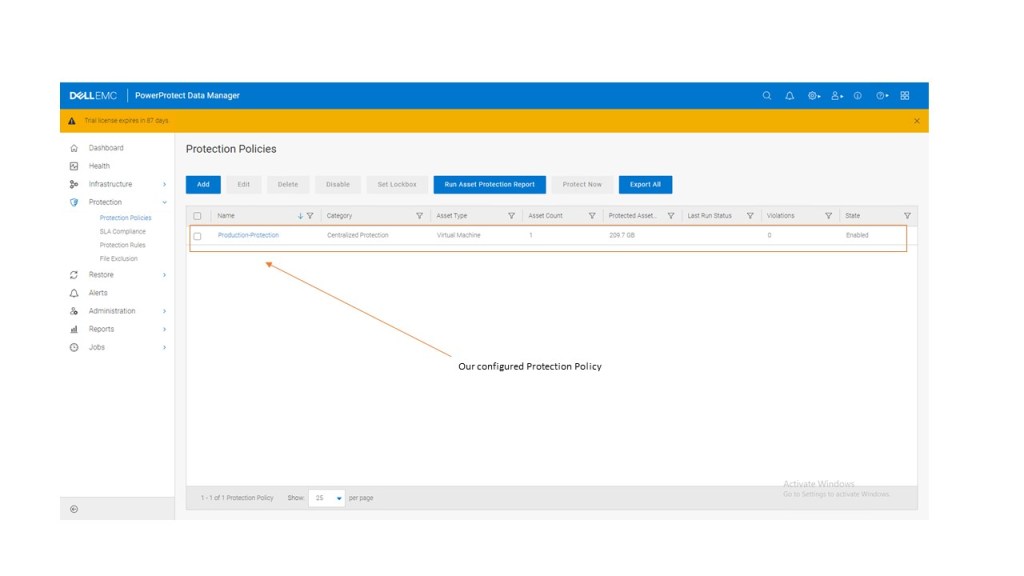
Step 4: Create Protection Policy
Now we have a very basic PPDM system setup with access to Data Domain storage as a backup target and a discovered ‘Assets’ vCenter inventory to which it may apply protection and recovery policies.
Again, we will step through this in the upcoming video. In the interim, flick through the gallery attached. it should be fairly intuitive.
Step 5: Run Protection Policy
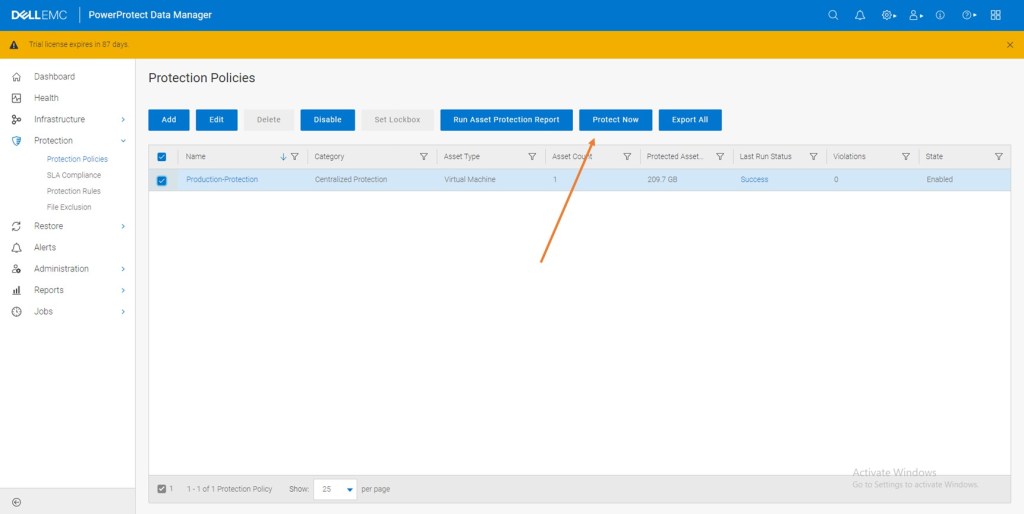
We have two options a) direct from the vSphere console and the PPDM plugin or b) manually via the PPDM interface. I’m going to take the latter approach for now. Of course we have scheduled the policy to run everyday at a certain time but in this instance we will initiate the process manually.
It really couldn’t be more simple. Highlight the Protection Policy and click ‘Protect Now’
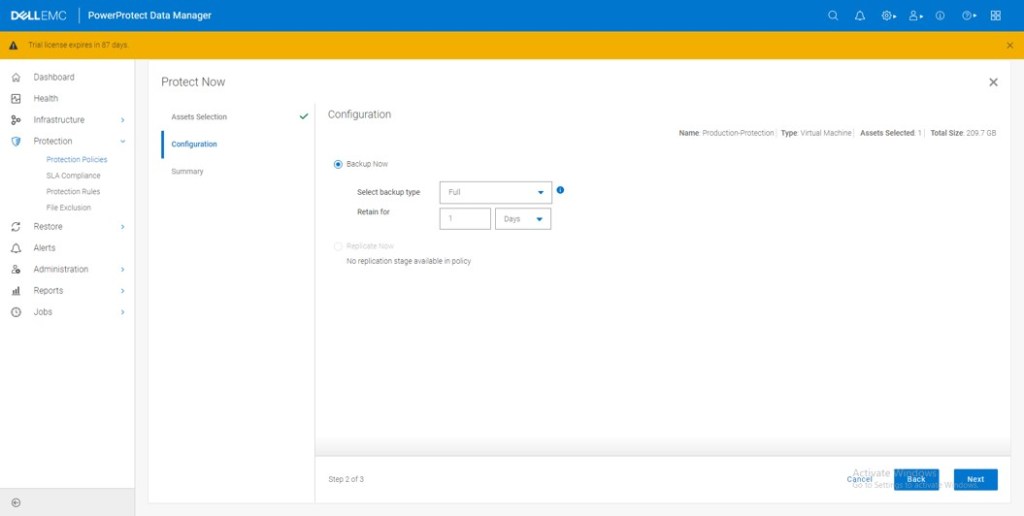
Select ‘All Assets’ – Remember our Policy is only backing up one VM.
In this instance we will select the ‘Full’ Backup. You have an option of a ‘Synthetic backup’ also which backs up the deltas from the original.
Click ‘Protect Now’
The ‘Protection Job’ kicks off, we can monitor its progress in the jobs panel in the GUI.
Once complete we can review in the same window under the successful jobs menu. Note also, not only has our manual job completed successfully, but so have the automated Synthetic Full ‘Policy’ jobs, configured to kickoff each evening at 8pm.
Review
Ultimately the purpose of this exercise was to populate the production side DDVE appliance with data. Once we have data on the production side, we can then set up the MTREE replication into the Cyber Recovery Vault (and automate/control/secure this process via the CR appliance). Logging back into the Data Domain System Manager, we can see the result:
We have Data written Data Domain in the last 24 hours……
Digging a little deeper into the file system itself we can see the activity and the Data Domain compression engine in action. Finally, we see this presented in the MTREE format. This is where we will CREATE the link to the Vault Data Domain Virtual Edition in the next post.
Hopefully, you found this post useful. We are now set to start standing up the CR Vault in the next post. As ever any questions/comments, please reach out directly or leave a comment below and I will respond.
As ever for best practice always refer to Dell official documentation
Cheers
Martin
DISCLAIMER The views expressed on this site are strictly my own and do not necessarily reflect the opinions or views of Dell Technologies. Please always check official documentation to verify technical information.

























 Cablestoclouds.blog